
Restore Required, Timers and Park
An open alarm can wait in three ways: on Timer 1, on Timer 2, or parked in Dispatch. The diagrams show each one, what an incoming signal does to the waiting alarm, and where Restore Required is checked. The Restore Exception and Unrestored Alarms guide describes the zone fields and the operator procedure.
Reading the diagrams
- Solid arrows are operator or system actions.
- Dashed orange arrows are the effect of an incoming signal.
- The green box is the zone status, which SBN keeps per zone, separately from the alarm.
- The Restore Required check is the same in all three diagrams. It runs when the operator resolves the alarm, and it reads the zone status.
New signal means any signal that reaches the Alarm Queue for the same installation and monitoring group: another alarm, a cancel, or a restore on a zone with Exc selected. A restore on a zone with Exc clear is logged and changes the zone status only.
1. Timer 1
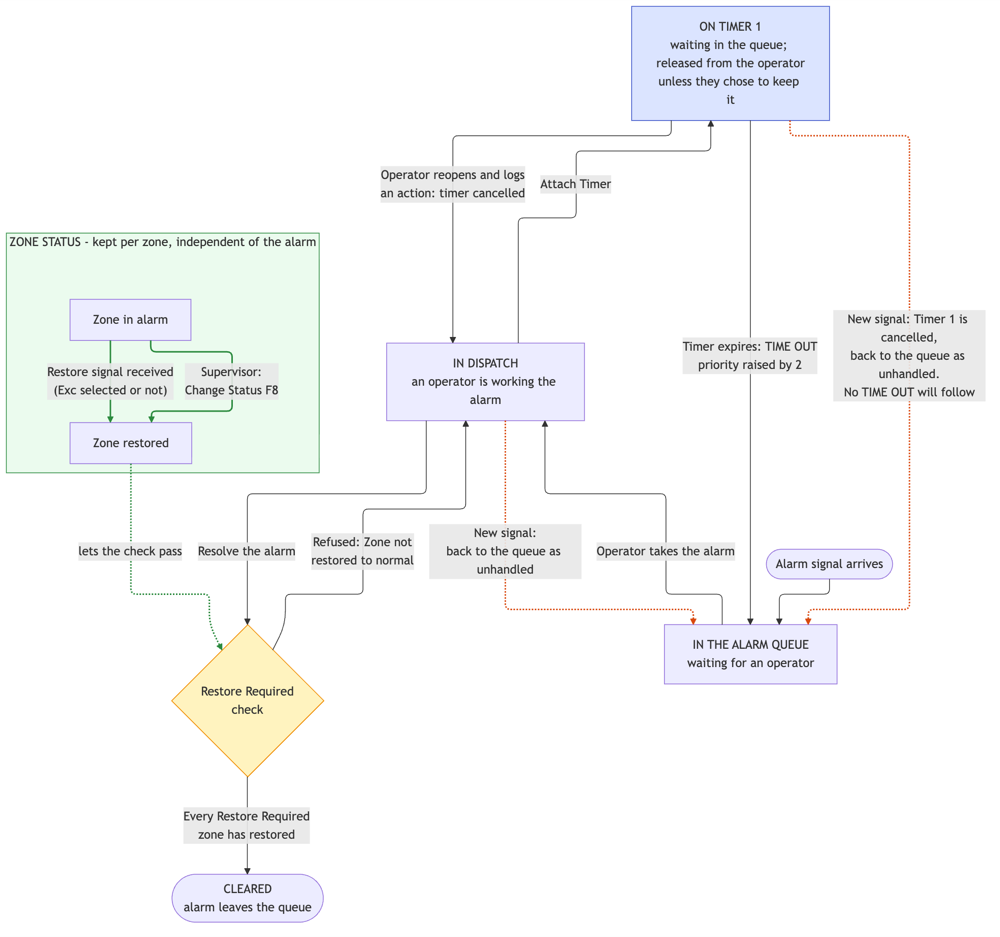
A new signal cancels Timer 1, and no TIME OUT follows. Attaching Timer 2 replaces a running Timer 1.
2. Timer 2
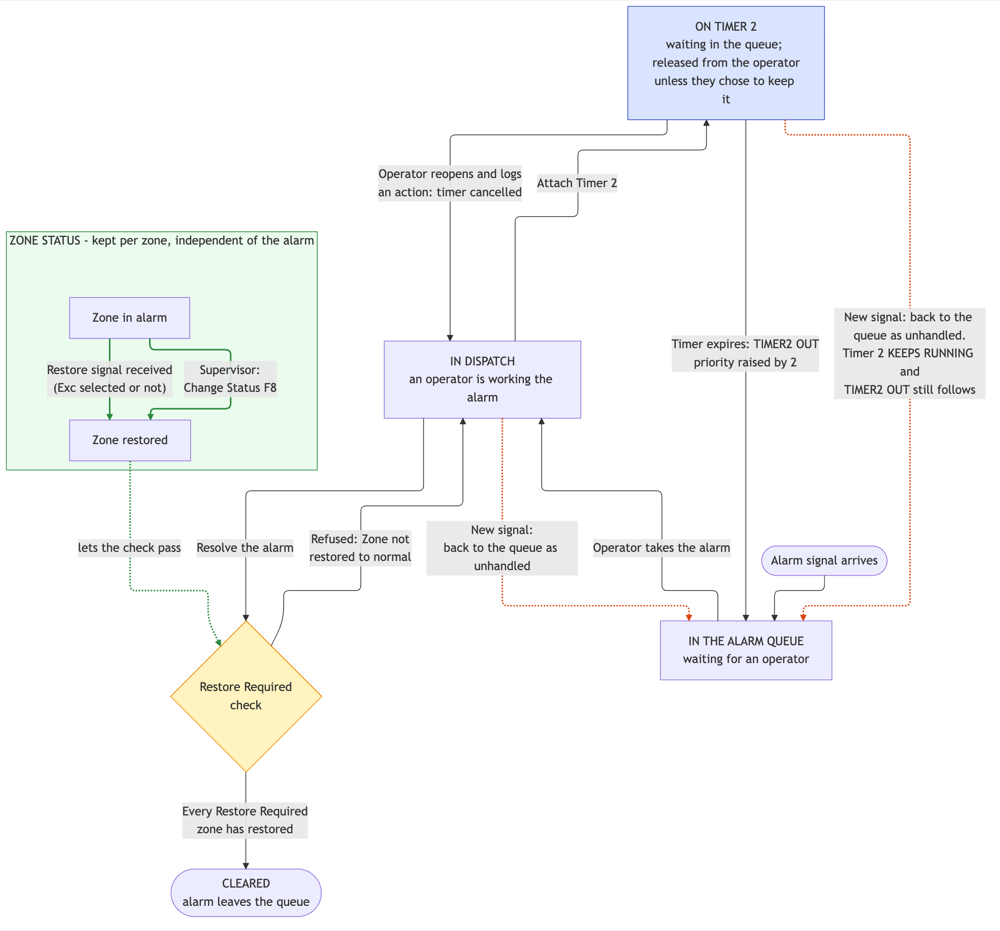
Timer 2 keeps running after a new signal, and TIMER2 OUT still follows. Attaching Timer 1 replaces a running Timer 2.
3. Dispatch Park
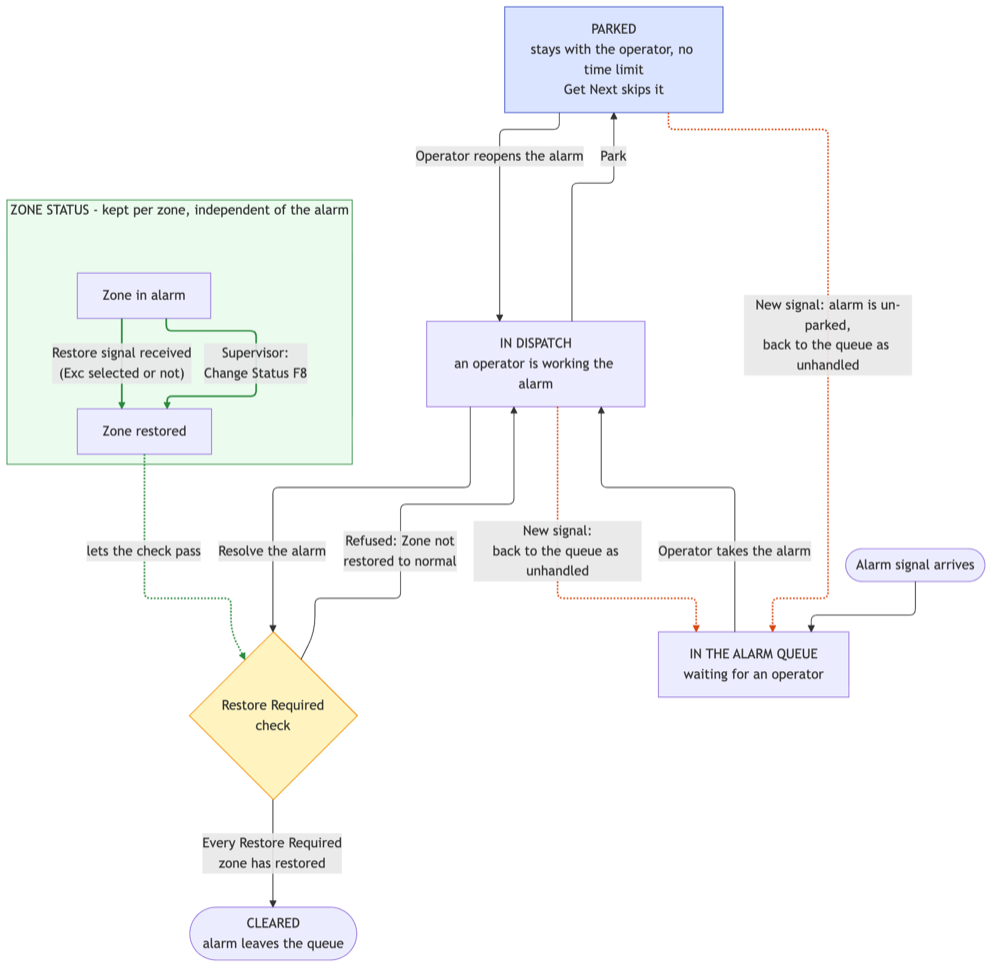
A parked alarm has no time limit. It comes back when the operator reopens it or a new signal arrives.
4. What each incoming signal does
Incoming signal | Waiting in the queue | In Dispatch | Parked | On Timer 1 | On Timer 2 |
|---|---|---|---|---|---|
Restore, Exc clear (the normal case) | Logged only. Zone status becomes restored. The alarm is not touched | Nothing changes on screen. The alarm can now be resolved | Stays parked | Timer keeps running | Timer keeps running |
Restore, Exc selected | Joins the alarm. Zone status becomes restored | Alarm returns to the queue as unhandled | Un-parked, returns to the queue | Timer 1 cancelled, returns to the queue | Returns to the queue, Timer 2 keeps running |
Another alarm (same installation and monitoring group) | Joins the alarm as a further line. Takes over priority and action plan if it is more urgent | Alarm returns to the queue as unhandled | Un-parked, returns to the queue | Timer 1 cancelled, returns to the queue | Returns to the queue, Timer 2 keeps running |
Cancel | Joins the alarm | Alarm returns to the queue as unhandled | Un-parked, returns to the queue | Timer 1 cancelled, returns to the queue | Returns to the queue, Timer 2 keeps running |
A signal from another monitoring group becomes a separate alarm of its own. The first alarm is unaffected in every state.
5. Key points
- Restore Required is checked when the operator resolves the alarm. The check reads the zone status. Whether the alarm is parked or on a timer makes no difference.
- A timer never checks for a restore. Expiry brings the alarm back to the queue with a raised priority. The operator checks the zone status.
- Timer 1 and Timer 2 cannot run together. Attaching one replaces the other. Any other action the operator logs on the alarm also cancels a running timer.
- Park has no time limit. A parked alarm comes back when the operator reopens it or a new signal arrives.
- The quiet restore resolves an unrestored zone. With Exc clear, the restore changes the zone status and leaves the parked or timed alarm undisturbed. The next attempt to resolve the alarm succeeds.
6. Options
Current values are shown for each option.
Options you can change in Options (#1887):
Option | Now | Effect |
|---|---|---|
mo178 | 2 | How much the priority is raised when a timer expires |
mo104 | Off | On: a restore that arrives before any operator has touched the alarm removes it from the queue automatically |
mo103 | Off | On: the same for a cancel |
mo207 | Off | On: the Dispatch window closes as soon as a timer is attached |
Options that Innovative sets on request:
Option | Now | Effect |
|---|---|---|
mo012 | Off | On: a new signal clears Timer 2 as well as Timer 1, and Park clears any running timer |
mo002 | Off | On: a new signal on a timed alarm also releases it from the operator and from Park |
mo130 | Off | On: automatic removal on restore, controlled per zone type and time window |
mo125 | Off | On: the raised priority after a timer expires is also shown as the alarm's priority |
ma023 | Off | On: attaching a timer moves the alarm to another queue through Queue Routing |