
Required Fields
Program #: 1843
Module: System Administration
Overview
IBS sets some fields as required fields for SBN. You can change some optional fields in SBN to required fields for your company. Use Required Fields (program #1843) to change optional fields to required fields.
To access this program, select Required Fields (program #1843) from the main menu of SBN.
Note: On the Cycle Fees tab (program #548), the Inhibit Date fields have entries on the Required Fields screen so that you can control who has the ability to set or change them.
Note: In the Service Log, the field css_reqtext_arr can be made required for each user. This field is found in Program #1843 under de_sv_req (Service Requests).
The Required Fields Window
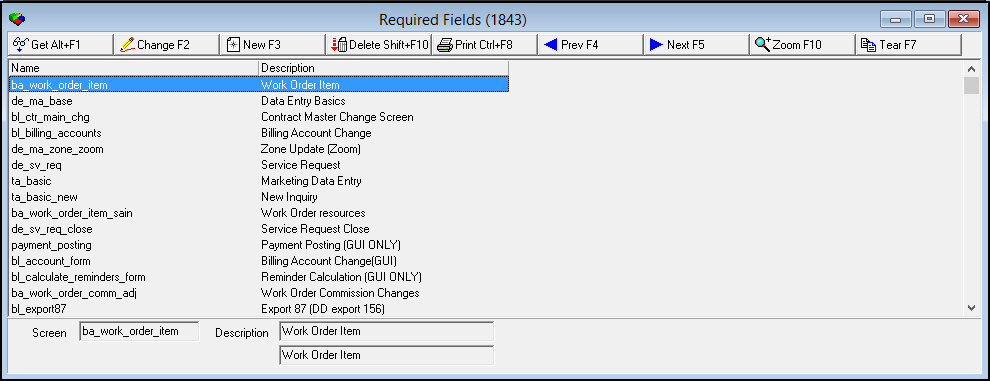
The following graphic shows Required Fields as the program opens. The upper pane displays the list of windows in which you can change optional fields to required fields.
Field/Column Descriptions
The following table describes the fields and columns used in Required Fields.
Field/Column |
Description |
Name |
System name for the window. |
Description |
Descriptive name of the window. |
Screen |
System name for the window. |
Using Common Functions
See the reference document Common Functions in SBN for more information.
Zooming into the Sublevel
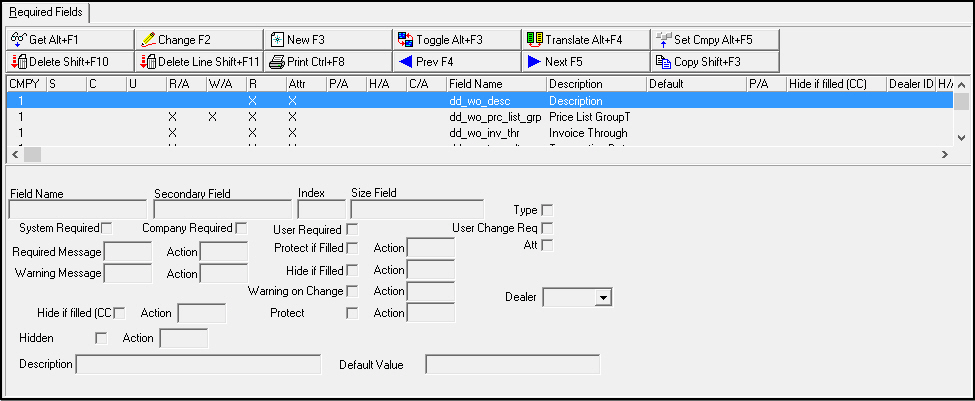
Required Fields (program #1843) contains a sublevel in which you can view the details and change the required status of the fields of the selected window.
The Required Fields Tab
Required Fields tab displays the fields included in the selected window.
Column Descriptions
The following table describes the columns used in the Required Fields tab.
Field/Column |
Description |
Company |
|
System Required |
If this column displays an X, IBS has set this as a system-level required field for SBN. |
Company Required |
If this column displays an X, IBS has set this as a system-level required field for your company. |
User Required |
If this column displays an X, your company has set this as a required field. |
Required Message/Action |
If this column displays an X:
|
Warning Message/Action |
If this column displays an X:
|
User Change Required |
If this column displays an X, IBS has enabled the Toggle for changing the User Required setting.
|
Attribute |
If this column displays an X, the user may change the Description field.
|
Protect if Filled/Action |
If this column displays an X:
|
Hide if Filled/Action |
If this column displays an X:
|
Hide if Filled (CC) |
If this field is checked and the means of payment is a credit card, then the value in this field displays as ********. Note: New 'Hide if filled (CC)' field can be checked for any field, not just cc # types. |
Change/Action |
If this column displays an X:
|
Field Name |
SBN name for the field. |
Hidden / Action |
If the Hidden check box is selected, you will no longer be able to see or use the related field, and the corresponding action is disabled. This feature doesn't apply to check boxes in a grid. |
Description |
Descriptive name of the field. |
Default |
This column displays the default defined for the selected field. Note: SBN applies default values to fields only, not to grid columns. |
Protect / Action |
If this column displays an X:
|
Dealer ID |
Dealer ID for whom the field is required. |
Field Descriptions
The following table describes the fields used in the Required Fields tab.
Note: Some of these fields require you to type an associated action number. Make sure you use an action number lower than 300, as those over 300 refer to menu commands. For more information, see Action Profiles in System Administration.
Field/Column |
Description |
Field Name |
SBN name for the field. |
Secondary Field |
SBN name for the second field, if applicable. |
Index |
Used for arrays to check one of multiple entries. |
Size Field |
Size of the array. |
Type |
IBS personnel may enter a check mark in this field to require users to complete both Name fields.
|
System Required |
IBS personnel may enter a check mark in this field to set the selected field as a system-level required field for SBN. |
Company Required |
IBS personnel may enter a check mark in this field to set the selected field as a system-level required field for company. Note: If this is checked when selecting the ba_personnel_main screen, then the Mobile M1 field in Personnel (program #1811) must be filled. |
User Required |
Enter a check mark in this field to set the selected field as a required field for your company. |
User Change Req |
IBS personnel may enter a check mark in this field to enable the Toggle for changing the User Required setting of the field. |
Required Message |
Provides a message that prompts the user to complete the field. To set up a required message, you must type the message number. |
Action |
Enables certain groups of users that have this action enabled to ignore/override the required message.
|
Protect if Filled |
Protects the field when the field contains data. |
Action |
Indicates the associated action number that overrides the Protect if Filled feature. |
Attribute |
IBS personnel may enter a check mark in this field to enable users to change the Description field. |
Warning Message |
Provides a message that warns the user to complete the field.
|
Action |
Enables certain groups of users that have this action enabled to ignore/override the warning message.
|
Hide if Filled |
Hides the field when it displays data. |
Action |
Indicates the associated action number that overrides the Protect if Filled feature. |
Warning on Change |
Provides a message that warns the user that the field information has changed.
|
Action |
Enables certain groups of users that have this action enabled to ignore/override the warning message.
|
Dealer |
The selected field is required for the Dealer ID in this field if it matches the user's dealer. |
Protect |
Enter a check mark in this box to protect the field from being updated. |
Action |
Enables certain groups of users that have this action enabled to override the protected field. |
Description |
Descriptive name of the field. |
Default |
You may type a default for the selected field.
Note: SBN applies default values to fields only, not to grid columns. |
Changing the Details of a Required Field
Use the following steps to change the details of a required field
1. In Required Fields (program #1843), select the window that contains the field for which you want to change details.
2. Choose Zoom in/out of sublevel.
‰ SBN opens the Required Fields tab below the main window.
3. In the Required Fields tab, select the field that you want to change.
4. If you want to change only the User Required setting, choose Toggle.
‰ SBN performs one of the following actions:
l If the User Required column displays an X, SBN removes the X.
l If the User Required column is blank, SBN inserts an X.
5. To change other fields, choose Change Record.
‰ Fields in the lower pane of the tab open.
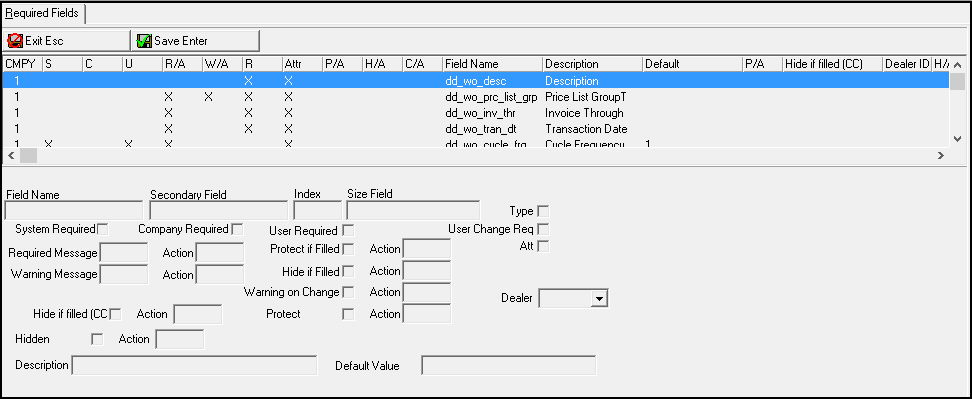
6. Complete the fields.
7. Choose Save.
Copying a Required Field
Use the following steps to copy a required field.
1. In Required Fields tab, select the field you want to copy.
2. Choose Copy.
‰ A dialog box opens prompting you to choose a dealer.
3. Select a dealer ID from the dialog box drop-down menu, and choose OK.
‰ Copied field displays in the grid with the assigned dealer ID.
Function Button Descriptions
The following table displays the buttons, describes the shortcut keys, actions, and functionality.
Button |
Name |
Shortcut Key |
Action |
Description |
|
Get |
ALT+F1 |
1843/ 1 |
Get record. |
|
Change |
F2 |
1843/ 2 |
Change selected record. |
|
New |
F3 |
1843/ 3 |
Create new record. |
|
Delete |
SHIFT+F10 |
1843/ 4 |
Delete selected record. |
|
Undelete |
ALT+F10 |
1843/ 5 |
Restore deleted record. |
|
CTRL+F8 |
1843/ 6 |
Print selected records. |
|
|
Previous |
F4 |
1843/ 7 |
Select last record. |
|
Next |
F5 |
1843/ 8 |
Select next record. |
|
Toggle |
ALT+F3 |
1843/15 |
Change only the User Required setting. |
|
Translate |
ALT+F4 |
1843/16 |
Copy details of selected field, assigning new Company number to associate with the copied information. |
|
Set Cmpy |
ALT+F5 |
1843/17 |
Set company to associate with selected field. |
|
Delete Line |
shift+F11 |
1843/23 |
Delete selected line. (Only deletes records with a dealer assigned.) |
|
Copy |
shift+F3 |
1843/22 |
Copy current record. |
|
Zoom |
F10 |
1843/ 999 |
Zoom in/out of sublevel. |
|
Tear |
F7 |
1843/ 999 |
Display selected source description. |















Modifications and Updates to Required Fields
The following table lists modifications and updates to the Required Fields document.
Mod Number |
Date |
Description |
n/a0 |
8/25/14 |
Images updated. |
07.82.24021, 07.82.24017 |
04/07/15 |
Added notice about the Company Required checkbox. |
08.88.11244, 07.88.25650, 07.88.25668, 08.88.11257 |
02/05/18 |
The "callout_log" form now has On/Off Site Date, On/Off Site Time and Pricelist Group as required fields. |