
AeonixDial.exe
AeonixDial lets SBN place and identify calls through an Aeonix PBX when the dialer type is AEONIX: setup, the test harness, automatic download, command line, and troubleshooting.
AeonixDial.exe
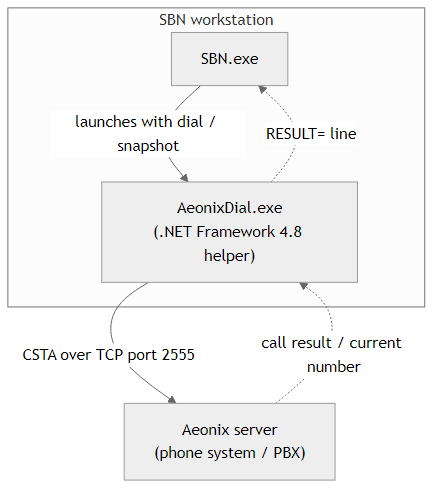
AeonixDial.exe is the component SBN uses to talk to an Aeonix phone system (PBX). It is a Windows application -- a .NET Framework 4.8 assembly (a console executable) -- that runs on the SBN workstation. SBN starts it only when it needs to place a call or look up the number on your current call; it is not a service and does not run on its own.
AeonixDial.exe connects directly to your Aeonix server using the CSTA protocol (default port 2555). Nothing is routed through an outside web service.
For setting up and using the Aeonix dialer in SBN -- enabling it, the test harness, the temporary extension, logging, and troubleshooting -- see Aeonix.
What it does
- Outbound call: SBN gives AeonixDial.exe the Aeonix server address, your extension, and the number to dial. AeonixDial.exe connects to the Aeonix server and places the call from your extension.
- Incoming call lookup: SBN asks AeonixDial.exe for the number on your active call so the matching installation can be opened.
Where it lives
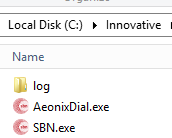
AeonixDial.exe normally sits in the SBN program folder, next to SBN.exe. If that folder is read-only for your Windows account, SBN keeps it in a per-user application-data folder instead. Either way, only one active copy is kept on the workstation.
How SBN installs and updates it
In normal use you do not install AeonixDial.exe by hand. SBN downloads and maintains it for you:
- When you set the dialer type to AEONIX (Options > Dialer), or when SBN starts with AEONIX already selected, SBN downloads the latest AeonixDial.exe from your SBN download server and places it next to SBN.exe.
- Each time, SBN checks whether a newer version is available and updates automatically.
- You can refresh it at any time from Options > Dependencies > Download Now.
- If the workstation cannot reach the download server, SBN keeps using the copy it already has. If there is no copy yet, dialing shows a message explaining it could not be downloaded.
Offline workstations
If the PC has no access to the download server (no HTTP or HTTPS), obtain AeonixDial.exe from Innovative and place it in the SBN program folder (next to SBN.exe). No connection is needed once the file is there; SBN uses it as-is and skips the update check.
Running AeonixDial.exe from the command line (support / diagnostics)
AeonixDial.exe can be run directly from the SBN program folder:
- dial places a call; output ends with
RESULT=OKorRESULT=FAIL|code|message. - snapshot reports the number on the extension's current call; output ends with
RESULT=NUMBER|<digits>,RESULT=NONE, orRESULT=FAIL|code|message. - The port is optional and defaults to 2555.
- A detailed log is written to
log\aeonix.login the same folder as AeonixDial.exe.
Related
- Aeonix -- setting up and using the Aeonix dialer in SBN
- Dialer Prefix