
Standard Labor Rates
Standard Labor Rates
Standard Labor Rates
Program #: 1795
Module: System Administration
Overview
Use Standard Labor Rates (program #1795) to define standard labor rates for each branch. These rates affect the calculation of job costing in the Work Order.
The Standard Labor Rates Window
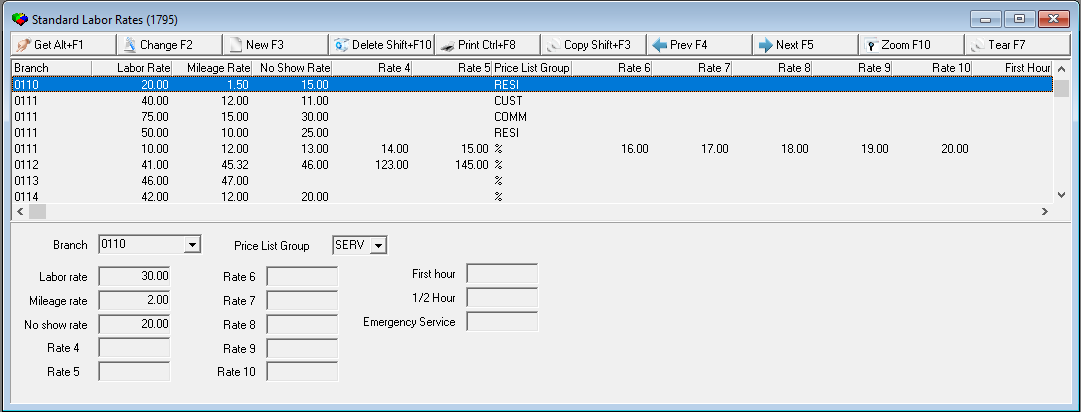
Standard Labor Rates displays all previously defined rates.
Field/Column Descriptions
The following table describes the fields and columns used in Standard Labor Rates.
Field/Column |
Description |
Branch |
Branch for which the rates apply. |
Price List Group |
Price list group of the work order; used to match labor rates based on the price list group of the work order, and create multiple standard labor rates for one branch. |
Labor Rate |
Hourly standard rate for labor at this branch. |
Mileage Rate |
Rate for mileage. |
No show Rate |
Rate paid for customer no show. |
Rate 4 |
Not currently used in SBN. |
Rate 5 |
Not currently used in SBN. |
Rate 6 |
Not currently used in SBN. |
Rate 7 |
Not currently used in SBN. |
Rate 8 |
Not currently used in SBN. |
Rate 9 |
Not currently used in SBN. |
Rate 10 |
Not currently used in SBN. |
First Hour |
Not currently used in SBN. |
1/2 Hour |
Not currently used in SBN. |
Emergency Service |
Not currently used in SBN. |
The Standard Labor Rates Window Zoomed
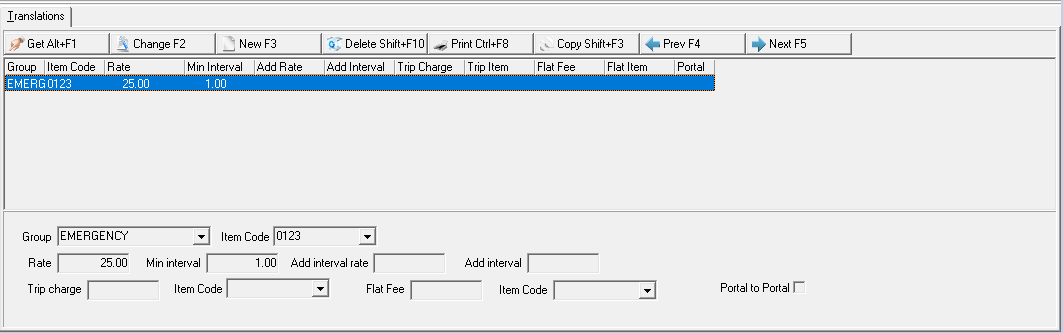
A user can press the Zoom button to bring up the translations tab within Standard Labor Rates (#1795). While zoomed into a specific Branch, a user can define a specific Group with a specific Item Code at a particular rate.
Field/Column Descriptions
The following table describes the fields and columns used in Standard Labor Rates when in Zoom mode..
Field/Column |
Description |
Top Pane |
|
Group |
Displays the Price list group of the work order; used to match labor rates based on the price list group of the work order, and create multiple standard labor rates for one branch. |
| Item Code | Displays the Item identifier. |
| Rate | Displays the Rate which is defined by the user in Standard Labor Rates (#1795). |
| Min Interval | Displays Minimal Interval of time in which a customer will be charged. This field is defined in the lower pane. |
| Add interval rate | Displays Additional interval rate which may be charged for any additional time past the set minimal interval. |
| Add Interval | Displays Additional Interval of time spent at a site past the minimal interval. Any time past the minimal time will be charged with the additional interval rate fee per specified additional interval. Example: If a Service is defined as being charged at $X.XX for a set amount of time (Minimal Interval) and any additional time within increments of "X" amount of minutes (Additional Intervals) is needed then an additional (interval) rate may be charged as defined within Standard Labor Rates (#1795) by the user. |
| Trip Charge | Displays the charge issued per visit to an on-site location. This is user defined. |
| Trip Item | Display the Item code used to define the cost of the trip. |
| Flat Fee | Displays the one-time fee with no additional costs as specified by the user. |
| Flat Item | Displays the Item code used to define the cost of the Flat Fee. |
| Portal | Displays the hours that were calculated based on the en route & off-site times (misc log) if applicable. |
Lower Pane |
|
| Group | Price list group of the work order; used to match labor rates based on the price list group of the work order, and create multiple standard labor rates for one branch. (Defined in #1709). |
| Item Code | Item identifier. This field originates from Items (#1535) |
Rate |
Rate which is defined by the user in Standard Labor Rates (#1795) |
Min interval |
Minimal Interval of time in which a customer will be charged. |
Add interval rate |
Additional interval rate which may be charged for any additional time past the set minimal interval. |
Add interval |
Additional Interval of time spent at a site past the minimal interval. Any time past the minimal time will be charged with the additional interval rate fee per specified additional interval. Example: If a Service is defined as being charged at $X.XX for a set amount of time (Minimal Interval) and any additional time within increments of "X" amount of minutes (Additional Intervals) is needed then an additional (interval) rate may be charged as defined within Standard Labor Rates (#1795) by the user. |
Trip charge |
A charge issued per visit to an on-site location. This is user defined. |
Item Code |
The Item code used to define the cost of the trip. |
Flat Fee |
A one-time fee with no additional costs as specified by the user. |
Item Code 2 |
The Item code used to define the cost of the Flat Fee. |
Portal to Portal |
The hours that were calculated based on the en route & off-site times (misc. log) if applicable. |
Using Common Functions
See the reference document Common Functions in SBN for more information.
Button Functions
The following table displays the buttons, describes the shortcut keys, actions, and functionality.
Button |
Name |
Shortcut Key |
Action |
Description |
|
Get |
ALT+F1 |
1795/ 1 |
Get rate. |
|
Change |
F2 |
1795/ 2 |
Change selected rate. |
|
New |
F3 |
1795/ 3 |
Create new rate. |
|
Delete |
SHIFT+F10 |
1795/ 4 |
Delete selected rate. |
|
CTRL+F8 |
1795/ 6 |
Print selected rate. |
|
|
Copy |
SHIFT+F3 |
1795/ 999 |
Copy selected field. |
|
Previous |
F4 |
1795/ 999 |
Select last rate. |
|
Next |
F5 |
1795/ 999 |
Select next rate. |
|
Zoom |
F10 |
1795/2 |
Zoom into Translations subtab. |
|
Tear |
F7 |
1795/2 |
View details in a separate window. |









Modifications and Updates to Standard Labor Rates
The following table lists modifications and updates to the Standard Labor Rates document.
Mod Number |
Date |
Description |
n/a |
08/26/14 |
Images updated. |
08.89.11467, 08.89.11466, 07.89.25947, 08.89.11477 |
08/01/18 |
A Zoom button was added that allows for the ability to add different rates for each branch as long as Service Miscellaneous Fields (#1709) is defined. The Zoom button brings up a new Translations subtab. Images updated. |
F1 Help
| Delphi Forms | ubbranchlaborform |
| Program Numbers | 1795 |