
Commission Types
Commission Types
Commission Types
Module: System Administration
Overview
Commission Types (program #1805) contains 99 commission types that you can use to group personnel into logical commission groups. The Commission Type menu appears in Commission Items (program #1810).
The Commission Types Window
The following graphic shows Commission Types as the program opens. The window displays previously defined commission types.
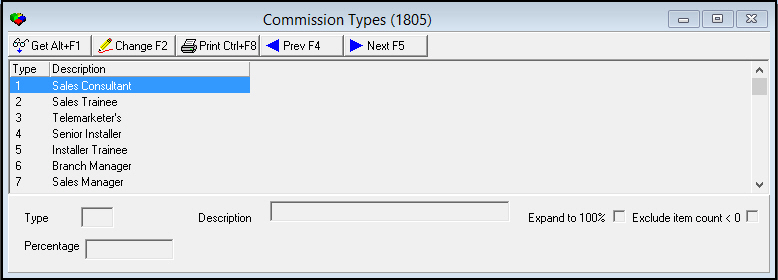
Note: If option ba386 is on, SBN uses the commission type that was in place for the resource at the time the work order was saved last. If off, commission calculation will use the value in effect when the commission calculation takes place (The time depends on various options Ex: comaappr and comasave, etc.)
Field/Column Descriptions
The following table describes the fields and columns used in Commission Types.
|
Field/Column |
Description |
|
Type |
SBN-assigned type number. (1-20). |
|
Description |
Text description of commission type. |
|
Expand to 100% |
Enter a check mark in this box to grant the selected type of personnel 100% credit of the total sales toward their monthly/yearly quota for bonuses and recognition. O 100% credit of the total sales is not the same as 100% commission. You may grant a resource type 100% credit of the total sales but split the actual commission among multiple resources. |
|
Exclude Item Count < 0 |
Enter a check mark in this box to limit the commission calculation for this commission type to items in a work order with a positive count. The Commission Change Log does not display entries for negative commission for negative item counts. O Use this functionality if you want to maintain the original commission for resources with this commission type even when items on a work order associated with that resource have been returned, excluded, or credited. O If you leave this box blank, the commission calculation for this commission type includes all items in a work order, even those with a negative count. The Commission Change Log displays entries for negative commission. |
|
Percentage |
Percentage of commission to prepay, for the resources defined in option comaappr. |
Button Functions
The following table displays the buttons, describes the shortcut keys, actions, and functionality.
|
Button |
Name |
Shortcut Key |
Action |
Description |
|
|
Get |
ALT+F1 |
1805/ 1 |
Get record |
|
|
Change |
F2 |
1805/ 2 |
Change selected record. |
|
|
|
CTRL+F8 |
1805/ 6 |
Print selected records. |
|
|
Previous |
F4 |
1805/ 999 |
Select last record. |
|
|
Next |
F5 |
1805/ 999 |
Select next record. |





Modifications and Updates to Commission Types
The following table lists modifications and updates to the Commission Types document.
|
Mod Number |
Date |
Description |
|
n/a |
8/15/14 |
Images updated. |
F1 Help
| Delphi Forms | commisprcitemsform, copyfromdialog |
| Program Numbers | 1810 |