
CS Customer Listing Report
Module: Account Management
Overview
The Central Station Customer Listing report is a single-line informational report which has a variety of uses. All Select fields use the same menu. For each item in the menu you may limit the selection by using a date range or mask. User’s branch restrictions apply.
To access this report, select CS Customer Listing (report #2106) from the main menu of SBN.
The CS Customer Listing Report
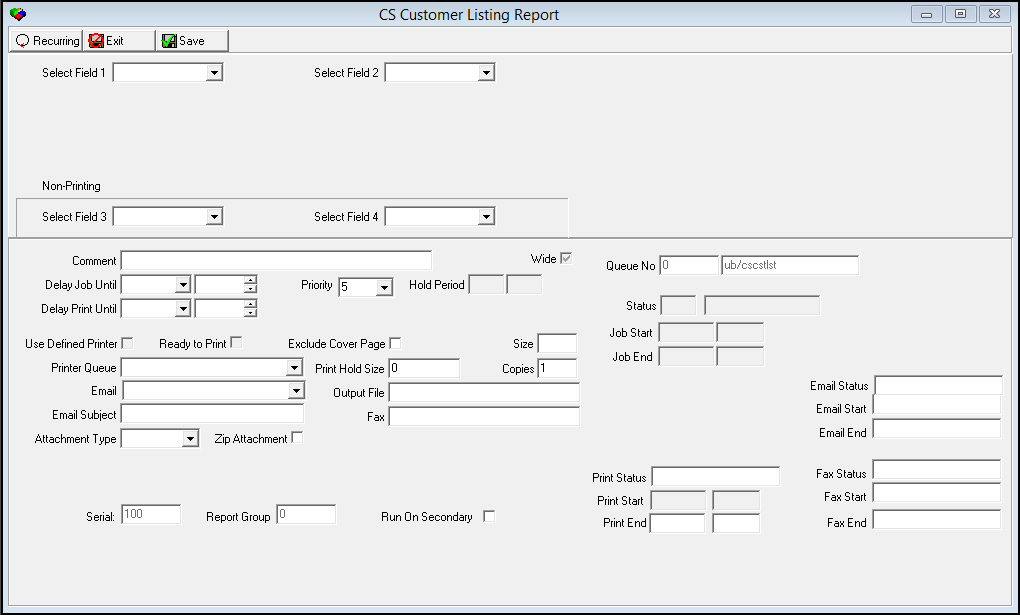
This window contains two panes: use the upper pane to define the content of the report; use the lower pane to define the job output - how, when, and where you want to print the report.
Note: See Report Parameters Pane for information on the fields in the lower pane, which are the same in every report.
Field Descriptions
The following table describes the fields used in the upper pane of this report.
Note: You can use wildcard characters in selected fields. For more information about using wildcards, see Searches.
Note: You can create recurring reports - reports that you can automatically process at a future date and time on a recurring basis. See Report Queue.
Field |
Wildcards Accepted |
Description |
Select Field 1 |
No |
Select the first parameter / sort item from the list. |
[Dynamic label] |
Yes |
l If the item selected is a date, calendars appear. l If the select field 1 is not a date, the mask parameter displays. Select the appropriate mask. An additional mask field appears. You must either type a parameter in the Mask 1field or use the % wildcard to include all parameters that match that mask. |
Select Field 2 |
No |
Select the second parameter / sort item from the list. |
[Dynamic label] |
Yes |
l If the item selected is a date, calendars appear. l If the select field 1 is not a date, the mask parameter displays. Select the appropriate mask. An additional mask field appears. You must either type a parameter in the Mask 2 field or use the % wildcard to include all parameters that match that mask. |
Select Field 3 |
No |
Select the third parameter / sort item from the list. This sort item does not appear on the report output. This field only restricts records returned for the report. |
[Dynamic label] |
Yes |
l If the item selected is a date, calendars appear. l If the select field 1 is not a date, the mask parameter displays. Select the appropriate mask. An additional mask field appears. You must either type a parameter in the Mask 3 field or use the % wildcard to include all parameters that match that mask. |
Select Field 4 |
No |
Select the fourth parameter / sort item from the list. This sort item does not appear on the report output. This field only restricts records returned for the report. |
[Dynamic label] |
Yes |
l If the item selected is a date, calendars appear. l If the select field 1 is not a date, the mask parameter displays. Select the appropriate mask. An additional mask field appears. You must either type a parameter in the Mask 4 field or use the % wildcard to include all parameters that match that mask. |
Mask/Calendar Descriptions
The following table describes the masks (m) and calendars (c) available for Select Fields.
Select Field Choice |
Description |
Account # (m) |
Account number from Contract Master. |
Address 1 (m) |
Address 1 from Service / Data Entry. |
Address 2 (m) |
Address 2 from Service / Data Entry. |
Branch (m) |
Monitoring branch from Service / Data Entry. |
CID # (m) |
Customer number from Service / Data Entry. |
City (m) |
City name from Service / Data Entry. |
Class (m) |
Installation class fields from Service / Data Entry. |
Contract # (m) |
Contract number from Contract Master. |
Contract Group 1 (m) |
Financial group 1 from Contract Master. |
Contract Group 2 (m) |
Financial group 2 from Contract Master. |
Dealer (m) |
Dealer grouping from Contract Master. |
Installation Number (m) |
Installation number from Service / Data Entry. |
Inspection Authority (m) |
Inspection Authority from devices in Service / Data Entry. |
In-Svc Date (c) |
In-service date from Contract Master. |
Mail Group 1 (m) |
Mail group 1 from Service / Data Entry. |
Mail Group 2 (m) |
Mail group 2 from Service / Data Entry. |
Monitoring Status (m) |
Monitoring status from Service / Data Entry. |
Monitoring Status Date (c) |
Monitoring status date from Service / Data Entry. |
Name (m) |
The last name from Service / Data Entry. |
On-Line Date (c) |
On-line date from Service / Data Entry. |
pane (m) |
pane type from Service / Data Entry. |
Permit # (m) |
Permit number from Service / Data Entry. |
Phone # (m) |
First phone number from Service / Data Entry. |
Permit Expiration (c) |
Permit expiration date from Service / Data Entry. |
Report Type (m) |
Report flags from Service / Data Entry. |
State (m) |
State from Service / Data Entry. |
Type (m) |
Customer type from Service / Data Entry. |
Zip (m) |
Zip code from Service / Data Entry. |
Note: You must select at least one parameter, or an error message appears.
Running and Viewing a Report
For information on running and viewing a report, see Common Functions in SBN.
Report Example
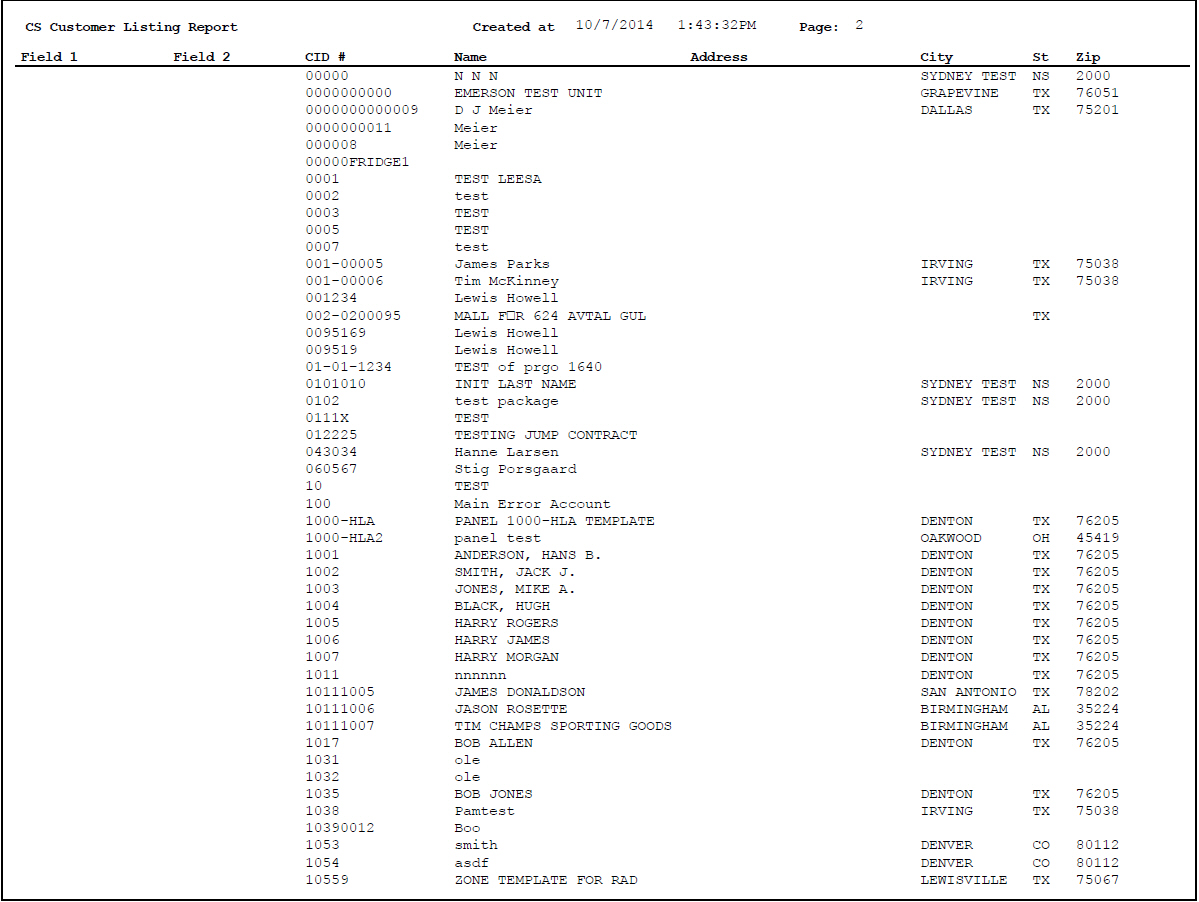
The following graphic shows the output of the CS Customer Listing report.
Column Descriptions
The following table describes the columns used in the output of the report.
Column |
Description |
Field 1 |
Field 1 mask selected in the report parameters. O If you choose a mask already listed in the output (CID #, Name, Address, etc.) the Field column remains blank. |
Field 2 |
Field 2 mask selected in the report parameters. O If you choose a mask already listed in the output (CID #, Name, Address, etc.) the Field column remains blank. |
CID # |
Customer identification number. |
Name |
Customer name. |
Address |
Customer address. |
City |
Customer city. |
State |
Customer state. |
Zip |
Customer zip code. |
Button Functions
The following table displays the buttons, describes the shortcut keys, actions, and functionality.
Button |
Name |
Shortcut Key |
Action |
Description |
|
Recurring |
Alt+F1 |
2106 |
Open fields for recurring/template reports. |
|
Exit |
Esc |
2106 |
Exit without saving. |
|
Save |
Enter |
2106 |
Save existing record. |



Modifications and Updates to CS Customer Listing Report
The following table lists modifications and updates to the CS Customer Listing Report document.
Mod Number |
Date |
Description |
n/a |
07/17/14 |
Images updated. |
|
|
|
|
|
|