
Rental Escalation Index
Rental Escalation Index
Rental Escalation Index
Program #: 1636
Module: Utilities
Overview
Use Rental Escalation Index (program #1636) to define the escalation rates in the Escalation field menu that appears in various SBN programs. An escalation rate determines the percentage or currency amount that the payment rate on a contract increases annually.
Note: Escalation rates apply to all contract types in Contract Master (program #548), not just rental contracts.
The Rental Escalation Index Window
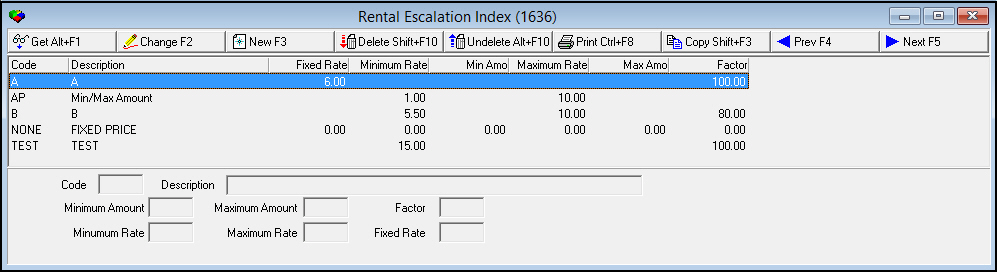
The following graphic shows Rental Escalation Index as the program opens.
Field/Column Descriptions
The following table describes the fields and columns in the Rental Escalation Index window.
|
Field/Column |
Description |
|
Code |
Code that identifies the escalation rate. |
|
Description |
Text description of the escalation rate. |
|
Fixed Rate |
Fixed percentage rate at which payments increase. |
|
Minimum Rate |
Minimum percentage rate at which payments increase. |
|
Minimum Amount |
Minimum currency amount at which payments increase. |
|
Maximum Rate |
Maximum percentage rate at which payments increase. |
|
Maximum Amount |
Maximum currency amount at which payments increase. |
|
Factor |
Percentage of the Fixed Annual Escalation Rate that SBN uses in escalation calculation. |
Creating an Escalation Rate
Use the following steps to create an escalation rate:
1. Choose New Record.
‰ The fields open for changes.
2. Enter the details of the new escalation rate.
3. Choose Save to save changes and close.
Changing an Escalation Rate
You can change the details of an existing escalation rate.
Use the following steps to change an escalation rate:
1. Double-click the escalation rate you want to change, or choose Get Record.
2. Choose Change Record.
‰ The fields open for changes.
3. Change the details as needed.
4. Choose Save.
Deleting an Escalation Rate
Use the following steps to delete an escalation rate:
1. Select the escalation rate you want to delete.
2. Choose Delete Record.
‰ The escalation rate no longer appears in the list of rates.
Button Functions
The following table displays the buttons, describes the shortcut keys, actions and functionality.
|
Button |
Name |
Shortcut Key |
Action |
Description |
|
|
Get Record |
alt+f1 |
1636/ 1 |
View details of the selected escalation rate. |
|
|
Change Record |
f2 |
1636/ 2 |
Change the selected escalation rate. |
|
|
New Record |
f3 |
1636/ 3 |
Create a new escalation rate. |
|
|
Delete Record |
shift+f10 |
1636/ 4 |
Delete the selected escalation rate. |
|
|
Select Record to Undelete |
alt+f10 |
1636/ 5 |
Restore a deleted escalation rate. |
|
|
Print Selected Records |
ctrl+f8 |
1636/ 6 |
Print the selected escalation rate. |
|
|
Copy Current Record |
shift+f3 |
Copy the current escalation rate. |
|
|
|
Previous Record |
f4 |
Go to the previous escalation rate. |
|
|
|
Next Record |
f5 |
Go to the next escalation rate. |
|
|
|
Exit without saving |
esc |
Exit without saving changes to the selected escalation rate. |
|
|
|
Save Existing Record |
enter |
Save changes to the selected escalation rate. |











Modifications and Updates to Rental Escalation Index
The following table lists modifications and updates to the Rental Escalation Index document.
|
Mod Number |
Date |
Description |
|
n/a |
09/02/14 |
Images updated. |