
CID Auto Generation
CID Auto Generation
CID Auto Generation
Module: System Administration
Overview
Use CID Auto Generation (program #1724) to define how SBN generates customer IDs when you add a new record in Data Entry (program #0559). In Data Entry program (program #0559) choose Auto Generate CID to automatically complete the CID field.
Note: For information on Data Entry, see Data Entry Master and Basics in Account Management.
In CID Auto Generation, you can define ranges by branch, panel, or dealer combination. The mask allows you to define number ranges with specific prefixes and/or suffixes. If you do not want to attach a suffix or prefix, you can use the underscore for each position in the number.
If option ba332 is on, when users choose Auto Generate CID in Data Entry (program #559), SBN generates the CID based on the parameters defined in this program and embeds the installation number in the CID. With option ba332 on, users can generate multiple CIDs for one installation at the same. All of the generated CIDs contain the embedded installation number. When option ba462 is off, SBN does not include the letter 'A' when generating CIDs in program #1724.
Note: If you define a panel with a specific index line, SBN only automatically generates CIDs for that panel when you use the specified index line of the CID grid to select that panel.
To access this program, select CID Auto Generation (program #1724) from the main menu of SBN.
The CID Auto Generation Window
The following graphic shows CID Auto Generation the program opens. The upper pane displays the list of defined masks. Use the fields in the lower pane to add or edit masks when in Change mode.
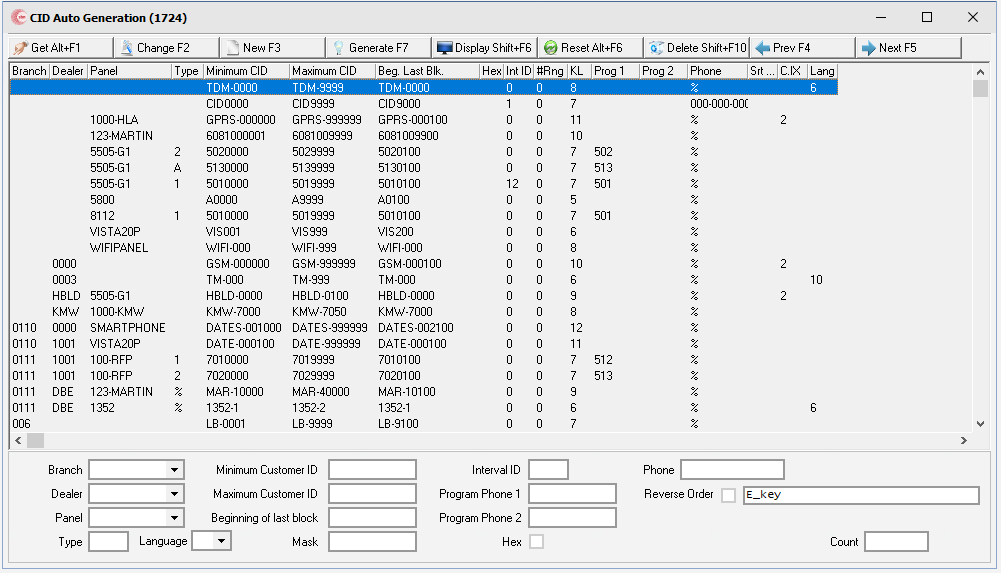
Note: When option ba332 is on, the Generate, Display, and Reset buttons do not appear.
Field/Column Descriptions
The following table describes the fields and columns used in CID Auto Generation.
Field/Column |
Description |
Branch |
Branch ID. (This menu originates from program #1530.) |
Dealer |
Dealer ID. (This menu originates from program #1537.) |
Panel |
Panel type. (This menu originates from program #1742.) |
Type |
User-defined CID type. Allows for multiple CID lists for the same Branch/Dealer/Panel combination. When this feature is used, an additional window appears when generating CIDs so the user can select the type. |
Language |
A language code that is tied to a language. |
Minimum Customer ID |
Lowest number in the range. |
Maximum Customer ID |
Highest number in the range. |
Beginning of last block |
For a new mask, this is the starting number for the series. For an existing mask, this is the beginning number in the last pool that the generator uses until it issues all numbers. |
Mask |
Defines the mask to use when creating the number. Use underscore ( _ ) to identify where to add the actual number. |
Interval ID |
ID number used to create various sets of numbers for the same branch/panel/dealer combination. O The initial mask should be interval 0 and backup masks should be numbered sequentially. (See Using Interval IDs.) |
Program Phone 1 |
Primary phone number that the receiver should dial. SBN automatically inserts this phone number into the phone 1 field in Data Entry when you choose Auto Generate CID. |
Program Phone 2 |
Secondary phone number that the receiver should dial. SBN automatically inserts this phone number into the phone 2 field in Data Entry when you choose Auto Generate CID. |
Hex |
If checked, SBN generates these numbers in Hexadecimal. O If you need blocks of numbers, you can group them by interval number. For example, a range of numbers from 100-200 may be interval 0, a range of numbers from 300-500 may be interval 1 and a range of numbers from 600-800 may be interval 2. When SBN has generated the last number in interval set 0, (200 in this example), it skips to interval 1. |
Phone |
An optional phone number prefix for further defining the mask. |
Reverse Order |
SBN generates these numbers in reverse order. |
Test Interval |
The test interval for the selected panel. O Use this field when option ba332 is on. |
CID Index |
Identifies the indexed number of the line of the CID grid in program #559. This field is used to generate specific numbers in combination with panels on the specific line of the CID grid. If it is not required to generate specific panels on specific lines, this field can remain blank. O Use this field when option ba332 is on. |
Count |
Quantity of numbers available for issue. |
Using Common Functions
See the reference document Common Functions in SBN for more information.
Using Interval IDs
You can set up blocks of numbers by grouping them by interval number. For example, you might set up a range of numbers from 100-200 as interval 0, a range of numbers from 300-500 as interval 1, and a range of numbers from 600-800 as interval 2. When SBN has generated the last number in interval 0 (200 in this example), it deletes this interval, renames interval 1 to interval 0, and begins using numbers from this range (300 in this example). It also moves the other interval ranges up. When SBN runs out of numbers, it provides a warning message that it cannot issue a CID number for this branch/dealer/panel combination.
Understanding Branch, Panel, and Dealer Priorities
When users choose Auto Generate CID in Data Entry (program #559), SBN issues the CID based on the following priority:
Branch |
Panel |
Dealer |
Branch |
______ |
Dealer |
Branch |
______ |
______ |
______ |
Panel |
Dealer |
______ |
______ |
Dealer |
______ |
Panel |
______ |
______ |
______ |
______ |
Generating CIDs to Test a New Mask
Use Generate to create a set of numbers for the selected mask, which then makes them available for use in Data Entry (program #0559). Please keep in mind that pre-generating a large group of numbers prevents the reuse of numbers until all of the pre-generated numbers have been issued
Note: For maximum use of your receiver line cards, you should only use this function to test a new mask.
Use the following steps to pre-generate CIDs:
1. In Auto Generate CID (program #1724), double-click the selected mask.
2. Choose Generate.
‰ SBN creates the CIDs and makes them available for assignment.
Resetting (Stopping) the Generate Process
Occasionally, if you accidentally generate an extremely large batch of numbers, or if the computer malfunctions, the generate process may stop. If this occurs, SBN displays repeated messages informing you that the CID generator is not available because it is in use. If you see these messages over an extended period of time, you may stop the generate process to unlock and reset the program.
Warning: Because the reset option stops the generate process, make sure this is necessary before using it.
Use the following steps to reset the generate process:
1. In Auto Generate CID (program #1724), confirm that you want to stop the generate process.
2. Choose Reset.
‰ The process stops.
Button Functions
The following table displays the buttons, describes the shortcut keys, actions, and functionality.
Button |
Name |
Shortcut Key |
Action |
Description |
|
Get Record |
ALT+F1 |
1724/ 1 |
Get record. |
|
Change Record |
F2 |
1724/ 2 |
Change selected record. |
|
New Record |
F3 |
1724/ 3 |
Create new record. |
|
Generate |
F7 |
1724/ 4 |
Generate CIDs. |
|
Display |
F6 |
1724/ 5 |
Displays the selected contract in the bottom pane. |
|
Reset |
alt+F6 |
1724/ 6 |
Stops the generate process to unlock and reset the program. |
|
Delete Record |
SHIFT+F10 |
1724/ 7 |
Delete selected record. |
|
Print Selected Records |
CTRL+F8 |
1724/ 8 |
Print selected records. |
|
Previous Record |
F4 |
1724/ 999 |
Go to previous record. |
|
Next Record |
F5 |
1724/ 999 |
Go to next record. |
|
Exit without saving |
esc |
1724/ 999 |
Exit without saving changes to record. |
|
Save New Record |
enter |
1724/ 999 |
Save changes to record. |












Modifications and Updates to CID Auto Generation
The following table lists modifications and updates to the CID Auto Generation document.
Mod Number |
Date |
Description |
n/a |
08/14/14 |
Images updated. |
08.92.11906, 07.92.26508, 08.92.11904, 07.92.26505 |
10/07/20 |
New Language field added. Images updated. |
F1 Help
| Delphi Forms | ubalaidform |
| Program Numbers | 1724 |