
States
States
States
Module: System Administration
Overview
Use States (program #1510) to define the states in which your company intends to do business. Menus of States appear in many programs in SBN.
This document covers the following topics:
Viewing the Details of a State
Changing the Details of a State
Using a Template for a New State
Navigating to States
Use the following steps to navigate to States:
1. From the main SBN toolbar, select Menu.
2. From the drop-down menu, select Go To [ALT+F1].
3. In the Go To Program dialog box, type in "1510."
w The States program opens.
The States Window
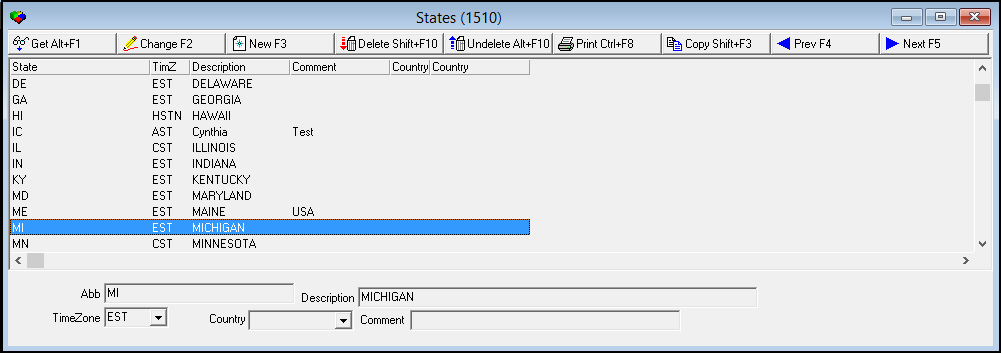
The following graphic shows States as the program opens. The upper pane displays previously defined states.
Field/Column Descriptions
The following table describes the fields and columns used in States.
|
Field/Column |
Description |
|
Abbreviation |
Code to define the state or province. (If there is no abbreviation, enter the name of the state or province.) Note: This field holds a maximum of 60 characters. |
|
Description |
State or province name, or text description of the area. |
|
Time Zone |
You must select the time zone applicable for the state. (This menu originates from program #1739.) |
|
Country |
You must select the country in which the state is located. Note: This field is used in option msmp to determine the country used in MapPoint. |
Viewing the Details of a State
You can view the details of a state in the fields in the lower pane.
Use the following steps to view the details of a state:
1. In States, select the state for which you want to view details from the upper pane.
2. Double-click your selection or choose Get.
w The fields in the lower pane display the details of the selected state.
Adding a State
Use the following steps to add a new state:
1. In States, choose New.
w The fields in the lower pane open for changes.
2. Complete all of the open fields.
3. Choose Save.
w SBN adds the state to the list of defined states in the upper pane.
Changing the Details of a State
Use the following steps to change the details of a state:
1. In States, select the state you want to change from the upper pane.
2. Choose Change.
w The fields that can be changed open for changes in the lower pane.
3. Enter changes, as needed.
4. Choose Save.
Deleting a State
Use the following steps to delete a state:
1. In States, select the state you want to delete.
2. Choose Delete.
w A Confirmation dialog box appears: "Delete XXX. Are you sure?"
3. Choose Yes.
w SBN deletes the selected state.
Restoring a Deleted State
You can restore a deleted state back into SBN.
Use the following steps to restore a deleted State:
1. In States, choose Undelete.
w The Undelete window appears.
2. In the Undelete window, find the state you want to restore and double-click it, or choose [Enter].
w SBN restores the state to the active list of defined states.
Using a Template for a New State
You can use one state as a template for another state.
Use the following steps to use one state as a template for new state:
1. In States, select the state you want to use as a template.
2. Choose Copy Current Record.
w Fields in the upper pane fill with the details of the selected state, but remain open for changes.
3. Change any information needed for the new state.
4. Choose Save.
w SBN adds the new state to the list of defined entries.
Button Functions
The following table displays the buttons, describes the shortcut keys, actions, and functionality.
|
Button |
Name |
Shortcut Key |
Action |
Description |
|
|
Get |
ALT+F1 |
1510/ 1 |
View the details of a state. |
|
|
Change |
F2 |
1510/ 2 |
Change selected record. |
|
|
New |
F3 |
1510/ 3 |
Create a new record. |
|
|
Delete |
SHIFT+F10 |
1510/ 4 |
Delete selected record. |
|
|
Undelete |
ALT+F10 |
1510/ 5 |
Restore deleted record. |
|
|
|
CTRL+F8 |
1510/ 6 |
Print selected records. |
|
|
Copy |
SHIFT+F3 |
1510/ 999 |
Copy the current state to use as a template. |
|
|
Previous |
F4 |
1510/ 999 |
Select last record. |
|
|
Next |
F5 |
1510/ 999 |
Select next record. |









Modifications and Updates to States
The following table lists modifications and updates to the States document.
|
Mod Number |
Date |
Description |
|
n/a |
8/26/14 |
Images updated. |