
Service Aging
Service Aging
Service Aging
Module: Account Management
Overview
Use Service Aging to view the outstanding balance for the chosen installation. To update information in this tab, calculate Service Aging information in Update Contract/Account Agings (program #576). The Service Aging tab displays data based on aging levels defined in Aging Levels (program #1802).
To verify balances on the installation, refer to the Invoice Status tab in Contract Master (program #548).
Navigating to Service Aging
Use the following steps to navigate to the Service Aging tab:
1. From the main SBN toolbar, select Menu.
2. From the drop-down menu, select Go To.
3. In the Go To Program dialog box, type in "559" and press Enter.
w Data Entry Master and Basics opens.
4. Choose the Service Aging tab in the lower pane of Data Entry.
The Service Aging Tab
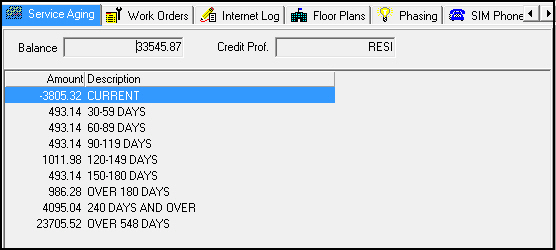
The following graphic shows the Service Aging tab with balance information displayed.
Field/Column Descriptions
The following table describes the fields and columns used in the Service Aging tab. All information on this tab is read-only.
Field/Column |
Description |
Balance |
Balance on the customer billing account after aging has occurred. |
Credit Prof |
Credit profile of the customer billing account. (This originates from the Billing Accounts tab of program #548.) |
Amount |
Amount due for this billing account broken down into aging levels. (This originates from the Invoice Status tab in program #548.) |
Description |
Aging level description. (This originates from program #1802.) |
Related Programs
The following table lists programs related to the Service Aging tab.
Program |
Number |
Document Link |
Description |
Aging Levels |
1802 |
Define aging levels and descriptions to display in Service Aging. |
|
Update Contract/Account Agings |
576 |
Calculate aging levels based on account balances. |
|
Data Entry Master and Basics |
559 |
The program from which you can access Service Aging. View installation information for selected accounts. |
|
Invoice Status Tab |
N/A |
View invoices that users have calculated for the selected billing account tied to the installation. |
Modifications and Updates to Service Aging
The following table lists modifications and updates to the Service Aging document.
Mod Number |
Date |
Description |
n/a |
07/31/09 |
Document rewritten. |
07.02.19815, 08.03.07611 |
06/10/10 |
Added Credit Profile field. |
n/a |
7/29/14 |
Images updated. |