
Events with Specific Type Report
Events with Specific Type Report
Events with Specific Type Report
Module: Account Management
Overview
Use the Events with Specific Type report to print a list of events by specific type. User’s branch restrictions apply. This report sorts events by event name and time.
To access this report, select Events with Specific Type (report #1984) from the main menu of SBN.
The Events with Specific Type Report
This window contains two panes. In the upper pane you define the content of the report. In the lower pane you define the job output - how, when, and where you want to print the report.
Note: See Report Parameters Pane for information on the fields in the lower pane, which are the same in every report.
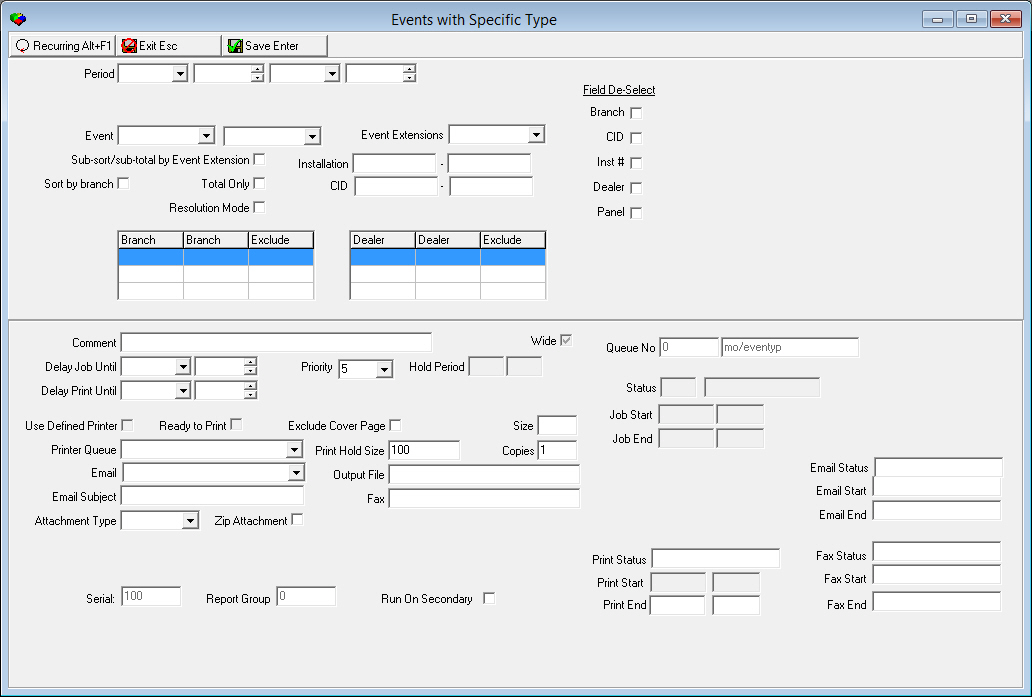
Field Descriptions
The following table describes the fields used in the upper pane of this report.
Field |
Description |
Period |
|
Date
- From |
You may select a range of dates to limit the report to events that occurred within that range. Select the beginning date of the range. |
Time
- From |
You may select a range of time to limit the report to events that occurred within that range. Select the beginning time of the range. |
Date
- To |
You may select a range of dates to limit the report to events that occurred within that range. Select the ending date of the range. |
Time
- To |
You may select a range of dates to limit the report to events that occurred within that range. Select the ending time of the range. |
Event Range |
|
Event
- (From) |
You may select a range of event types to limit the report to events within that range. Select the beginning event type of the range. |
Event
- (To) |
You may select a range of event types to limit the report to events within that range. Select the ending event type of the range. |
Event Extensions |
You may select an event extension to limit the report to events with that extension. |
Sub-sort / sub-total by Event Extension |
Enter a check mark in this box to sort and subtotal the report by event extension. |
Installation Range |
|
Installation - From |
You may select a single installation or a range of installations to limit the report to events that occurred for that installation or within that range. Select the beginning installation of the range. O If you leave these fields blank, the report includes all installations that meet other selected parameters. |
Installation - To |
You may select a single installation or a range of installations to limit the report to events that occurred for that installation or within that range. Select the ending installation of the range. O If you leave these fields blank, the report includes all installations that meet other selected parameters. |
Sort by Branch |
Enter a check mark in this box to sort the report by installation branch. |
Total Only |
Enter a check mark in this box to print ONLY the total number of CIDs found. The report ignores all other parameters. |
Resolution Mode |
Customer-specific checkbox. Activates the Target version of the report. |
CID Range |
|
CID - From |
You may select a single CID or a range of CIDs to limit the report to events that occurred for that CID or within that range. Select the beginning CID of the range. O If you leave these fields blank, the report includes all CIDs that meet other selected parameters. |
CID - To |
You may select a single CID or a range of CIDs to limit the report to events that occurred for that CID or within that range. Select the ending CID of the range. O If you leave these fields blank, the report includes all CIDs that meet other selected parameters. |
Branch Ranges |
|
Branch |
You may select up to three ranges of branches to limit the report to branches within the ranges. Select the beginning branch number of a range. (These menus originate from program #1530.) O When option ba323 is on, the report uses service branches instead of base branches. |
Branch |
You may select up to three ranges of branches to limit the report to branches within the ranges. Select the ending branch number of a range. (These menus originate from program #1530.) O When option ba323 is on, the report uses service branches instead of base branches. |
Exclude |
You may exclude ranges of branches from the report by selecting the ranges and then entering a check mark in the corresponding Exclude box. |
Dealer Ranges |
|
Dealer |
You may select up to three ranges of dealer IDs to limit the report to dealer IDs within the ranges. Select the beginning dealer ID of a range. (These menus originate from program #1537.) |
Dealer |
You may select up to three ranges of dealer IDs to limit the report to dealer IDs within the ranges. Select the ending dealer ID of the range. (These menus originate from program #1537.) |
Exclude |
You may exclude ranges of dealer IDs from the report by selecting the ranges and then entering a check mark in the corresponding Exclude box. |
Field De-Select |
|
Branch |
Enter a check mark in this box to exclude the Branch field from the report. |
CID |
Enter a check mark in this box to exclude the CID field from the report. |
Inst # |
Enter a check mark in this box to exclude the Inst #field from the report. |
Dealer |
Enter a check mark in this box to exclude the Dealer field from the report. |
Panel |
Enter a check mark in this box to exclude the panel field from the report. |
Running and Viewing a Report
For information on running and viewing a report, see Common Functions in SBN.
Report Example
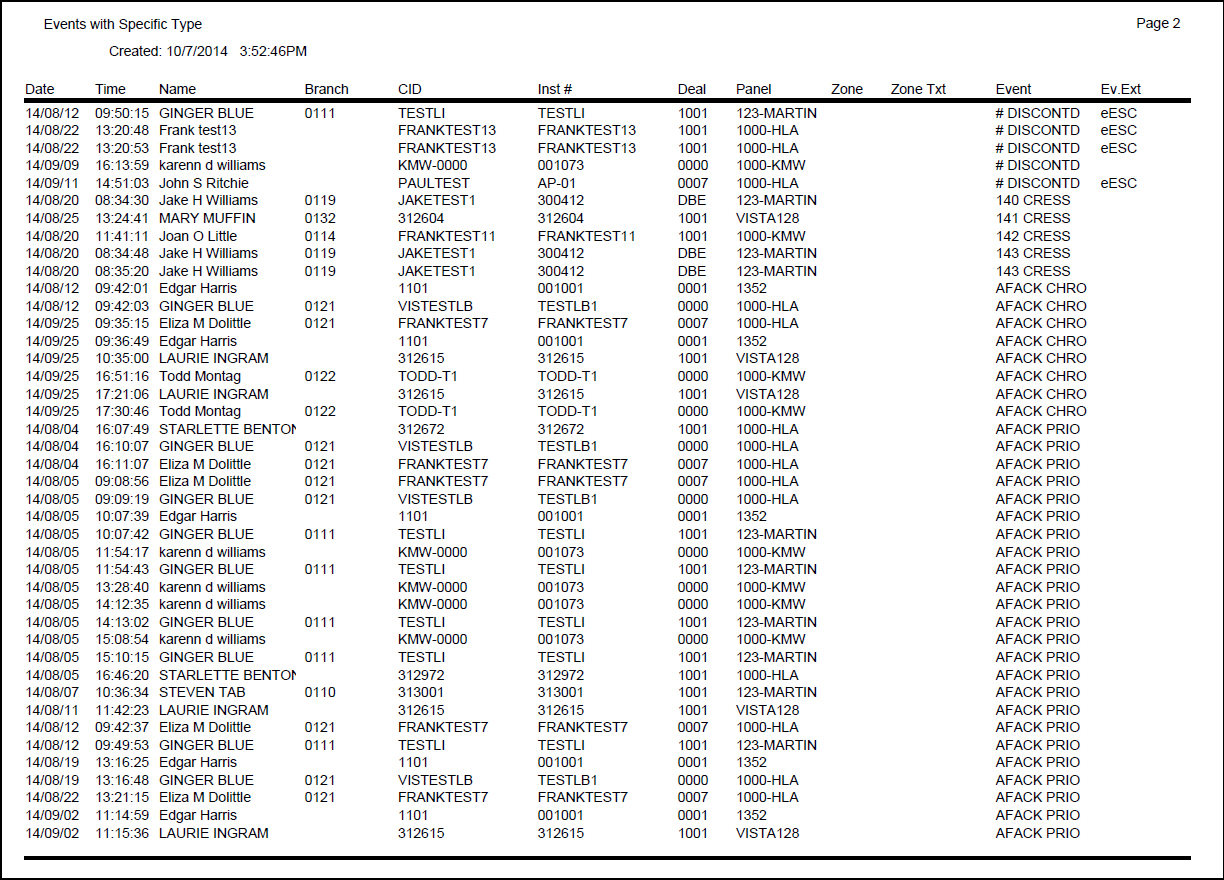
The following graphic shows an example of the output of Events with Specific Type.
Column Descriptions
The following table describes the columns used in the output of Events with Specific Type.
Column |
Description |
Date |
Date on which the event occurred. |
Time |
Time at which the event occurred. |
Name |
Installation name. |
Branch |
ID of branch associated with the installation. O When option ba323 is on, the report uses service branches instead of base branches. |
CID |
CID associated with event. |
Inst # |
Installation number. |
Deal |
ID of the dealer associated with the installation. |
Panel |
Identifies the pane type installed. |
Zone |
Identifies the zone on which the event occurred. |
Zone text |
Zone text for selected zone. |
Event |
Name of the event. |
Event Ext |
Event extension, if used. |
Extension Total |
Subtotal for the reported event extensions, if flagged as a parameter for the report. |
Event Total |
Subtotal for the reported events. |
Branch Total |
Subtotal for the reported events by branch, if flagged as a parameter for the report. |
CID Total |
Total number of CIDs included in the report. |
Button Functions
The following table displays the buttons, describes the shortcut keys, actions, and functionality.
Button |
Name |
Shortcut Key |
Action |
Description |
|
Recurring |
Alt+F1 |
1984 |
Open fields for recurring/template reports. |
|
Exit |
Esc |
1984 |
Exit without saving. |
|
Save |
Enter |
1984 |
Save existing record. |



Modifications and Updates to Events with Specific Type Report
The following table lists modifications and updates to the Events with Specific Type Report document.
Mod Number |
Date |
Description |
n/a |
7/18/14 |
Images updated. |