
Contract Approval Report
Contract Approval Report
Contract Approval Report
Report #: 2023
Module: Account Generation
Overview
Use the Contract Approval report to view contract details of specific work orders created within a specified period. The report only includes work orders with the work order type Include in Job Costing. (The menu of Work Order Types originates from program #1796.)
The report includes the following contract details:
-
Sell price
-
Terms
-
Components
User’s branch restrictions apply.
Note: This report is not compatible with option bl031, which adds the branch number followed by a minus sign (-) in front of the inquiry number.
To access this report, select Contract Approval (report #2023) from the main menu of SBN.
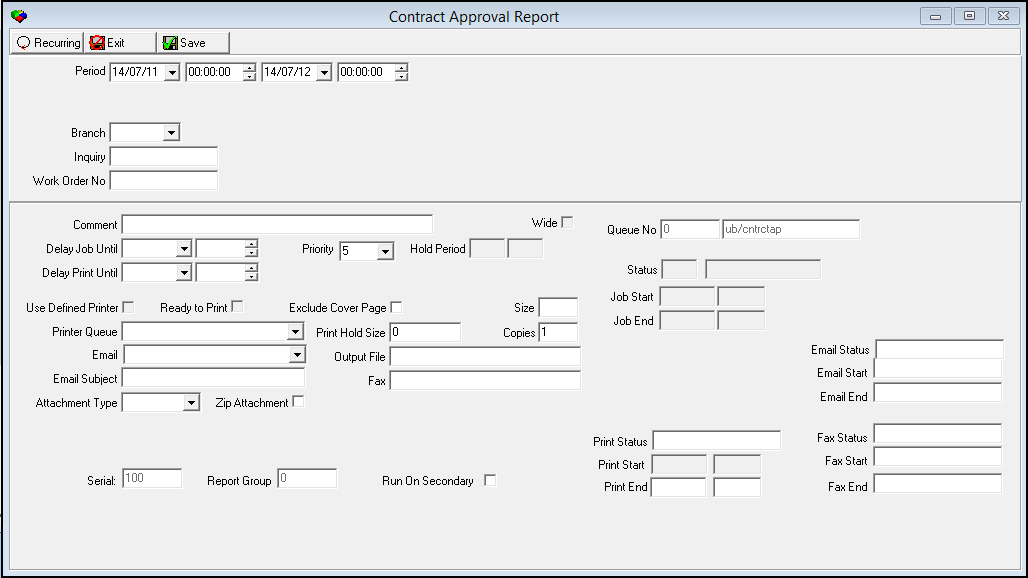
The Contract Approval Report
This window contains two panes: use the upper pane to define the contents of the report; use the lower pane to define the job output - how, when, and where you want to print the report.
Note: See Report Parameters Pane for information on the fields in the lower pane, which are the same in every report.
Field Descriptions
The following table describes the fields used in the upper pane of this report.
|
Field |
Description |
|
Period |
|
|
Date - From |
You may select a range of dates to limit the report to work orders created within that range. Select the beginning date of the range. O This field defaults to today’s date. |
|
Time - From |
You may select a range of times to limit the report to work orders created within that range. Select the beginning time of the range. O This field defaults to 00:00 (Midnight.) |
|
Date - To |
You may select a range of dates to limit the report to work orders created within that range. Select the ending date of the range. O This field defaults to tomorrow’s date. |
|
Time - To |
You may select a range of times to limit the report to work orders created within that range. Select the ending time of the range. O This field defaults to 00:00 (Midnight.) |
|
Branch |
You may select a specific marketing branch ID to limit the report to work orders associated with that marketing branch. (This menu originates from program #1530.) O If you leave this field blank, the report includes all marketing branches. |
|
Inquiry |
You may type a specific inquiry number to limit the report to work orders associated with that inquiry number. O If you leave this field blank, the report includes all inquiries that match your other selected parameters. |
|
Work Order No |
You may type a specific work order number to limit the report to that work order. O If you leave this field blank, the report includes all work orders that match your other selected parameters. |
Running and Viewing a Report
For information on running and viewing a report, see Common Functions in SBN.
Report Example
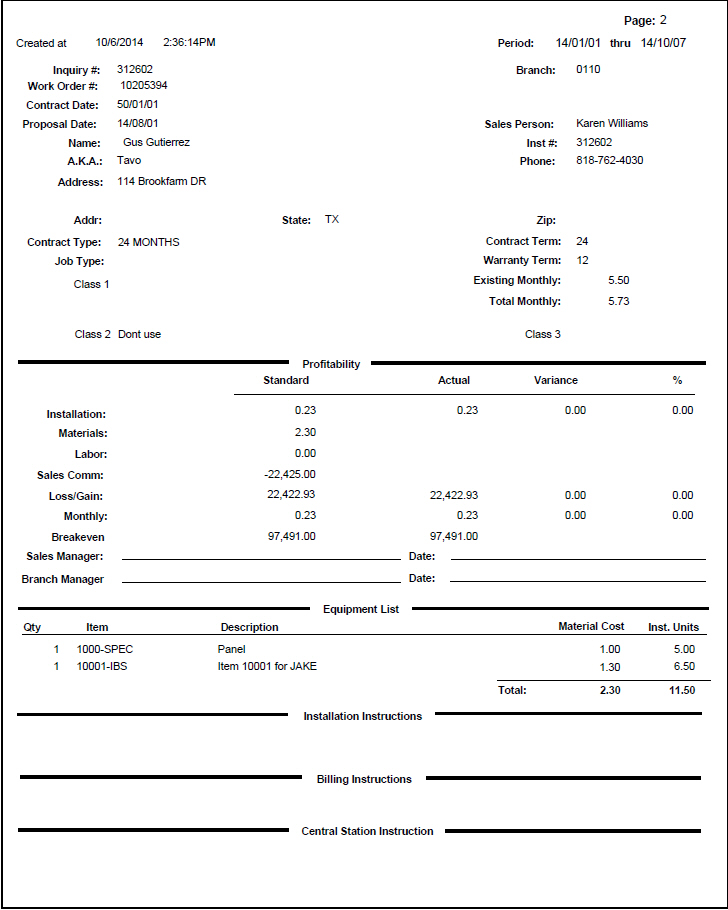
The following graphic shows an example of the output of the Contract Approval report.
Column Descriptions
The following table describes the columns used in the report output.
Note: This report may span several pages for a single record depending on the number of items in the equipment list and on the length of comments.
|
Column |
Description |
|
Report Data |
|
|
Inquiry # |
Inquiry number. |
|
Branch |
Branch ID. |
|
Work Order # |
Work order number. This report searches for open work orders in WIP that are attached to an inquiry number. |
|
Contract Date |
Contract date; from Contract Master. |
|
Proposal Date |
Transaction date; from Marketing Packages. |
|
Sales Person |
Name of the sales person associated with the work order. |
|
Name |
Name of the customer. |
|
Inst # |
Installation number; from Data Entry. |
|
AKA |
�Also Known As� name for the customer. |
|
Phone |
Phone number of the customer. |
|
Address |
Address of the customer. |
|
Second Address Line (No label) |
Additional line of customer address, if available. |
|
Addr |
City (part of the customer’s address). |
|
State |
State (part of the customer’s address). |
|
Zip |
Zip code (part of the customer’s address). |
|
Contract Type |
Contract type; from Contract Master. |
|
Contract Term |
Number of months in contract term; from Contract Master. |
|
Job Type |
Description of the Work Order Type; from the work order header. |
|
Warranty Term |
Number of months in warranty term; from Contract Master. |
|
(Dynamic label) |
Label and description; from the Class 1 field in Data Entry. |
|
Existing Monthly |
Total cycle fees for this customer; from Contract Master. |
|
Total Monthly |
Sum of existing cycle fees and the current cycle fees from this work order. |
|
(Dynamic label) |
Label and description; from the Class 2 field in Data Entry. |
|
(Dynamic label) |
Label and description; from the Class 3 field in Data Entry. |
|
Profitability |
|
|
Standard |
Total one-time fees; from Price List. |
|
Actual |
Total one-time fees after discounts. |
|
Variance |
Difference between standard and actual. |
|
% |
Variance percentage. |
|
Installation |
Total fees: l Standard l Actual l Variance l % |
|
Materials |
Material cost for components contained on the work order, based on item cost. O Material cost includes work order items flagged as exchange items. |
|
Labor |
Standard installation units multiplied by the standard branch installation rate. O Labor cost includes installation units of work order items flagged as exchange items. |
|
Sales Comm |
Commission; calculated by the commission profile attached to the sales person. |
|
Loss / Gain |
Standard cost subtracted from either Standard or Actual sell price. |
|
Monthly |
Total cycle fees; from the Price List, after discounts. The difference between Actual and Standard and the Variance percentage. |
|
Breakeven |
Loss / Gain divided by (Monthly Standard) / (Monthly Actual) cycle fee. |
|
Sales Manager |
Line for Sales Manager to approve the contract details. |
|
Branch Manager |
Line for Branch Manager to approve the contract details. |
|
Equipment List |
|
|
Qty |
Quantity of each item on the work order. |
|
Item |
Item code of each item on the work order. |
|
Description |
Text description of each item on the work order. |
|
Material Cost |
Item cost multiplied by the quantity of each item on the work order. O Material cost includes work order items flagged as exchange items. |
|
Inst. Units |
Standard installation units multiplied by quantity of each item on the work order. O Installation Units includes installation units of work order items flagged as exchange items. |
|
Total |
Totals for both material cost and installation units. |
|
Installation Instructions |
|
|
Installation Comment |
Displays text from Installation Comment; from Contract Basics. |
|
Billing Instructions |
|
|
Contract Comment (No label) |
Displays text from Contract Comment; from Contract Basics. |
|
Central Station Instructions |
|
|
Comment |
Displays text from Comment; from Data Entry Basics. |
Button Functions
The following table displays the buttons, describes the shortcut keys, actions, and functionality.
|
Button |
Name |
Shortcut Key |
Action |
Description |
|
|
Open fields for recurring/template reports |
alt+f1 |
Open fields for recurring/template reports. |
|
|
|
Exit without saving |
esc |
Exit without saving changes to selected record. |
|
|
|
Save Existing Record |
enter |
Save changes to selected record. |



Modifications and Updates to Contract Approval Report
The following table lists modifications and updates to the Contract Approval Report document.
|
Mod Number |
Date |
Description |
|
n/a |
7/11/14 |
Updated images. |