
Document Templates
Document Templates
Document Templates
Module: Utilities
Overview
Use Document Templates (program #1645) to define from which fields in Data Entry Master and Basics (program #559), Marketing Basics (program #562), or Contract Master (program #548) SBN exports data into MS Word documents when you press the Document Template button in any of these programs. Create an entry for each document template stored in the file path defined by option ba469 and indicate from which fields of Data Entry and the Basics tab, Marketing Basics, or Contract Master to export data into the template.
Navigating to Document Templates
Use the following steps to navigate to Document Templates:
1. From the main SBN toolbar, select Menu.
2. From the drop-down menu, select Go To.
3. In the Go To Program dialog box, type in "1645" and press enter.
w The Document Templates program opens.
The Document Templates Window
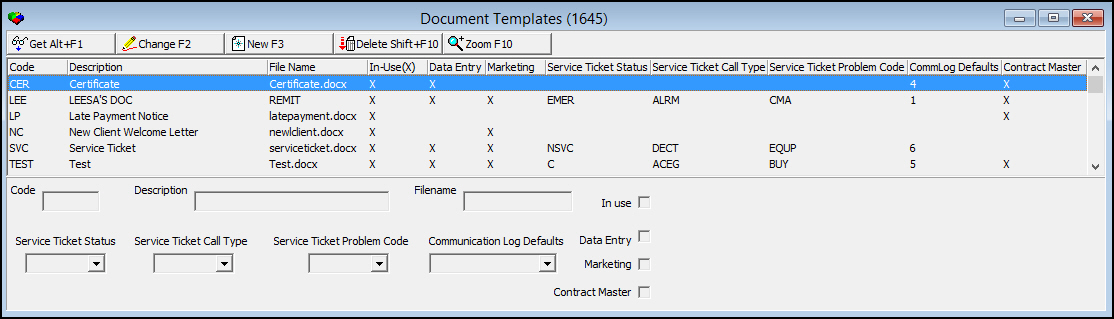
The following graphic displays Document Templates as the program opens.
Field/Column Descriptions
The following table describes the fields and columns used in Document Templates.
Field/Column |
Description |
Code |
ID code of the selected document template. |
Description |
Description of the selected document template. |
Filename |
Selected document template file name. |
In Use |
Select this check box to make the selected template appear in the drop-down menu of the Document Templates button in Data Entry (program #559) and Contract Master (program #548). Note: The document must exist in the file path defined by option ba469 to appear in the Document Templates menus. |
Service Ticket Status |
This dropdown menu determines the status if a service ticket is to be submitted with the use of the document template. If left empty, no service ticket status will be submitted with the document template's use. |
Service Ticket Call Type |
This dropdown menu determines the call type for a service ticket is to be submitted with the use of the document template. If left empty, no service ticket call type will be submitted with the document template's use. |
Service Ticket Problem Code |
This dropdown menu determines the problem code for a service ticket is to be submitted with the use of the document template. If left empty, no service ticket problem code will be submitted with the document template's use. |
Communication Log Defaults |
This dropdown menu determines the entry submitted to the Communication Log, program #1888. (This menu is populated from Communication Log Defaults, program #1673.) |
Data Entry |
Select this check box to allow the selected document to appear in the Document Template dropdown list in Data Entry (program #559). Checking this box will also insert an X into the appropriate column. |
Marketing |
Select this check box to allow the selected document to appear in the Document Template dropdown list in Marketing Basics (program #562). Checking this box will also insert an X into the appropriate column. |
Contract Master |
Select this check box to allow the selected document to appear in the Document Template dropdown list in Contract Master (program #548). Checking this box will also insert an X into the appropriate column. |
Viewing Details of a Document Template Record
Use the following steps to view document template details:
1. Select the document template you want to view.
2. Choose Get Record.
w The document template details appear in the fields in the lower pane.
Creating a Document Template Record
Use the following steps to create a new document template record:
1. Choose New Record.
w The fields in the lower pane open for changes.
2. Enter details for the document template.
3. Choose Save.
w The new document template record appears in the list in the upper pane.
Changing a Document Template Record
Use the following steps to change a document template record:
1. From the upper pane, select the document template record you want to change by double-clicking or choosing Get Record.
w The document template details appear in the lower pane.
2. Choose Change Record.
w The fields in the lower pane open for changes.
3. Change document template details as necessary.
4. Choose Save.
Deleting a Document Template Record
Use the following steps to delete a document template record:
1. From the upper pane, select the document template record you want to delete by double-clicking or choosing Get Record.
w The document template details appear in the lower pane.
2. Choose Delete Record.
w A confirm dialog box opens: "Are you sure?"
3. Choose Yes.
4. SBN removes the document template record from the list in the upper pane.
Zooming to the Sublevel
Choose Zoom to view the Document Templates sublevel in which you can define from which fields in Data Entry (program #559) or Contract Master (program #548) SBN exports data into each document template.
The Document Templates Sublevel
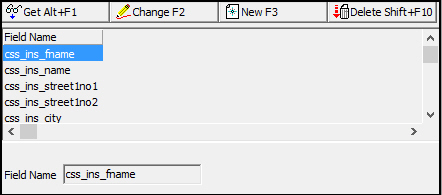
The following graphic shows the sublevel of Document Templates. The tab displays the field names from which SBN exports data into the selected template.
Field/Column Descriptions
The following table describes the field and column used in the sublevel of Document Templates.
Field/Column |
Description |
Field Name |
Name of the field from which SBN exports data into the selected document template. |
Button Functions
The following table displays the buttons, and describes the actions and functionality.
Button |
Name |
Action |
Description |
|
Get Record |
1645/ 1 |
View details of selected document template record. |
|
Change Record |
1645/ 2 |
Change details of selected document template record. |
|
New Record |
1645/ 3 |
Create new document template record. |
|
Delete Record |
1645/ 4 |
Delete selected document template record. |
|
Zoom in/out of sublevel |
1645/ 5 |
Access sublevel with field names from which SBN exports data into document templates. |
|
Exit without saving |
Exit without saving changes to selected record. |
|
|
Save Existing Record |
Save changes to selected record. |







Modifications and Updates to Document Templates
The following table lists modifications and updates to the Document Templates document.
Mod Number |
Date |
Description |
n/a |
09/02/14 |
Images updated. |
07.81.23572, 08.81.09781, 08.81.09759, 07.81.23544 |
09/16/14 |
Included new fields, columns, and checkboxes for Data Entry, Marketing, Contract Master, and Service Ticket status. |
F1 Help
| Delphi Forms | badoctemplateform |
| Program Numbers | 1645 |