
Autofeed Postpone
Autofeed Postpone
Autofeed Postpone
Program #: 1671
Module: Utilities
Overview
Use Autofeed Postpone (program #1671) to define the drop-down menu of the Postpone Reason field in the Job Ending window of Dispatch (program #537). The Postpone Reason field in the Job Ending window displays only those postpone reasons defined for the selected Alarm Queue, the dynamic skill level selected for the monitoring session, and the installation dealer and country.
Navigating to Autofeed Postpone
Use the following steps to access the Autofeed Postpone program:
1. From the main SBN toolbar, select Menu.
2. From the drop-down menu, select Go To.
3. In the Go To Program dialog box, type in "1671" and press ENTER.
w The Autofeed Postpone window opens.
The Autofeed Postpone Window
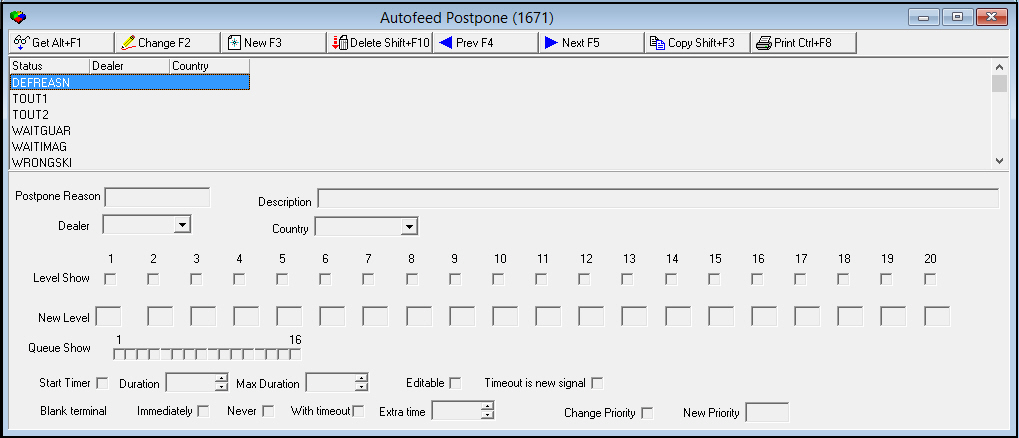
The following graphic shows Autofeed Postpone as the program opens.
Field/Column Descriptions
The following table describes the fields and columns used in Autofeed Postpone.
|
Field/Column |
Description |
|
Postpone Reason |
ID for the selected postpone reason. |
|
Description |
Text description of the selected postpone reason. |
|
Dealer |
Dealer associated with the selected postpone reason. (This menu originates from program #1537.) The Postpone Reason field in the Job Ending window of program #537 displays only those postpone reasons defined for the selected installation dealer and country. |
|
Country |
Country associated with the selected postpone reason. (This menu originates from program #1865.) The Postpone Reason field in the Job Ending window of program #537 displays only those postpone reasons defined for the selected installation dealer and country. |
|
Level Show 1-20 |
Select a check box for each dynamic skill level that a user can select for a monitoring session (using the Set Skill Filter monitoring command in Dispatch) in order for the selected postpone reason to appear in the drop-down menu of the Postpone Reason field in the Job Ending window of program #537. The Postpone Reason field in the Job Ending window of program #537 displays only those postpone reasons defined for the dynamic skill level selected for the monitoring session. |
|
New Level 1-20 |
For each dynamic skill level, you may define a new dynamic skill level that an alarm will be changed to when you choose the selected postpone reason in the Job Ending window of program #537. |
|
Queue Show 1-16 |
Select a check box for each Alarm Queue that the selected postpone reason can be used in. The Postpone Reason field in the Job Ending window of program #537 displays only those postpone reasons defined for the selected Alarm Queue. |
|
Start Timer |
Select this check box to automatically enter a timer duration in the Postpone tab of the Job Ending window in Dispatch (program #537) when you enter the selected postpone reason in the Job Ending window. |
|
Duration |
Timer duration that SBN automatically enters in the Timer Duration field of the Postpone tab in the Job Ending window of Dispatch (program #537) when you enter the selected postpone reason. |
|
Max Duration |
Maximum timer duration that can be entered in the Timer Duration field of the Postpone tab in the Job Ending window of Dispatch (program #537) when you enter the selected postpone reason. |
|
Editable |
Select this check box to indicate that the timer fields in the Postpone tab of the Job Ending window in program #537 can be edited when you choose the selected postpone reason. If you do not select this check box, the timer fields in the Postpone tab of the Job Ending window are read-only when you choose the selected postpone reason. |
|
Timeout Is New Signal |
If you select this check box, SBN regards an alarm as a new signal in the Alarm Queue when the timer applied to the alarm by the selected postpone reason expires. |
|
Blank Terminal |
|
|
Immediately |
Select this check box to remove the operator's terminal from the alarm immediately when the selected postpone reason is selected in the Postpone tab of the Job Ending window in program #537. |
|
Never |
Select this check box to leave the operator's terminal on the alarm when the selected postpone reason is selected in the Postpone tab of the Job Ending window in program #537. |
|
With Timeout |
Select this check box to remove the operator's terminal from the alarm when the timer for the postpone reason expires when the selected postpone reason is selected in the Postpone tab of the Job Ending window in program #537. |
|
Extra Time |
You may enter an extra amount of time that SBN leaves the operator's terminal on the alarm after the timer for the selected postpone reason expires. |
|
Change Priority |
Select this check box to make the selected postpone reason change the priority of an alarm when the reason is selected in the Postpone tab of the Job Ending window in program #537. |
|
New Priority |
Enter the priority level that SBN changes an alarm to when the selected postpone reason is selected in the Postpone tab of the Job Ending window in program #537. |
Viewing Details of a Postpone Reason
Use the following steps to view postpone reason details:
1. Select the postpone reason you want to view.
2. Choose Get Record.
w The postpone reason details appear in the fields in the lower pane.
Creating a Postpone Reason
Use the following steps to create a new postpone reason:
1. Choose New Record.
w The fields in the lower pane open for changes.
2. Enter details for the postpone reason.
3. Choose Save.
w The new reason appears in the list in the upper pane.
Changing a Postpone Reason
Use the following steps to change a postpone reason:
1. From the upper pane, select the postpone reason you want to change by double-clicking or choosing Get Record.
w The reason details appear in the lower pane.
2. Choose Change Record.
w The fields in the lower pane open for changes.
3. Change postpone reason details as necessary.
4. Choose Save.
Deleting a Postpone Reason
Use the following steps to delete a postpone reason:
1. From the upper pane, select the postpone reason you want to delete by double-clicking or choosing Get Record.
w The reason details appear in the lower pane.
2. Choose Delete Record.
w A confirm dialog box opens: "Are you sure?"
3. Choose Yes.
4. SBN removes the postpone reason from the list in the upper pane.
Button Functions
The following table displays the buttons, describes the shortcut keys, actions and functionality.
|
Button |
Name |
Shortcut Key |
Action |
Description |
|
|
Get Record |
alt+f1 |
1671/ 1 |
View details of selected postpone reason. |
|
|
Change Record |
f2 |
1671/ 2 |
Change details of selected postpone reason. |
|
|
New Record |
f3 |
1671/ 3 |
Create new postpone reason. |
|
|
Delete Record |
shift+f10 |
1671/ 4 |
Delete selected postpone reason. |
|
|
Previous Record |
f4 |
1671/ 1 |
Go to previous postpone reason. |
|
|
Next Record |
f5 |
1671/ 1 |
Go to next postpone reason. |
|
|
Copy Current Record |
SHIFT+F3 |
1671/ 3 |
Copy details of selected postpone reason to create new record. |
|
|
Print Selected Records |
CTRL+F8 |
1671/ 5 |
Print selected postpone reason. |








Modifications and Updates to Autofeed Postpone
The following table lists modifications and updates to the Autofeed Postpone document.
|
Mod Number |
Date |
Description |
|
08.79.09423, 07.79.22983, 08.79.09416, 07.79.22975, 08.79.09415, 07.79.22974, 08.79.09413, 07.79.22972 |
11/07/13 |
Created document |
|
n/a |
8/27/14 |
Images updated. |