
Branch Call List
Branch Call List
Branch Call List
Program #: 1506
Module: Account Management
Overview
Use Branch Call List (program #1506) to view the telephone number information entered in Branch / Dealer Call List (program #1761). Branch Call List (program #1506) only displays branch telephone data; you cannot make additions or changes in this program. To add and change telephone number information, you must open Branch / Dealer Call List (program #1761).
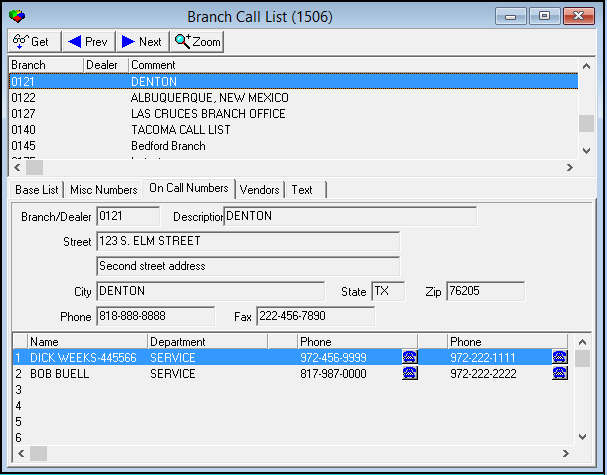
You can access the Branch Call List by choosing [CTRL+B] or [CTRL+L] from anywhere in SBN. When you navigate to the Branch Call List, the program opens:
-
With the focus on the Branch/Dealer associated with the record you have open
-
Zoomed into the On Call Numbers tab of that Branch/Dealer
This document covers the following topics:
Navigating to the Branch Call List
Navigating to the Branch Call List
You can access the Branch Call List by choosing Misc > Call List (Ins Br) or Misc > Call List (Mon Br) from the main SBN toolbar, or from the SBN main menu.
If you choose Misc > Call List (Ins Br) or [CTRL+B], the Branch Call List opens with the focus on the Installation Branch and Dealer for the record you have open in Data Entry (program #559) or Contract Master (program #548). If you choose Misc > Call List (Mon Br) or [CTRL+L], the Branch Call List opens with the focus on the Monitoring Branch and Dealer for the record you have open in Data Entry or Contract Master. If Data Entry or Contract Master are not open, [CTRL+B] and [CTRL+L] open the Branch Call List with the focus on a record with a blank branch and dealer.
Note: When option ba434 is on and you press [CTRL+B] or [CTRL+L], SBN first matches the branch with a record in Branch Call List when it opens. If there are no Branch Call List records for the branch, SBN then matches the dealer with a Branch Call List record. When this option is off and you press [CTRL+B] or [CTRL+L], SBN first matches the dealer with a record in Branch Call List when the program opens. If there are no Branch Call List records for the installation dealer, SBN then matches the branch with a Branch Call List record.
Use the following steps to access the Branch Call List from the main menu:
1. From the main SBN toolbar, select Menu.
2. From the drop-down menu, select Go To.
3. In the Go To Program dialog box, type in "1506" and press Enter.
w Branch Call List opens.
The Branch Call List
The following graphic shows the Branch Call List with information and the sublevel displayed.
Note: The Branch Call List displays only records associated with the dealer assigned to your user ID in program #1501 and records associated with no dealer.
Column Descriptions
The following table describes the columns used in the upper pane of the Branch Call List.
|
Column |
Description |
|
Branch |
ID of the branch displayed. |
|
Dealer |
ID of the dealer displayed or ID of the dealer with which the branch is associated. |
|
Comment |
Text comments for the branch or dealer. |
Zooming into the Sublevel
Choose Zoom to view the five sublevel tabs in the Branch Call List:
-
The Base List tab
-
The Misc Numbers tab
-
The On Call Numbers tab
-
The Vendors tab
-
The Text tab
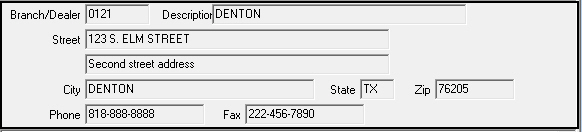
Each sublevel tab has the same fields in the upper pane of the tab. These fields display branch or dealer information.
Field Descriptions - Branch/Dealer Details
The following table describes the fields in the upper pane of the five sublevel tabs.
|
Field |
Description |
|
Branch/Dealer |
Displays the branch or dealer ID. |
|
Description |
Text description of the branch/dealer. |
|
Street |
Street address of the branch/dealer. |
|
Street 2 (No label) |
Second line of the street address of the branch/dealer, if necessary. |
|
City |
City of the branch/dealer address. |
|
State |
State of the branch/dealer address. |
|
Zip |
Zip code of the branch/dealer address. |
The Base List Tab
Use the Base List tab to view specific phone numbers for the following positions:
-
C.S.C Fax - Customer Service Center Fax
-
Sales
-
Service
-
Installation
-
Branch Fax - Fax number
-
Cust. Svc. - Customer Service number
-
Data Entry
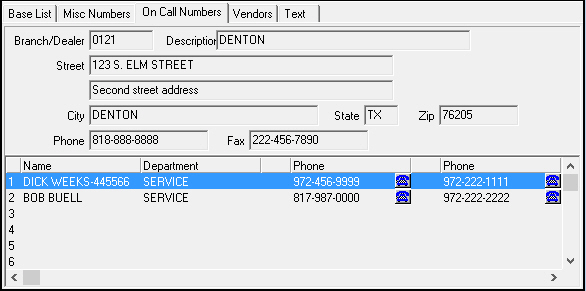
The following graphic shows the Base List tab with information displayed.
Column Descriptions
The following table describes the columns used in the lower pane of the Base List tab.
|
Column |
Description |
|
Type (No label) |
Phone number description of the specific positions. |
|
Phone 1 |
First phone number for the department or location. |
|
Extension 1 |
Extension for the first phone number, if necessary. |
|
Phone 2 |
Second or backup phone number for the department or location. |
|
Extension 2 |
Extension for the second phone number, if necessary. |
The Misc Numbers Tab
The Misc Numbers Tab displays phone numbers for positions or departments within your branch.
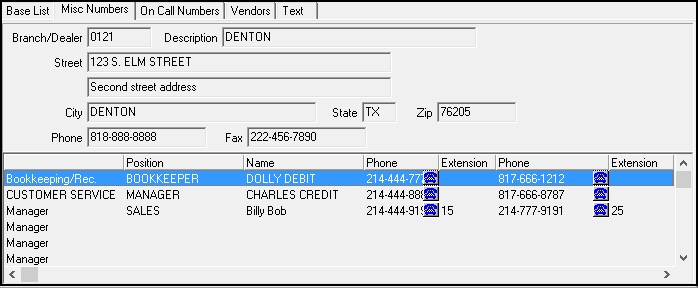
The following graphic shows the Misc Numbers tab with information displayed.
Column Descriptions
The following table describes the columns used in the lower pane of the Misc Numbers tab.
|
Column |
Description |
|
Type |
Phone number description or department. |
|
Position |
Position in branch of the person listed. |
|
Name |
Name of the person who holds the position listed. |
|
Phone 1 |
First phone number for the department or position. |
|
Extension 1 |
Extension for the first phone number, if necessary. |
|
Phone 2 |
Second or backup phone number for the department or position. |
|
Extension 2 |
Extension for the second phone number, if necessary. |
The On Call Numbers Tab
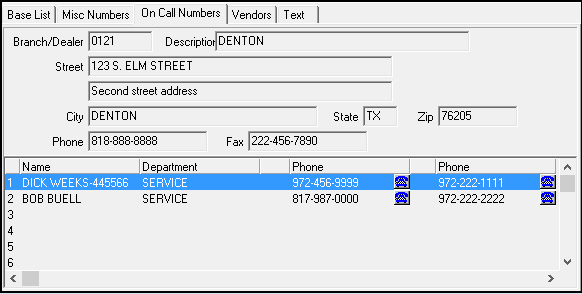
The On Call Numbers tab lists the people who are on call, their positions, and two phone numbers to contact them after-hours. To call one of the on call phone numbers, choose the auto-dial icon next to the phone number. Calls that you place from the On Call Numbers tab display in the Alarm Log with the name and phone number of the person called and the branch or dealer ID as the event extension.
When you enter the Branch Call List, the program opens with this tab displayed and shows the information related to the Branch/Dealer associated with the record you have open.
The following graphic shows the On Call Numbers tab with information displayed.
Column Descriptions
The following table describes the columns contained in the lower pane of the On Call Numbers tab.
|
Column |
Description |
|
Index number |
Line number for the contact. |
|
Name |
Name of the On Call contact. |
|
Department |
Department in which the contact works. |
|
Phone 1 Type (No label) |
Type of number contained in the Phone 1 column (number abbreviation). |
|
Phone 1 |
First phone number for the contact. |
|
Phone 2 Type (No label) |
Type of number contained in the Phone 2 column (number abbreviation). |
|
Phone 2 |
Second or backup phone number for the contact. |
The Vendors Tab
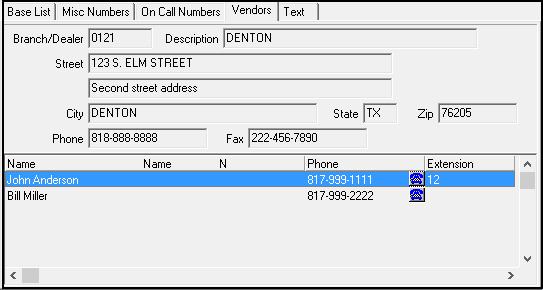
The Vendors Tab displays critical vendor phone numbers for the branch. The following graphic shows the Vendors tab with information displayed.
Column Descriptions
The following table describes the columns used in the lower pane of the Vendors tab.
|
Column |
Description |
|
Name |
Name of the vendor. |
|
Phone |
Phone number of the vendor. |
|
Extension |
Extension of the phone number, if necessary. |
The Text Tab
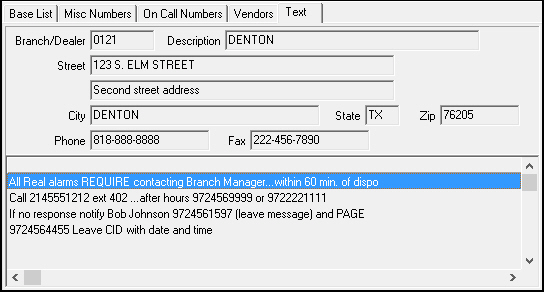
The Text tab displays information from the branch or dealer on the contacts listed.
The following graphic shows the Text tab with information displayed.
Related Programs
The following table lists programs related to the Branch Call List.
|
Program |
Number |
Document Link |
Description |
|
Alarm Log Tab |
N/A |
SBN records calls placed from the On Call Numbers tab as events in the Alarm Log. |
|
|
Branch/Dealer Call List |
1761 |
Enter and change Branch Call List information in this program. |
Button Functions
The following table displays the buttons, describes the shortcut keys, actions, and functionality.
|
Button |
Name |
Shortcut Key |
Action |
Description |
|
|
Get Record |
Alt+F1 |
1506/1 |
Get selected record. |
|
|
Previous Record |
f4 |
1506 |
Scroll to previous record. |
|
|
Next Record |
f5 |
1506 |
Scroll to next record. |
|
|
Zoom in/out of sublevel |
f10 |
1506 |
Zoom in or out of sublevel information display. |




Modifications and Updates to Branch Call List
The following table lists modifications and updates to the Branch Call List document.
|
Mod Number |
Date |
Description |
|
n/a |
01/15/08 |
document rewritten |
|
08.03.07492, 08.03.07560 |
06/08/10 |
CTRL+L accesses Branch Call List by monitoring branch |
|
n/a |
07/17/14 |
Images updated. |