
Aeonix
The Aeonix dialer lets SBN place outbound calls and identify incoming calls through an Aeonix phone system (PBX). When the Aeonix dialer is enabled, dialing a contact or installation connects the call from your extension to the number -- no separate phone application is needed -- and an incoming call can be matched so the right installation opens automatically.
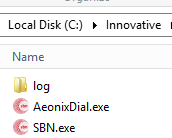
This page covers setting up and using the Aeonix dialer. The component that does the work is AeonixDial.exe; for the component itself -- what it is, how it installs and updates, and its command-line use -- see AeonixDial.exe.
Availability
The Aeonix dialer requires SBN release 08.92 build 08.92.0088.0001 or later. Earlier 08.92 builds do not include it.
Enabling the Aeonix dialer
The Aeonix dialer is configured in Options > Dialer:
- Dialer type -- choose Use AEONIX.
- Dialer Prefix -- the digit(s) needed to reach an outside line, plus the long-distance 1 if required (for example,
9or91). See Dialer Prefix. - Temporary Extension -- This is the extension calls are placed from and identified on. This will default to the phone extension set on your workstation's Terminal record (Terminals, program 1861). This is a temporary extension to use for the existing SBN session. This value is never saved. This should be used only for testing. Log back into SBN to reset this value.

Setting the Aeonix server address
SBN needs the IP address of your Aeonix phone system. This is set once for the site in System Options, in the option aeonixip ("Aeonix phone system IP for Aeonix dialer"). Enter the IP address of your Aeonix server there. If you are unsure of this value, contact Innovative support.
Placing a call
With the Aeonix dialer enabled, use the dial action on a contact or installation in SBN. The call is placed from your extension to the selected number, with the Dialer Prefix applied automatically.
Identifying an incoming call
When you load the installation from your current call, SBN looks up the number on your active call and opens the matching installation automatically.
Temporary extension (for testing)
For testing, you can have SBN place and identify calls on a different extension without changing your Terminal record. On the Options > Dialer tab, enter the extension in the Test extension box. This override applies only for the current SBN session -- it is never saved, and it is cleared when you close SBN.
Test Harness
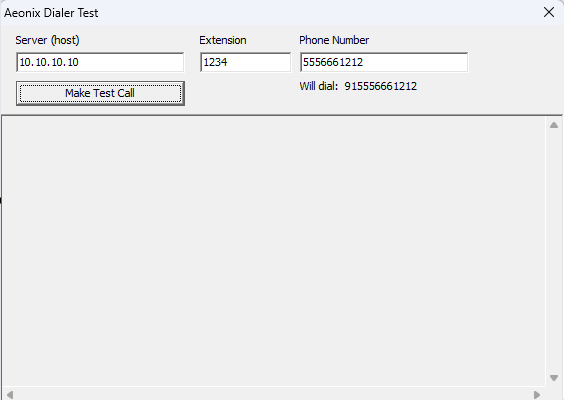
When AEONIX is the selected dialer type, the Options > Dialer tab shows a Test Aeonix Dialer... button. It opens a test window where you can:
- enter Server, Extension, and Phone Number;
- see a live Will dial: preview that shows the exact digits to be sent (after the Dialer Prefix is applied);
- press Make Test Call to place a test call and see the result and diagnostics in the window.
The same tab also shows the installed Version and Location of AeonixDial.exe, with a ... button that opens the folder where it is installed.
Logging
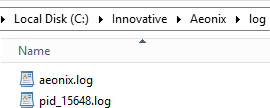
When a call is placed or a number is looked up, a detailed log is written to log\aeonix.log in the same folder as AeonixDial.exe. It records the number dialed, each step of the exchange with the Aeonix server, and any error returned.
The same activity is also shown on the SBN Debug screen.
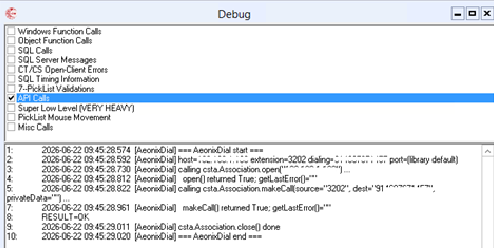
Check these log first when a call does not behave as expected.
Troubleshooting
Symptom | What to check |
|---|---|
Version / location unknown | Options > Dialer (with AEONIX selected) shows the installed Version and Location of AeonixDial.exe; the ... button opens the folder. |
"Not installed" / could not be downloaded | The workstation could not reach the SBN download server. Check the network, then reselect the AEONIX dialer or use Options > Dependencies > Download Now. Offline PCs: place AeonixDial.exe in the SBN program folder manually (see AeonixDial.exe). |
Could not start the dialer | AeonixDial.exe may be missing or blocked. Use Options > Dependencies > Download Now to reinstall it. |
Call could not be placed / did not complete | Check |
Wrong number dialed | Verify the Dialer Prefix (see Dialer Prefix). The test harness Will dial: preview shows exactly what will be sent. |
Incoming call does not load the installation | Confirm your Terminal's extension is set, and that the caller's number is stored on the installation in the expected format. |
Related
- AeonixDial.exe -- the component SBN uses, how it installs and updates, and command-line use
- Dialer Prefix
- SBN Client Options