
External Invoices
External Invoices
External Invoices
Module: System Administration
Overview
Use External Invoices (program #1620) to define ranges of external invoice numbers to use in the Invoice Manager (program #1557). If option bl125 is on, you can create duplicate ranges of external invoice numbers.
To access this program, select External Invoices (program #1620) from the main menu of SBN.
The External Invoices Window
The following graphic shows External Invoices. The upper pane displays previously defined ranges of external invoice numbers.
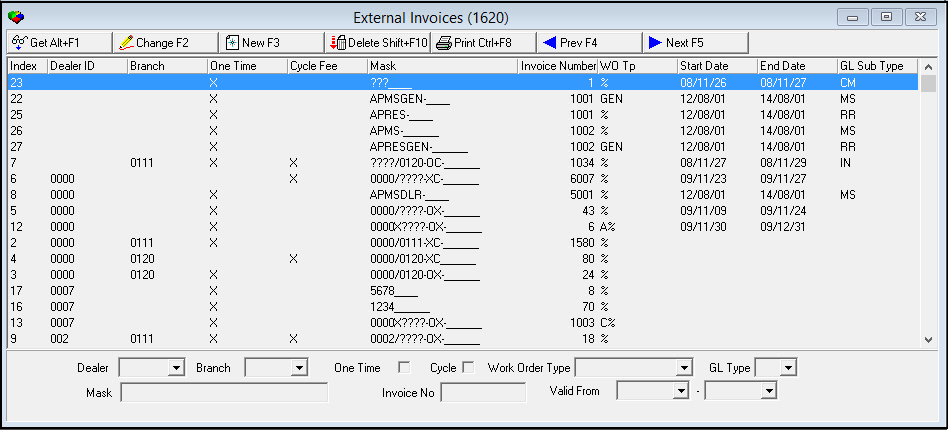
Note: Option bl151 controls the grouping of invoices in export 11.
Field/Column Descriptions
The following table describes the fields and columns used in External Invoices.
|
Field/Column |
Description |
|
Index |
The index number of the range of external invoice numbers. O You can use the index number in the Range field of Calculate Invoices in Invoice Manager (program #1557) to select a range of external invoice numbers. |
|
Dealer ID |
ID of the dealer associated with the range of external invoice numbers. O An invoice batch may be associated with only one dealer. |
|
Branch |
ID of the branch associated with the external invoice. |
|
One Time |
Type an X in this field to define external invoice numbers for one-time fee invoices. |
|
Cycle Fee |
Type an X in this field to define external invoice numbers for cycle fee invoices. |
|
Mask |
Type your company-defined mask of invoice numbers to use. |
|
Invoice Number |
Type the next sequence number to issue. O As you generate invoice batches in the Calculate Invoices window of the Invoice Manager (program #1557), SBN updates this number. |
|
Work Order Type |
You may associate an external invoice number with a work order type. (This menu originates from program #1796.) O Select the % wildcard to associate the external invoice number with all work order types. |
|
GL Type |
You may associate external invoice numbers with a billing account GL type. (This menu originates from program #1578). |
Using Common Functions
See the reference document Common Functions in SBN for more information.
Button Functions
The following table displays the buttons, describes the shortcut keys, actions, and functionality.
|
Button |
Name |
Shortcut Key |
Action |
Description |
|
|
Get |
ALT+F1 |
1620/ 1 |
Get record. |
|
|
Change |
F2 |
1620/ 2 |
Change selected record. |
|
|
New |
F3 |
1620/ 3 |
Create new record. |
|
|
Delete |
SHIFT+F10 |
1620/ 4 |
Delete selected record. |
|
|
|
CTRL+F8 |
1620/ 6 |
Print selected records. |
|
|
Previous |
F4 |
1620/ 999 |
Select last record. |
|
|
Next |
F5 |
1620/ 999 |
Select next record. |







Modifications and Updates to External Invoices
The following table lists modifications and updates to the External Invoices document.
|
Mod Number |
Date |
Description |
|
n/a |
8/18/14 |
Images updated. |