
Agency 7
Agency 7
Agencies 7
Program #: 1612
Module: Utilities
Overview
Use Agencies 7 (program #1612) to
-
Search for patrol agencies.
-
Set up patrol contact information for multiple branches and regions, as well as specific agencies per zip code.
-
Define pricing for patrol calls for a selected agency.
-
Define a maximum time — in the main level — in which a patrol agency must respond in order to receive payment.
or...
-
Zoom into the sublevel of an agency to define pricing for multiple intervals of patrol response times.
If you associate an agency with a specific dealer, you may only use price list groups associated with the same dealer.
This document covers the following topics:
Viewing the Details of an Agency
Changing the Details of an Agency
Using a Template for a New Agency
Navigating to Agencies 7
Use the following steps to navigate to Agencies:
1. From the main SBN toolbar, select Menu.
2. From the drop-down menu, select Go To.
3. In the Go To Program dialog box, type in "1612" and press Enter.
w The Agencies 7 program opens.
The Agencies 7 Window
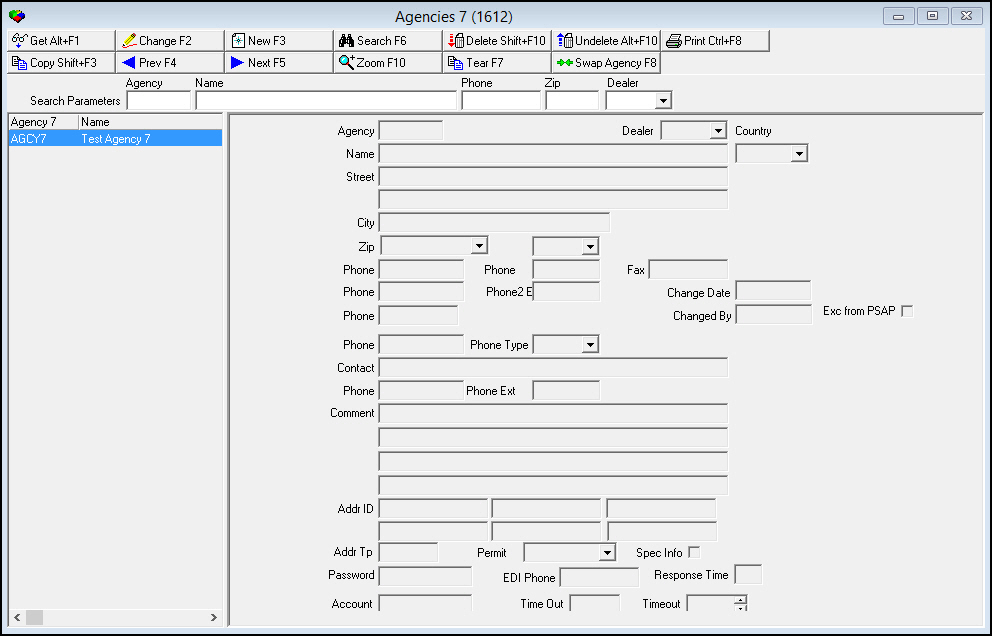
The following graphic shows Agencies 7 as the program opens.
Field/Column Descriptions
The following table describes the fields and columns used in the main window of Agencies 7.
|
Field/Column |
Description |
|
Search Parameters |
|
|
Agency |
You may search for an agency by agency ID. |
|
Name |
You may search for an agency by name. |
|
Phone |
You may search for an agency by primary phone number. |
|
Zip |
You may search for an agency by zip code. |
|
Dealer |
You may search for an agency by the ID of the dealer associated with that agency. (This menu originates from program #1537.) O If you leave this field blank, the search includes all dealers. |
|
Columns |
|
|
Agency 7 |
Agency 7 ID. |
|
Name |
Name of the Agency 7 agency. |
|
Phone # |
Primary phone number for the Agency 7 agency. |
|
City |
City where the Agency 7 agency is located. |
|
Dealer ID |
ID of the dealer associated with the Agency 7 agency. |
|
Detail Fields |
|
|
Agency |
ID of the selected agency. |
|
Dealer |
ID of the dealer associated with the patrol agency. O For an event associated with the selected patrol agency, the Call Out Log (program #705) only allows payments to agencies whose dealer ID matches the dealer ID of the installation, or to agencies not associated with a dealer ID |
|
Name |
Name of the selected agency. |
|
Street |
Street address of the selected agency. |
|
Additional Street |
Additional street address of the selected agency. |
|
City |
City of the selected agency. |
|
Zip |
Zip code of the selected agency. |
|
State |
State for the agency. (This field holds a maximum of 60 characters.) |
|
Country |
Country in which the agency is located. |
|
Phone |
Primary phone number for the agency. |
|
Phone Ext. |
Extension of the primary phone, if necessary. |
|
Fax |
Fax number of the agency. |
|
Phone 2 |
Secondary phone number for the agency. |
|
Phone Ext. 2 |
Extension of the secondary phone, if necessary. |
|
Change Date |
Date on which the selected agency record was last changed. |
|
Phone |
Paging or other special phone number for the agency. |
|
Changed By |
User ID that last made changes to the selected agency record. |
|
Phone |
Paging or other special phone number for the agency. |
|
Phone Type |
Type of phone number typed in the previous field. (This menu originates from program #1840.) O The phone type determines how the phone call is treated when dialed automatically. For example, a pager phone type opens the paging dialog box rather than the dialer. |
|
Contact |
Contact name at the agency. |
|
Phone |
Phone number for the contact person. |
|
Phone Ext. |
Extension number for the contact person, if necessary. |
|
Comment |
Four lines for typing comments for this agency. This information appears when you zoom on the agency in Dispatch. O Maximum of 30 characters per line. |
|
Addr Tp |
Address type defines the Dispatch interface used for this agency. This field is NOT validated. Valid inputs are:
Note: When a Addr Tp is defined, all Guard actions in the Dispatch tab bypass the autodialer and transmit the dispatch event using the IP addresses defined in the Addr ID. |
|
Addr ID |
Primary IP address for agency interference. |
|
Addr ID (No label) |
Secondary IP address for agency interference. |
|
Addr ID (No label) |
Additional IP address for agency interference. |
|
Addr ID (No label) |
Additional IP address for agency interference. |
|
Addr ID (No label) |
Additional IP address for agency interference. |
|
Addr ID (No label) |
Additional IP address for agency interference. |
|
Account |
Vendor ID; used in Accounts Payable. |
|
Response Time |
Maximum time, in minutes, in which this agency must respond. The Call Out Log (program #705) uses this time to calculate payments for an agency. O You may either define one response time in this field or zoom into the sublevel to define multiple intervals of response time. Do not define response time in both the main level and sublevel. |
|
EDI Phone |
Phone number SBN dials to electronically transfer information to the agency. |
|
Spec Info |
This check box indicates that there is additional information for this agency. This information displays after the phone number is dialed, but before the call resolution window appears. |
|
Permit |
Permit type this agency requires. (This menu originates from program #1716.) |
|
Timeout |
Amount of time that SBN should try transmitting the data electronically before notifying the operator there is a problem and an alternate contact method should be used. |
|
Password |
Password used to authenticate information being electronically sent to the agency. |
|
Exc from PSAP |
If this box is checked, PSAP will never replace this agency on an Action Plan. |
Searching for Agencies
Use the following steps to search for agencies:
1. In Agencies, type information into one or more of the search parameter fields.
2. Choose Search.
w The columns in the left pane display the results that match your search parameters.
Viewing the Details of an Agency
You can view the details of an agency in the fields in the right pane.
Use the following steps to view the details of an agency:
1. In Agencies, select the agency for which you want to view details from the left pane.
2. Double-click your selection or choose Get.
w The fields in the right pane display the details of the selected agency.
Adding an Agency
Use the following steps to add a new agency:
1. In Agencies, choose New.
w The fields in the right pane open for changes.
2. Complete the Agency, Name, and Phone fields. Complete the reaming fields, as desired.
3. Choose Save.
w SBN adds the agency to the list of defined agencies in the left pane.
Changing the Details of an Agency
Use the following steps to change the details of an agency:
1. In Agencies, select the agency you want to change from the left pane.
2. Choose Change.
w The fields that can be changed open for changes in the right pane.
3. Enter changes, as needed.
4. Choose Save.
Deleting an Agency
Use the following steps to delete an agency:
1. In Agencies, select the agency you want to delete.
2. Choose Delete.
w A Confirmation dialog box appears: "Delete XXX. Are you sure?"
3. Choose Yes.
w SBN deletes the selected agency.
Restoring a Deleted Agency
You can restore a deleted agency back into SBN.
Use the following steps to restore a deleted agency:
1. In Agencies, choose Undelete.
w The Undelete window appears.
2. In the Undelete window, find the agency you want to restore and double-click it, or choose [Enter].
w SBN restores the agency to the active list of defined entries.
Using a Template for a New Agency
You can use one agency as a template for another agency.
Use the following steps to use one agency as a template for new agency:
1. In Agencies, select the agency you want to use as a template.
2. Choose Copy Current Record.
w Fields in the left pane fill with the details of the selected agency, but remain open for changes.
3. Change any information needed for the new agency.
4. Choose Save.
w SBN adds the new agency to the list of defined entries.
Zooming into the Sublevel
Agencies 7 (program #1612) contains a sublevel in which you define the pricing parameters for a selected agency.
The Agency Pricing Tab
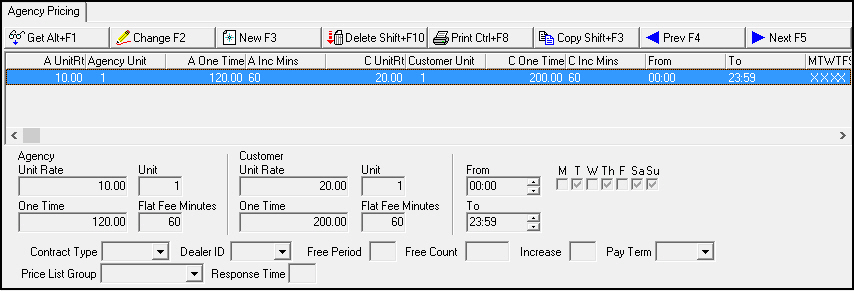
The following graphic shows the Agency Pricing tab as the tab opens. The tab displays previously defined pricing parameters for the selected agency.
Field/Column Descriptions
The following table describes the fields and columns used in the Agency Pricing tab.
|
Field/Column |
Description |
|
Agency |
|
|
Unit Rate |
Rate, in dollars, the agency charges for each unit of time on site. |
|
Unit |
Number of minutes in one unit of time |
|
One Time |
Base fee the selected agency charges for responding within the contract-defined time period. |
|
Flat Fee Minutes |
Number of initial minutes covered by the one-time fee. |
|
Customer |
|
|
Unit Rate |
Rate, in dollars, charged to the customer for each unit of time the selected agency is on site. |
|
Unit |
Number of minutes in one unit of time. |
|
One Time |
Base fee charged to the customer when the selected agency responds within the contract-defined time period. |
|
Flat Fee Minutes |
Number of initial minutes covered by the one-time fee. |
|
From |
Select a beginning time for a range of time in which this rate is in effect. |
|
M T W Th F Sa Su |
An X in any of these fields indicates that the rate is in effect on that day of the week. |
|
To |
Select an ending time for a range of time in which this rate is in effect. |
|
Contract Type |
Type of contract. (This menu originates from program #1531.) |
|
Dealer ID |
ID of the dealer associated with the selected agency. (This menu originates from program #1537.) |
|
Free Period |
Not yet functional in SBN. |
|
Free Count |
Not yet functional in SBN. |
|
Increase |
Not yet functional in SBN. |
|
Pay Term |
Choices for payment terms for the contract. (This menu originates from program #1529.) |
|
Price List Group |
Select a price list group to use as the default for the selected agency. (This menu originates from program #1771.)
|
|
Response Time |
Maximum time, in minutes, in which this agency must respond. The Call Out Log (program #705) uses this time to calculate payments for an agency.
|
Defining Multiple Intervals of Response Time
You may define multiple intervals of response time so that an agency is paid according to which interval its response time matches. Intervals must be unique. For an event associated with the selected agency, the Call Out Log (program #705) uses the pricing definition of the lowest interval that is greater than or equal to the actual response time.
Example
The Agency Pricing tab for patrol agency ABC contains 4 response time intervals defined with different rates:
|
Time Interval |
One Time Rate |
|
0 - 5 minutes |
$75.00 |
|
6 - 10 minutes |
$50.00 |
|
11 - 15 minutes |
$45.00 |
|
15 + minutes |
$0.00 |
Patrol agency ABC responded to an event in 8 minutes. The Call Out Log uses the interval defined as 6 - 10 minutes, with a rate of $50.00, to calculate the payment for patrol agency ABC.
Button Functions
The following table displays the buttons, describes the shortcut keys, actions and functionality.
|
Button |
Name |
Shortcut Key |
Action |
Description |
|
|
Get Record |
alt+f1 |
1612/ 1 |
View details of selected record. |
|
|
Change Record |
f2 |
1612/ 2 |
Change details of selected record. |
|
|
New Record |
f3 |
1612/ 3 |
Create new record. |
|
|
Search |
f6 |
1612/ 7 |
Search for patrol agencies. |
|
|
Delete Record |
shift+f10 |
1612/ 4 |
Delete selected record. |
|
|
Select Record to Undelete |
alt+f10 |
1612/ 5 |
Restore deleted record. |
|
|
Print Selected Records |
ctrl+f8 |
1612/ 6 |
Print selected records. |
|
|
Copy Current Record |
shift+f3 |
Copy current record. |
|
|
|
Previous Record |
f4 |
Go to previous record. |
|
|
|
Next Record |
f5 |
Go to next record. |
|
|
|
Zoom in/out of sublevel |
f10 |
Zoom into the sublevel of an agency to define pricing for multiple intervals of patrol response times. |
|
|
|
Tear Away Selected Tab |
f7 |
View selected tab in a separate window. |
|
|
|
Exit without saving |
esc |
Exit without saving changes to selected record. |
|
|
|
Save Existing Record |
enter |
Save changes to selected record. |
|
|
|
Swap Agency |
F8 |
1612/17 |
Replaces the agency with another selected agency on Action Plans on all installations with that agency. |















Modifications and Updates to Agencies 7
The following table lists modifications and updates to the Agencies 7 document.
|
Mod Number |
Date |
Description |
|
08.81.09732, 07.81.23481, 07.81.23478, 07.81.23477, 07.81.23475, 08.81.09699, 07.81.23446 |
7/28/14 |
Added Exc from PSAP check box and Swap Agency button. |
|
n/a |
8/27/14 |
Images updated. |