
Current Customer Status Report
Current Customer Status Report
Current Customer Status Report
Module: Accounting
Overview
Use the Current Customer Status Report to print contract detail information including the current cycle and a range of billing activities.
To access this report, select Current Customer Status Report (report #2104) from the main menu of SBN.
The Current Customer Status Report
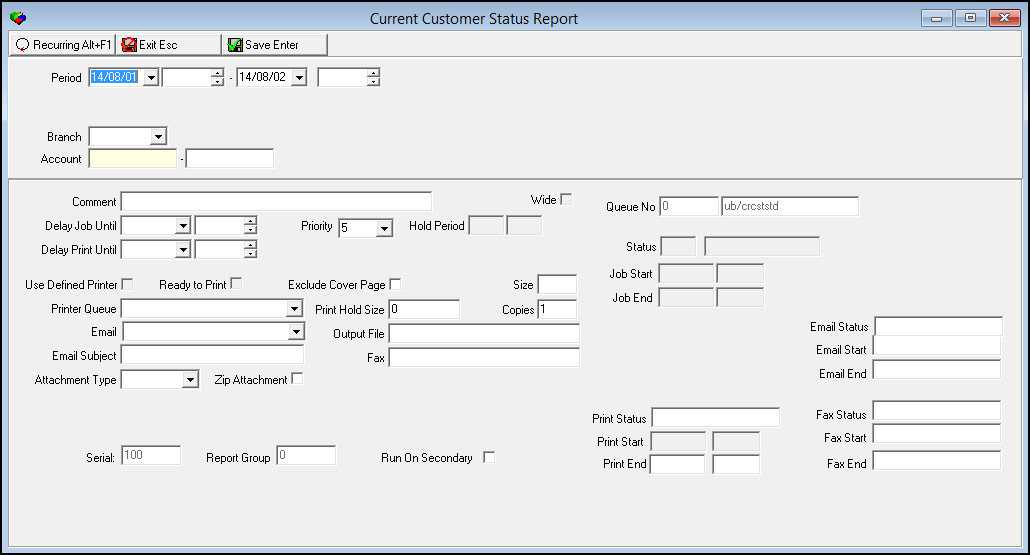
This window contains two panes: use the upper pane to define the contents of the report; use the lower pane to define the job output - how, when, and where you want the report printed.
Note: See Report Parameters Pane for information on the fields in the lower pane, which are the same in every report.
Field Descriptions
The following table describes the fields used in the upper pane of this report.
Field |
Description |
Period |
|
Date
- From |
You may select a range of dates to limit the report to billing activity that occurred during the range. Select the beginning date of the range. O This field defaults to today’s date. |
Time
- From |
You may select a range of times to limit the report to billing activity that occurred during the range. Select the beginning time of the range. |
Date
- To |
You may select a range of dates to limit the report to billing activity that occurred during the range. Select the ending date of the range. O This field defaults to tomorrow’s date. |
Time
- To |
You may select a range of times to limit the report to billing activity that occurred during the range. Select the ending time of the range. |
Branch |
You may select a specific branch to limit the report to billing activity for that branch. (This menu originates from program #1530.) |
Account Range |
|
Account - From (No label) |
You may type a range of account numbers (you must type at least one account number) to limit the report to billing activity for accounts within the range. Type the beginning account number of the range. |
Account
- To |
You may type a range of account numbers to limit the report to billing activity for accounts within the range. Type the ending account number of the range. |
Running and Viewing a Report
For information on running and viewing a report, see Common Functions in SBN.
Report Example
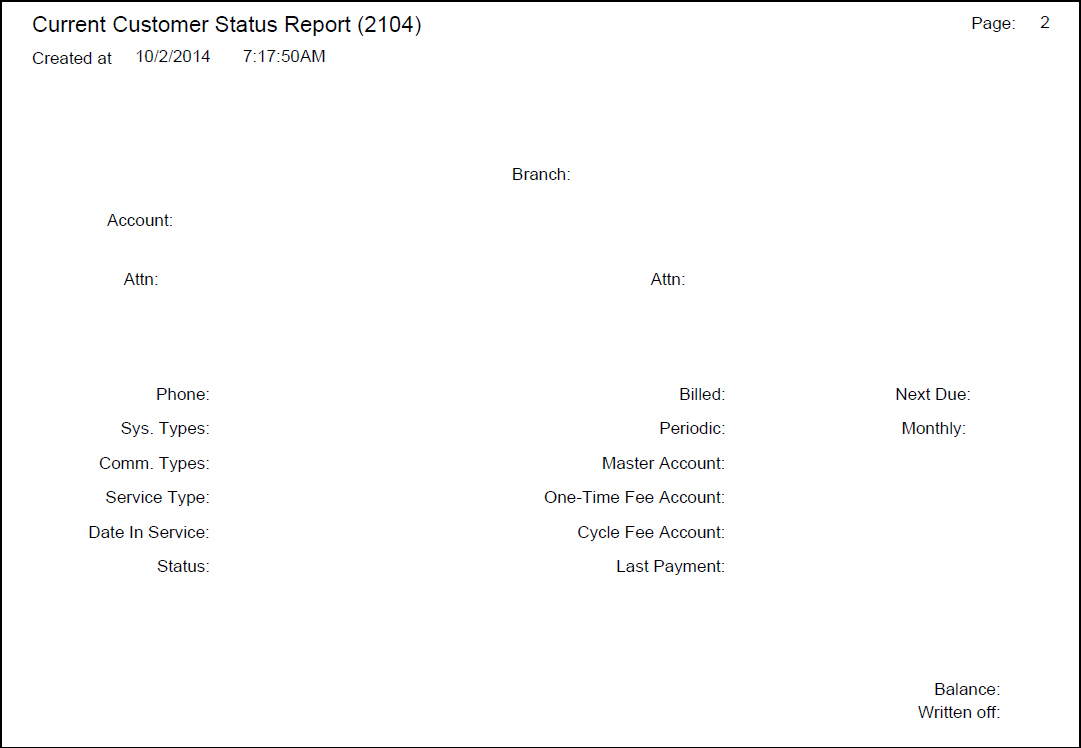
The following graphic shows an example of the output of the Current Customer Status Report.
Column Descriptions
The following table describes the columns used in the output of the report.
Column |
Description |
Branch |
Displays the branch ID and name. |
Account |
Contract number to which the following billing activity refers. |
Attn |
Displays the installation Attention name |
Attn |
Displays the billing account Attention name. |
Installation
Address |
Displays the installation address with city, state, and zip code |
Billing
Address |
Displays the billing account address with city, state, and zip code |
Phone |
Installation phone number. |
Billed |
Frequency of cycle billing. |
Next Due |
Next due date for cycle fees. |
Sys. Type |
Description from Class 1 field of Data Entry. |
Periodic |
Total cycle billing based on (frequency of billing) * (monthly cycle fees). |
Monthly |
Amount of monthly cycle fee. |
Comm. Type |
Description from Class 2 field of Data Entry. |
Master Account |
Primary account number of the billing account. |
Service Type |
Description from Class 3 field of Data Entry. |
One-Time Fee Account |
Billing account number for one-time fees. |
Date in Service |
On-line date from Contract Basics. |
Cycle Fee Account |
Billing account number for cycle fees. |
Status |
Contract status of account. |
Last Payment |
Amount and date of last payment made on the account. |
Current Cycle Fees |
|
End |
If this column displays an X, the cancelled contract is set to invoice to the end of the contract. |
From / To Date |
Beginning and ending dates for cycle billing. The report populates the To date only when the contract is cancelled. |
Revenue
Text |
Description of the revenue text. |
RevTyp |
Revenue type. |
FeePr |
The number of months covered by the cycle fee. |
TxI |
If this field displays an X, the cycle fee includes tax. |
Cyc Dt |
Last cycle period that has been billed. |
Day |
The day of the month on which invoices are sent. |
Pr |
How often, in months, invoices are sent. |
Abbr |
Text line associated with the cycle fee. |
Activity |
|
From Dt |
Beginning date of the transaction. |
To Date |
Ending date of the transaction. |
Ins No |
Installation number of the transaction. |
Inv No |
Invoice number of the transaction. |
RevTp |
Revenue type. |
Description |
Text description of the transaction activity. |
Amount |
Amount of the transaction. |
Balance |
Running balance of the account. |
Button Functions
The following table displays the buttons, describes the shortcut keys, actions, and functionality.
Button |
Name |
Shortcut Key |
Action |
Description |
|
Open fields for recurring/template reports |
alt+f1 |
Open fields for recurring/template reports. |
|
|
Exit without saving |
esc |
Exit without saving changes to selected record. |
|
|
Save Existing Record |
enter |
Save changes to selected record. |



Modifications and Updates to Current Customer Status Report
The following table lists modifications and updates to the Current Customer Status Report document.
Mod Number |
Date |
Description |
n/a |
8/1/14 |
Images updated. |