
Monpag Definitions
Monpag Definitions
Monpag Definitions
Module: System Administration
Overview
Use Monpag Definitions (program #1667) to define the messages for pages or emails that SBN sends to the specified contacts on an action plan when SBN receives an alarm. The messages defined in this program appear in the drop-down menu of the Message field in the Action Plan Details window.
Note: SBN does not check the SQL code that you type to define the message for correct syntax until an alarm type associated with the message is triggered. Validate the SQL code in a test account with a simulated alarm before you use it in your production environment. (For steps to simulate an alarm, see the Simulate Alarm section of the Dispatch document.)
To access this program, choose Monpag Definitions (program #1667) from the main menu of SBN.
The Monpag Definitions Window
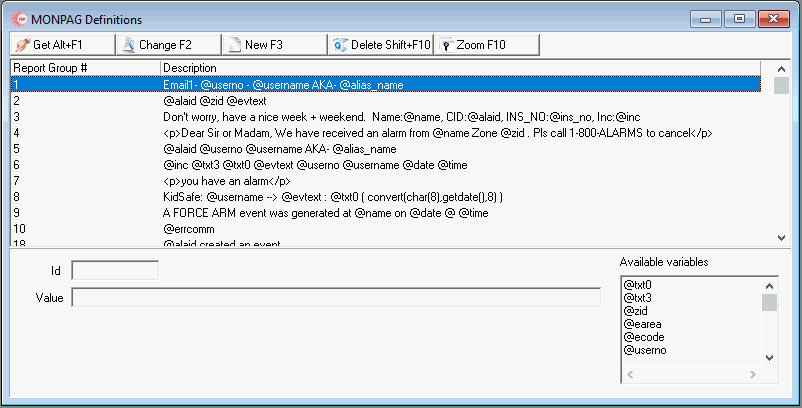
The following graphic shows Monpag Definitions as the program opens. The window displays previously defined messages.
Field/Column Descriptions
The following table describes the fields and columns used in Monpag Definitions.
Field/Column |
Description |
Report Group # (ID) |
ID number of the selected message. Messages defined in this program appear in the drop-down menu of the Message field in the Action Plan Details window. |
Description / Value |
Default text and variables that SBN pages or emails to the specified contacts on the action plan when you select this message in the Action Plan Details window. |
Available Variables |
List of available variables users can input into Monpag. |
Message Variables
You may include any of the following variables in messages defined in this program. When SBN sends pages or emails to action plan contacts, it replaces these variables with data from the alarm incident that triggered the page or email.
|
|
Using Common Functions
See the reference document Common Functions in SBN for more information.
Zooming into the Sublevel
Use the sublevel tab, Dealer/Translation, to attach dealers and translations to Monpag Definitions. You may enter alternate text for specific dealers and languages. The alternate text is used for installations with the selected dealer and/or language assigned in Data Entry (program #559).
Note: Actions 1667/10-14 control access to the Dealer/Translation tab and functions.
The Dealer/Translation Tab
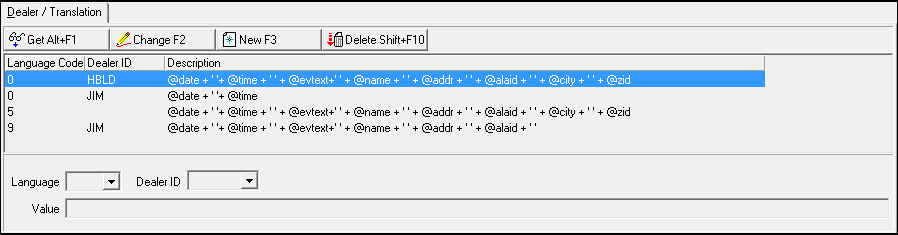
The following graphic shows the Dealer/Translation tab. The tab displays previously defined dealers and translations.
Field/Column Descriptions
The following table describes the fields and columns used in the Dealer/Translation tab.
Field/Column |
Description |
Language Code |
Code that identifies the language of the associated translation. O Contact IBS before using codes 11-17. |
Dealer ID |
Dealer that the alternate text is used for. |
Description |
Alternate text, including variables, that appears for the selected dealer and/or language. |
Button Functions
The following table displays the buttons, describes the shortcut keys, actions, and functionality.
Button |
Name |
Shortcut Key |
Action |
Description |
|
Get |
ALT+F1 |
1667/ 1 |
Get record. |
|
Change |
F2 |
1667/ 2 |
Change selected record. |
|
New |
F3 |
1667/ 3 |
Create new record. |
|
Delete |
SHIFT+F10 |
1667/ 4 |
Delete selected record. |
|
Zoom |
F10 |
1667/ 1 |
Access sublevel tab. |





Modifications and Updates to Monpag Definitions
The following table lists modifications and updates to the Monpag Definitions document.
Mod Number |
Date |
Description |
07.79.22966 |
10/23/13 |
Document created |
n/a |
08/20/14 |
Images updated. |
n/a |
03/02/18 |
Message variables updated to show terms associated with each. |
07.93.26964, 08.93.12209, 07.93.26966 |
09/23/22 |
Monpag 'Available Variables" field added. Note: Strings no longer require "+" symbols to join segments of string, and single quotes are no longer required either. Images updated. |
F1 Help
| Delphi Forms | mamonpagform |
| Program Numbers | 1667 |