
Dealer Call Preference
Program #: 1639
Module: Utilities
Overview
Use Dealer Call Preference (program #1639) to define the order in which premise and agency action plan contacts with a sequence number of 0 (zero) appear in the call list of Dispatch (program #537) for all installations associated with a specific dealer.
Navigating to Dealer Call Preference
Use the following steps to navigate to Dealer Call Preference:
1. From the main SBN toolbar, select Menu.
2. From the drop-down menu, select Go To.
3. In the Go To Program dialog box, type in "1639" and press Enter.
w Dealer Call Preference opens.
The Dealer Call Preference Window
The following graphic shows Dealer Call Preference as the program opens.
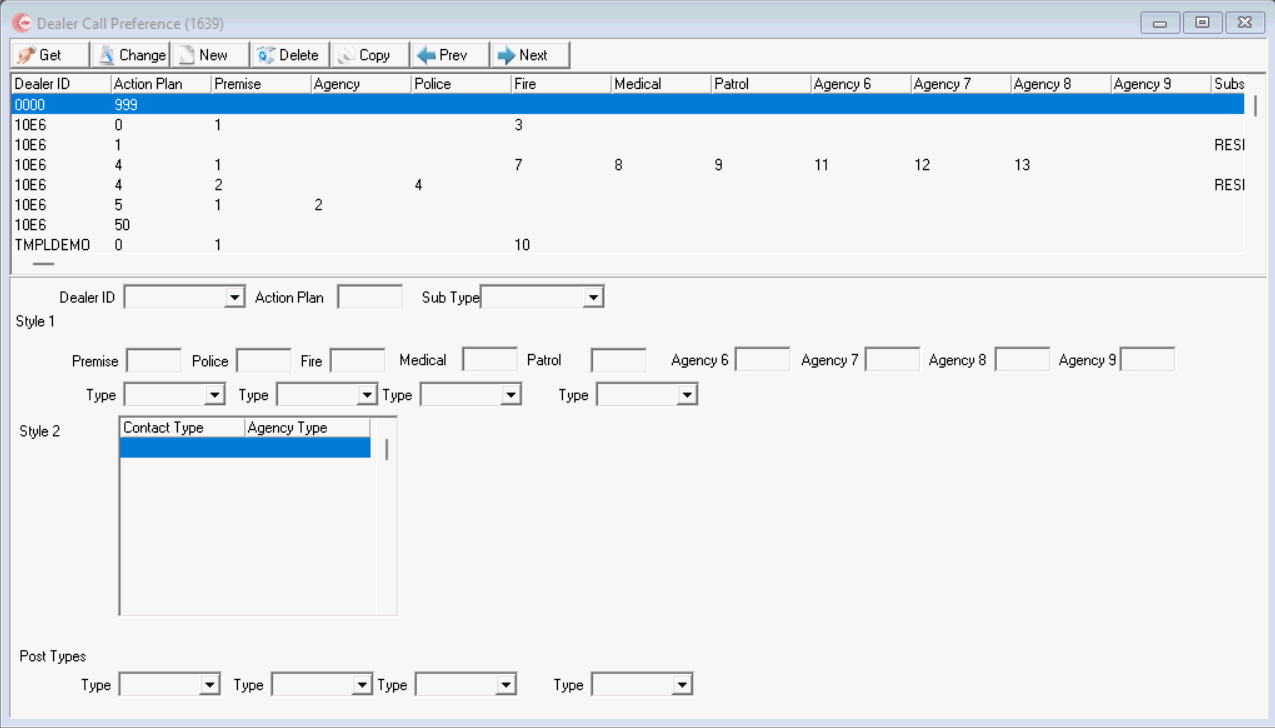
Field/Column Descriptions
The following table describes the fields and columns used in Dealer Call Preference.
Field/Column |
Description |
Dealer ID |
Dealer ID to which the selected premise and agency contact order apply. |
Action Plan |
Action plan number to which the selected premise and agency contact order apply. |
Sub Type |
Subscriber Type. (This field originates from Subscriber Types (#1534). |
Style 1 |
|
Premise |
This number indicates the position of the Premise contact in the Dispatch call list (if the Premise contact has a sequence number of 0 in the action plan). |
Agencies |
This number indicates the position of Agency contacts in the Dispatch call list (for Agency contacts that have a sequence number of 0 in the action plan). |
Type 1-4 |
Contact Types. (These fields originate from Contact Types (#1632). |
Style 2 |
|
Contact Type |
The drop-down includes all contact types from (#1632) |
Agency Type |
The drop-down includes all agency types in SBN |
Post Type |
|
Type 1-4 |
Contact Types. (These fields originate from Contact Types (#1632). |
Creating a Dealer Call Preference Sequence
Use the following steps to create a new dealer call preference sequence:
1. Choose New Record.
w The fields open for changes.
2. Enter details of the new call preference sequence.
3. Choose Save.
Changing a Dealer Call Preference Sequence
Use the following steps to change a dealer call preference sequence:
1. Select the call preference sequence you want to change by double-clicking on it, or choose Get Record.
w Most fields open for changes.
2. Enter changes.
3. Choose Save.
Deleting a Dealer Call Preference Sequence
Use the following steps to delete a dealer call preference sequence:
1. Select the call preference sequence you want to delete.
2. Double-click your selection or choose Get Record.
3. Choose Delete Record.
w A confirm dialog box opens.
4. Choose Yes.
w SBN removes the call preference sequence from the list.
Button Functions
The following table displays the buttons, describes the shortcut keys, actions and functionality.
Button |
Name |
Shortcut Key |
Action |
Description |
|
Get Record |
alt+f1 |
1639/ 1 |
View details of selected record. |
|
Change Record |
f2 |
1639/ 2 |
Change selected record. |
|
New Record |
f3 |
1639/ 3 |
Create new record. |
|
Delete Record |
shift+f10 |
1639/ 4 |
Delete selected record. |
|
Copy Current Record |
shift+f3 |
1639 |
Copy current record. |
|
Previous |
f4 |
1639 |
Scroll to previous record. |
|
Next |
f5 |
1639 |
Scroll to next record. |
|
Exit without saving |
esc |
1639 |
Exit without saving changes to selected record. |
|
Save Existing Record |
enter |
1639 |
Save changes to selected record. |









Blanket Dealer Default
A blanket dealer call preference can serve as the default when a sub-dealer has no matching preference.
Modifications and Updates to Dealer Call Preference
The following table lists modifications and updates to the Dealer Call Preference document.
Mod Number |
Date |
Description |
n/a |
08/28/14 |
Images updated. |
07.93.26964, 08.93.12209, 07.93.26966 |
09/21/22 |
New Subscriber Type and Type fields added. Images updated. |
08.93.12291, 07.93.27112, 08.93.12286, 08.93.12283, 07.93.27103, 07.93.27100, |
01/11/23 |
Added new Style Types |