
Payment Methods
Payment Methods
Payment Methods
Module: System Administration
Overview
Use Payment Methods (program #1528) to define types of credit card or direct debit payments that you export to a third party (bank). Menus of Payment Methods appear in the following programs:
-
Work Orders > Work Order Details, as Pymt Code
-
Data Entry (program #559) > Service Log > New Service Request, as Payment Cd
-
Contract Master (program #548) > Billing Account and Contract panes in New and Change mode, as Pay Code
-
Contract Master (program #548) > Payment Methods tab, as Pymt Code
-
Import Interface (program #1889) > Contract Mode, as Payment Cd
-
Invoice Manager (program #1557) > Invoice Export dialog box, as Pay Code
If you use standard billing and accept cash or check payments from a customer, leave the Payment Methods fields blank for that customer.
To access this program, select Payment Methods (program #1528) from the main menu of SBN.
The Payment Methods Window
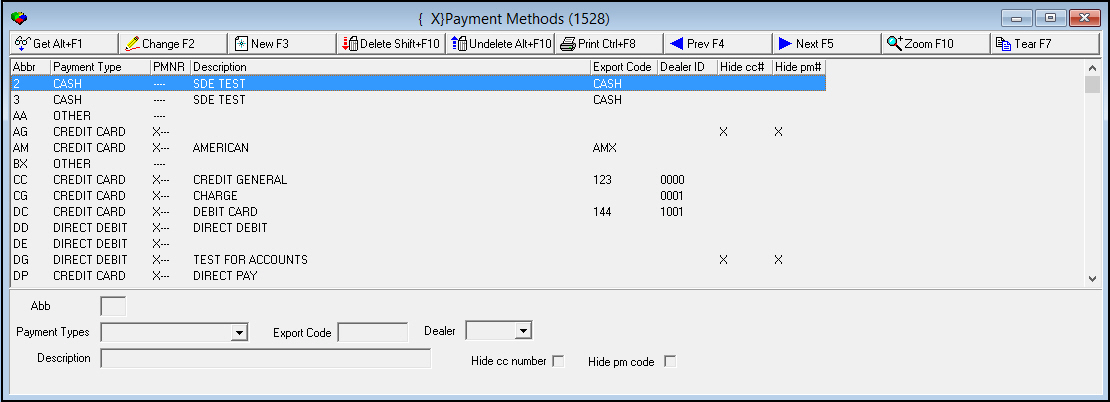
The following graphic shows Payment Methods as the program opens. The upper pane displays previously defined payment methods.
Field/Column Descriptions
The following table describes the fields and columns used in Payment Methods.
|
Field/Column |
Description |
|
Abbr |
Abbreviation that identifies the selected payment method. |
|
Payment Type |
Identifies the type of payment associated with the selected payment method. (This menu originates from program #1586.) |
|
Payment No Required |
If the payment type you select requires validation (for example: credit card or debit card) SBN enters an X in this column. If this column displays an X and you type this code in the Pay Code field in Contract Master, you must enter valid numbers in the Pymt Code fields in Contract Master. |
|
Description |
Text description of the selected payment method. |
|
Export Code |
Code to use on exports, if applicable. |
|
Dealer |
You may select a dealer ID to associate with this payment method.
|
|
Hide CC Number |
Indicates whether SBN hides credit card numbers in the pay_mean_no_2 field of Contract Master (program #548) by displaying an X if a user chooses the selected payment method in Contract Master. |
|
Hide PM Code |
Indicates whether SBN hides numbers in the Payment Code field of Contract Master (program #548) by displaying an X if a user chooses the selected payment method in Contract Master. |
Using Common Functions
See the reference document Common Functions in SBN for more information.
Zooming into the Sublevel
Payment Methods contains a sublevel with two tabs:
-
Translations - Attach translations to payment methods. Payment methods then appear in SBN in the user’s language as defined in Personnel (program #1811).
Note: Actions 1528/10-14 control access to the Translations tab and functions.
-
Schedules - Attach schedule details to payment methods that SBN uses in the Payment Schedule tab of work orders with the selected payment method and dealer.
The Translations Tab
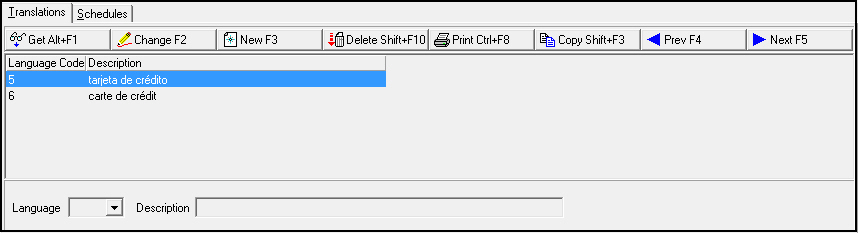
The following graphic shows the Translations tab. The tab displays previously defined translations.
Field/Column Descriptions
The following table describes the fields and columns used in the Translations tab.
|
Field/Column |
Description |
|
Language Code |
Code that identifies the language of the associated translation. Note: Contact IBS before using codes 11-17. |
|
Description |
Text description, in the associated language, of the selected payment method. |
The Schedules Tab
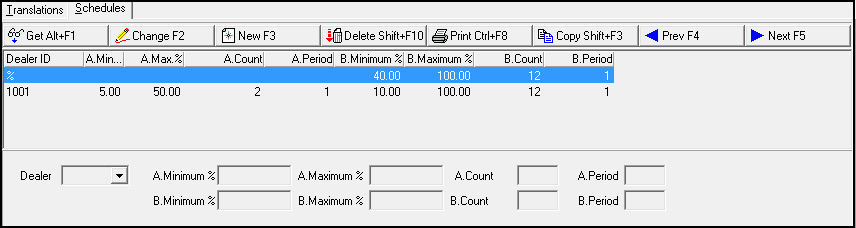
The following graphic shows the Schedules tab. The tab displays previously defined payment schedules.
Field/Column Descriptions
The following table describes the fields and columns used in the Schedules tab.
|
Field/Column |
Description |
|
Dealer ID |
Select a dealer for which SBN applies the payment schedule to work orders with that dealer and the selected payment method. (This menu originates from program #1537.) |
|
A Minimum % |
Minimum percentage of work order total cost to use for Payment Schedule A calculation on work orders with the selected dealer and payment method. |
|
A Maximum % |
Maximum percentage of work order total cost to use for Payment Schedule A calculation on work orders with the selected dealer and payment method. |
|
A Count |
Number of periods to use for Payment Schedule A calculation on work orders with the selected dealer and payment method. For example, entering a Count of 12 and a Period of 1 would distribute payments monthly over 12 months for Payment Schedule A. Entering a Count of 4 and a Period of 3 would distribute payments quarterly over a year. |
|
A Period |
Length of each period in months to use for Payment Schedule A. For example, entering a Count of 12 and a Period of 1 would distribute payments monthly over 12 months for Payment Schedule A. Entering a Count of 4 and a Period of 3 would distribute payments quarterly over a year. |
|
B Minimum % |
Minimum percentage of work order total cost to use for Payment Schedule B calculation on work orders with the selected dealer and payment method. |
|
B Maximum % |
Maximum percentage of work order total cost to use for Payment Schedule B calculation on work orders with the selected dealer and payment method. |
|
B Count |
Number of periods to use for Payment Schedule B calculation on work orders with the selected dealer and payment method. For example, entering a Count of 12 and a Period of 1 would distribute payments monthly over 12 months for Payment Schedule B. Entering a Count of 4 and a Period of 3 would distribute payments quarterly over a year. |
|
B Period |
Length of each period in months to use for Payment Schedule B. For example, entering a Count of 12 and a Period of 1 would distribute payments monthly over 12 months for Payment Schedule B. Entering a Count of 4 and a Period of 3 would distribute payments quarterly over a year. |
Modifications and Updates to Payment Methods
The following table lists modifications and updates to the Payment Methods document.
|
Mod Number |
Date |
Description |
|
n/a |
8/21/14 |
Images updated. |
F1 Help
| Delphi Forms | blpaymeansform |
| Program Numbers | 1528 |