
Payment Register Report
Payment Register Report
Payment Register Report
Module: Accounting
Overview
Use the Payment Register Report to accompany a deposit slip, or run it without a �group by� parameter to locate errors in an unbalanced batch.
You may run this report in Export mode by selecting the Run in Export Mode check box in the lower pane. In Export mode, SBN generates the report as a text file in the report directory.
To access this report, select one of the following:
Extra Print from Open Batches (program #1577)
Payment Register Report (report #1174) from the main menu of SBN.
The Payment Register Report
This window contains two panes: use the upper pane to define the contents of the report; use the lower pane to define the job output - how, when, and where you want to print the report.
Note: See Report Parameters Pane for information on the fields in the lower pane, which are the same in every report.
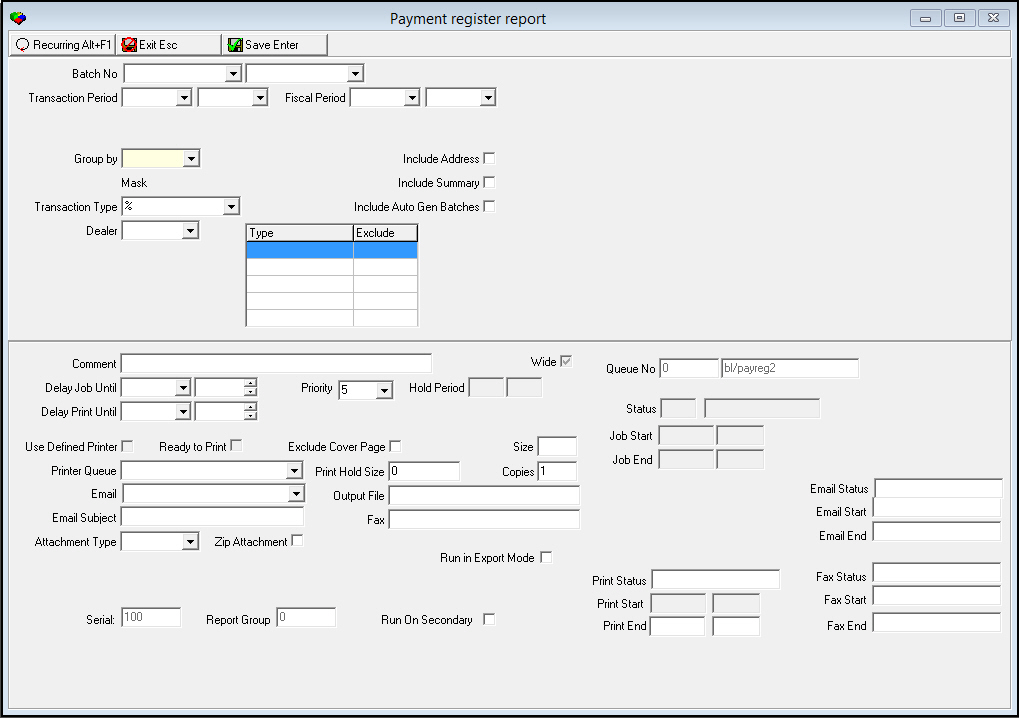
Field Descriptions
The following table describes the fields used in the upper pane of this report.
Note: You can use wildcard characters in selected fields. For more information on using wildcards, see Searches.
Field |
Wildcards Allowed |
Description |
Batch Range |
||
Batch No - From |
No |
You may select a single batch or a range of batches to limit the report to that batch or range. Select the beginning batch number. O Select either l A batch number or range of batches l A range of transaction dates l A range of fiscal periods |
Batch
No - To |
No |
If you select a range of batch numbers to limit the report to that range, select the ending batch number of the range. |
Transaction Period Range |
||
Transaction
Period |
No |
You may select a range of transaction dates to limit the report to dates within the range. Select the beginning transaction date of the range. O Select either l A batch number or range of batches l A range of transaction dates l A range of fiscal periods |
Transaction
Period |
No |
If you select a range of transaction dates to limit the report to that range, select the ending transaction date of the range. |
Fiscal Period Range |
||
Fiscal Period - From |
No |
You may select a range of fiscal periods to limit the report to dates within the range. Select the beginning fiscal period of the range. O Select either l A batch number or range of batches l A range of transaction dates l A range of fiscal periods |
Fiscal
Period - To |
No |
If you select a range of fiscal periods to limit the report to that range, select the ending transaction date of the range. |
Group By |
No |
You must select a grouping parameter for the report: l Branch l None |
Transaction Type |
Yes |
You may either select a specific transaction type to limit the report to records that include that transaction type or use the % wildcard to include all transaction types. (This menu originates from program #1586.) |
Include Address |
No |
Enter a check mark in this box to print the billing account address on the report. |
Include Summary |
No |
Enter a check mark in this box to add a summary by transaction type at the end of the report. |
Include Auto Gen Batches |
No |
Enter a check mark in this box to include auto-generated batches in the report, such as batches generated during payment posting or invoice calculation. O If you run the report for one batch, SBN displays all batches auto-generated by the selected batch. |
Dealer |
No |
You may select a dealer ID to restrict the report to payments associated with that dealer. (This menu originates from program #1537.) O If your company uses Dealer restrictions, the menu displays only those dealer IDs included in your user profile. O If you leave this field blank, the report includes payments for all dealers. |
Payment Type Exclusion Grid |
||
Type |
No |
You may select up to five payment types to exclude from the report. You must select the Exclude check box for each payment type you select. SBN excludes all payments of the selected types from each batch that appears on the report. (These menus originate from program #1528.) |
Exclude |
No |
Select this check box for each payment type you want to exclude from the report. |
Running and Viewing a Report
For information on running and viewing a report, see Common Functions in SBN.
Note: Added option ma010 to prevent batch No1 from being bigger than batch No2.
Report Example 1
The following graphic shows an example of the output of the Payment Register report without a Dealer selected as a parameter.
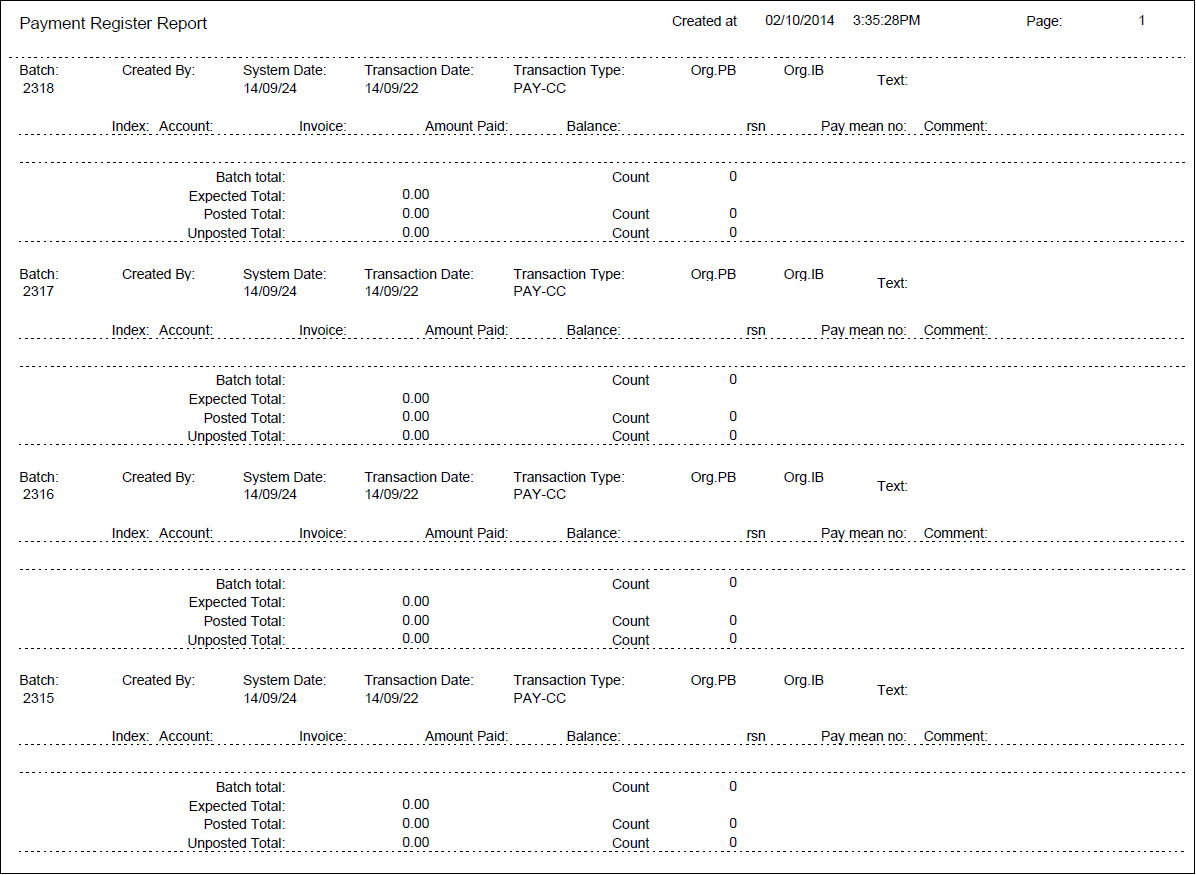
Column Descriptions 1
The following table describes the columns used in the output of the report.
Column |
Description |
Dealer |
If you selected a Dealer in the parameters, this field displays the ID of the dealer associated with the displayed accounts. |
Batch |
SBN-assigned batch number. |
Created By |
ID of the user who created the batch. |
System Date |
Date on which the batch was created. |
Transaction Date |
Date on which the transaction occurred. |
Transaction Type |
Transaction code for the batch. |
Org. PB |
Originating payment batch, if batch was auto-generated during payment posting. |
Org. IB |
Originating invoice batch, if batch was auto-generated during invoice calculation. |
Text |
Text description of the batch. |
Index |
Line number of the payment in the batch. |
Account |
Account number. |
Invoice |
Invoice number. |
Amount Paid |
Amount of payment. |
Balance |
Remaining balance on invoice. |
Transaction |
Transaction type code. |
Rsn |
Payment reason code. |
Pay Mean No. |
Pay means number. |
Comment |
Description of payment batch. |
Err |
Payment post error code. |
Ext err |
External Error code. |
(No label) |
If you flagged Include Address, displays account address and name. |
Batch Total |
Payment amount total for the batch shown. |
Count |
Number of payments for the batch shown. |
Posted Total |
Posted payment amount for the batch shown. |
Number of Batches |
Total number of batches included in the report. |
Grand Total |
Total amount of payments included in all batches in the report. |
Expected Total |
Total expected amount from all payment batches included in the report. |
Unposted Total |
Total unposted amount from all payment batches included in the report. |
Report Example 2
If you flagged Include Summary in the report parameters window, the following page appears at the end of the report.
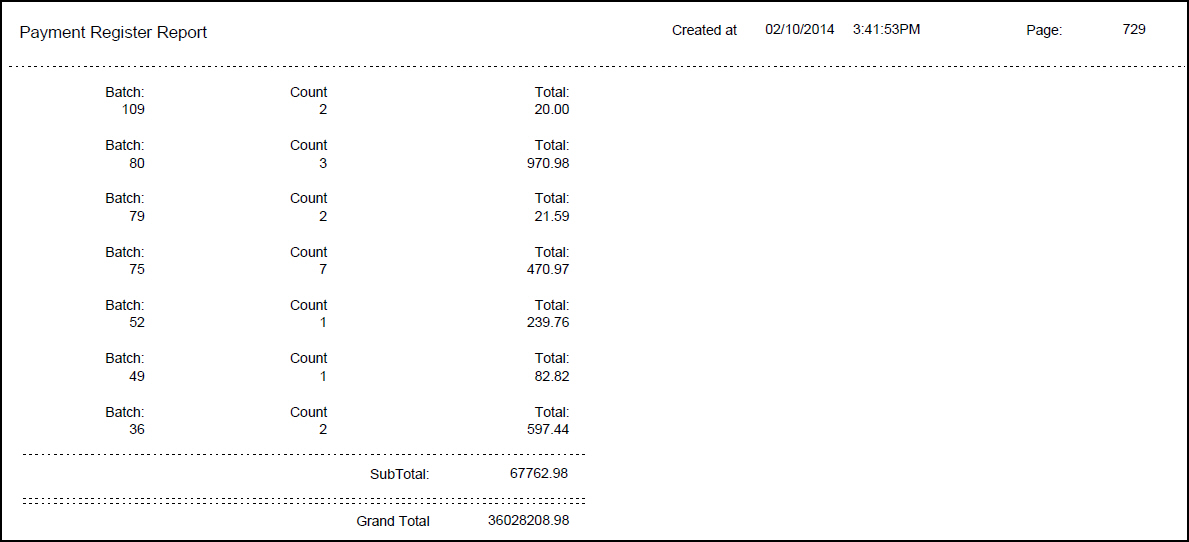
Column Descriptions 2
The following table describes the columns used in the summary page of the output of the report.
Column |
Description |
Batch |
Each batch number that uses the specified transaction code. |
Count |
Number of payment records in the batch that uses the specified transaction code. |
Total |
Payment amount in the batch that uses the specified transaction code. |
Sub Total |
Total payment amount of all batches for the specified transaction code. |
Grand Total |
Total of all payments for all transaction codes and batches. |
Button Functions
The following table displays the buttons, describes the shortcut keys, actions, and functionality.
Button |
Name |
Shortcut Key |
Action |
Description |
|
Open fields for recurring/template reports |
alt+f1 |
Open fields for recurring/template reports. |
|
|
Exit without saving |
esc |
Exit without saving changes to selected record. |
|
|
Save Existing Record |
enter |
Save changes to selected record. |



Modifications and Updates to Payment Register Report
The following table lists modifications and updates to the Payment Register Report document.
Mod Number |
Date |
Description |
n/a |
8/06/14 |
Images updated. |