
Miscellaneous User Access Profiles
Miscellaneous User Access Profiles
Miscellaneous User Access Profiles
Program #: 1745
Module: System Administration
Overview
Use Miscellaneous User Access Profiles (program #1745) to define and maintain profiles of miscellaneous user access. These definitions allow you to assign a profile to a user for a specific program. The defaults set in this program control user access in Customer Service, Inventory, Monitoring, and reporting. Additionally, developing profiles that limit users to one branch or queue is a convenient way to utilize queue monitoring in emergency situations.
To access this program, select Miscellaneous User Access Profiles (program #1745) from the main menu of SBN.
The Miscellaneous User Access Profiles Window
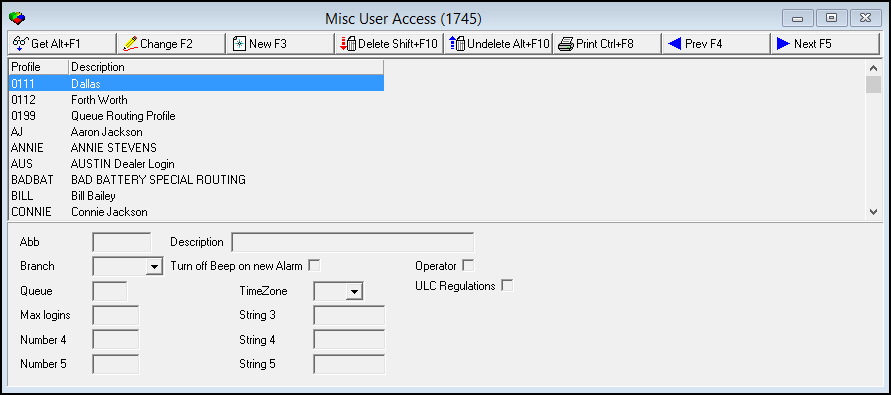
The following graphic shows Miscellaneous User Access Profiles as the program opens. The upper pane displays previously defined profiles for miscellaneous user access.
Field/Column Descriptions
The following table describes the fields and columns used in Miscellaneous User Access Profiles.
|
Field/Column |
Description |
|
Profile/Abbreviation |
Abbreviation that identifies the selected miscellaneous user access profile. |
|
Description |
Text description of the selected miscellaneous user access profile. |
|
Branch |
You can select a default branch for this profile. (This menu originates from program #1530.) O SBN limits a user in monitoring with this profile to the default branch unless the user has the authority level to change branches. O If you leave this field blank, a user in monitoring with this profile sees alarms from all branches. |
|
Turn off Beep on new Alarm |
Enter a check mark in this field to allow a user with this profile to disable the beep in monitoring. O If this field is blank, the user cannot disable the beep. |
|
Operator |
Select this check box to indicate that the selected user is an operator. To link this setting to a user's account, locate the user on the Users tab of Personnel (program #1811). Select the setting in the Misc drop-down list. Then when you click the All/Operators button in Temp User Skills (program #531) in Skill of current users mode, the user appears in the list of operators. |
|
Queue |
You can select a default monitoring queue for this profile. O SBN limits a user in monitoring with this profile to the default queue unless the user has the authority level to change queues. O If you leave this field blank, a user in monitoring with this profile sees all queues. |
|
Time Zone |
Select a default time zone for this profile. (This menu originates from program #1739.) O SBN stamps log times and print queues for a user with this profile according to the default time zone. |
|
Max logins |
Type the maximum number of logins for a user with this profile. O Type a zero (0) in this field to allow unlimited logins. |
|
Number 4 |
No current functionality. |
|
Number 5 |
No current functionality. |
|
String 3 |
No current functionality. |
|
String 4 |
No current functionality. |
|
String 5 |
No current functionality. |
|
ULC Regulations |
If this checkbox and the "ULC Regulations" checkbox in UL Security Grades (program #1745) are selected, then the operator will be able to access incidents of this security grade in Dispatch (program #559). If the UL Security Grades checkbox is selected but this checkbox is not, the operator will be unable to acknowledge incidents of this security grade, and will receive an Error Message window whenever this is attempted. |
Using Common Functions
See the reference document Common Functions in SBN for more information.
Button Functions
The following table displays the buttons, describes the shortcut keys, actions, and functionality.
|
Button |
Name |
Shortcut Key |
Action |
Description |
|
|
Get |
ALT+F1 |
1745/ 1 |
Get record. |
|
|
Change |
F2 |
1745/ 2 |
Change selected record. |
|
|
New |
F3 |
1745/ 3 |
Create new record. |
|
|
Delete |
SHIFT+F10 |
1745/ 4 |
Delete selected record. |
|
|
Undelete |
ALT+F10 |
1745/ 5 |
Restore deleted record. |
|
|
|
CTRL+F8 |
1745/ 6 |
Print selected records. |
|
|
Previous |
F4 |
1745/ 999 |
Select last record. |
|
|
Next |
F5 |
1745/ 999 |
Select next record. |








Modifications and Updates to User Access Profiles
The following table lists modifications and updates to the Miscellaneous User Access Profiles document.
|
Mod Number |
Date |
Description |
|
08.79.09281, 07.79.22741, 08.79.09273, 07.79.22722 |
10/04/2013 |
Added the Operator check box. |
|
07.80.23284, 08.80.09594 |
4/08/2014 |
Added new ULC Regulations checkbox. |
|
n/a |
8/20/14 |
Images updated. |