
Fiscal Control
Fiscal Control
Fiscal Control
Module: Accounting
Overview
Use Fiscal Control to define fiscal dates for your company. Each accounting period is usually set as either monthly or yearly. This process computes all transactions coming in or going out of your company. The fiscal process is only run once for the selected fiscal dates. Once you set the fiscal date for a future date, you cannot set it back to a date before that. For example, if you set the Fiscal Year for the year 2010, you cannot change the date back to 2009. Use this program carefully.
To access this program, select Fiscal Control (program #568) from the main menu of SBN.
Options
Option bl068 - Controls whether SBN displays a warning when the Closed Fiscal Period payment date is less than the Fiscal Date in Fiscal Control (program #568).
Option bl010 - Defines how far in the future you can set the month end date.
Option bl196 - Controls whether to update fiscal control tables. You may improve performance of this program by turning bl196 off, which prevents SBN from updating fiscal control tables when a fiscal period is closed. Note that reports #2116, #2122, and #2123 will not work without these table updates.
The Fiscal Control Window
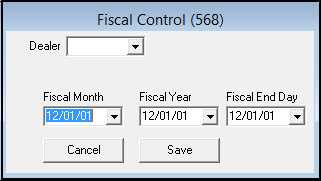
This graphic shows Fiscal Control as the program opens.
Field Descriptions
The following table describes the fields used in this program.
|
Field |
Description |
|
Dealer |
Dealer ID to close for the selected fiscal month or year. Note: Action 568/1 must be on to use this feature. |
|
Fiscal Month |
Month end date for this fiscal year. The date selected here is the day, month and year displayed in accounting on all transactions. O Changing this date indicates a change in the month to which the activity corresponds for accounting and reporting. |
|
Fiscal Year |
Year end date for this fiscal year. The date selected here is the day, month and year displayed in accounting on all transactions. O Changing this date indicates a change in the year to which the activity corresponds for accounting and reporting. |
|
Fiscal End Day |
Last day of this fiscal period. The date selected here does not affect any accounting transactions; it is only used for automatic Cognito work order closing logic when option ba492 is on. If this field is blank, automatic Cognito work order closing logic uses the last day of the Fiscal Month when option ba492 is on. |
Setting Fiscal Dates
To set a new fiscal date
1. In Fiscal Control (program #568) select the Fiscal Month or Fiscal Year you want to run.
Note: If you choose to manually enter the date, you must type all 6 digits with slashes.
2. Choose Save.
‰ SBN copies all current balances and open invoices to the special fiscal tables used to run financial reports.
Modifications and Updates to Fiscal Control
The following table lists modifications and updates to the Fiscal Control document.
|
Mod Number |
Date |
Description |
|
n/a |
8/04/14 |
Images updated. |