
Miscellaneous Inventory Fields
Miscellaneous Inventory Fields
Miscellaneous Inventory Fields
Program #: 1764
Module: System Administration
Overview
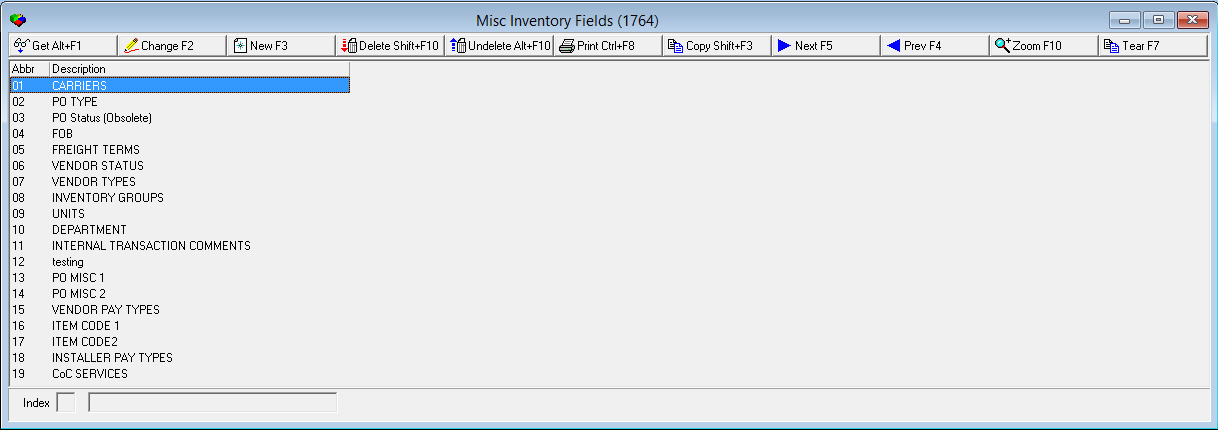
Use Miscellaneous Inventory Fields (program #1764) to define certain menus available throughout the purchasing and inventory programs in SBN. When the program opens, the window displays the indexes and default descriptions. Zoom into the sublevel to add to or view details of each index.
Note: Although a new button appears on this window, only IBS can add indexes. You can change the description of the index, but this does not change the functionality of the menu or the field label in the program where it appears.
To access this program, select Miscellaneous Inventory Fields (program #1764) from the main menu of SBN.
The Miscellaneous Inventory Fields Window
The following graphic shows Miscellaneous Inventory Fields as the program opens. The upper pane displays previously defined miscellaneous inventory fields.
Field/Column Descriptions
The following table describes the fields and columns used in the main window of Miscellaneous Inventory Fields.
|
Field/Column |
Description |
|
Abbr |
Index number. |
|
Description |
Description of the menu. |
Index Descriptions
The following table describes each index and lists the program in which the menu appears.
|
Index No. |
Index Name |
Description |
|
1 |
Carriers |
Used to define companies that deliver purchases. This menu appears in l Purchasing (program #571) l Vendor Master (program #1758) |
|
2 |
PO Type |
Used to define purchase order types. This menu appears in l Purchasing (program #571) l Vendor Master (program #1758) |
|
3 |
PO Status (Obsolete) |
No longer used in SBN. |
|
4 |
FOB |
Used to define where ownership of the purchase order receipts changes. This menu appears in l Purchasing (program #571) l Vendor Master (program #1758) |
|
5 |
Freight Terms |
Used to define who is responsible for the freight charges. This menu appears in l Purchasing (program #571) l Vendor Master (program #1758). |
|
6 |
Vendor Status |
Used to define any unique vendor status. This menu appears in Vendor Master (program #1758). |
|
7 |
Vendor Types |
Used to classify vendors, usually by the service they provide. This menu appears in Vendor Master (program #1758). |
|
8 |
Inventory Groups |
Used to subdivide inventory. This menu appears in programs l Items/Inventory Items tab (program #1535) l Systems (program #1883) |
|
9 |
Units |
Used to define the valid units of measure for inventory items. This menu appears in l Items (programs #1535) l Purchasing (program #571) |
|
10 |
Department |
Used when creating a new requisition in Branch Inventory (program #1757) when option ba220 in on. SBN uses this to construct a GL number based on a string defined in option ba221. |
|
11 |
Internal Transaction Comments |
Used to define pre-formatted comments when using the INTN transaction type. This appears in Branch Inventory/ Transactions (program #1757). |
|
15 |
Vendor Pay Types |
Used to define pay types for vendors. This menu appears in the Pay field of the Installer/Vendor list in the WIP tab of Work Orders. |
Using Common Functions
See the reference document Common Functions in SBN for more information.
Zooming into the Sublevel
Miscellaneous Inventory Fields contains a sublevel in which you can view the codes for each index or menu.
The Details Tab
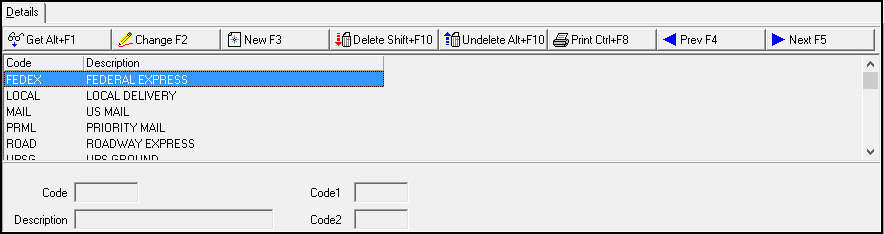
The following graphic shows the Details tab for the selected miscellaneous inventory field. The tab displays codes associated with the selected miscellaneous inventory field.
Field/Column Descriptions
The following table describes the fields and columns used in the details tab of the Miscellaneous Inventory Fields program.
|
Field/Column |
Description |
|
Code |
Abbreviation that identifies the code for the menu. |
|
Description |
Text description of the code. |
|
Code 1 |
Code to use on exports, if applicable. Note: In Index 15, Vendor Pay Types, the number entered in this field determines the calculations SBN makes in the Work Orders WIP tab. |
|
Code 2 |
Additional code to use on exports, if applicable. |
|
GL Account No |
You may associate a GL account with an inventory transaction. O This field appears only in the sublevel of Index 11, Internal Transaction Comments. |
Vendor Pay Type Code 1 Descriptions
In Index 15, Vendor Pay Types, the number entered in the Code 1 field determines the calculations SBN makes in the Work Orders WIP tab. The number entered in the Code 1 field should be unique for each Code entered in Index 15.
The following table describes each of the pay types in Index 15.
|
Code |
Code 1 |
Description |
|
A (Labor Cash Advance) |
6 |
Labor cash advance pay type. This pay type is client specific for company 156. |
|
D (Displacement Cash Advance) |
8 |
Displacement cash advance pay type. This pay type is client specific for company 156. |
|
K (Mileage) |
4 |
When a user selects this code in the Pay field of the Work Orders WIP tab, SBN enters the Mileage Rate from Standard Labor Rates (program #1795) for the associated Branch and Price List Group of the work order in the Amount field of the WIP tab. |
|
L (Labor) |
3 |
Standard labor cost. When a user selects this code in the Pay field of the Work Orders WIP tab, SBN enters the Labor Rate from Standard Labor Rates (program #1795) for the associated Branch and Price List Group of the work order in the Amount field of the WIP tab. |
|
M (Miscellaneous) |
7 |
Miscellaneous pay type. |
|
N (No Show) |
5 |
When a user selects this code in the Pay field of the Work Orders WIP tab, SBN enters the No Show Rate from Standard Labor Rates (program #1795) for the associated Branch and Price List Group of the work order in the Amount field of the WIP tab. |
|
P (Parts) |
9 |
When a user selects this code in the Pay field of the Work Orders WIP tab, SBN enters the Mileage Rate from Standard Labor Rates (program #1795) for the associated Branch and Price List Group of the work order in the Amount field of the WIP tab. This amount is added to the Labor amount for the work order, and the total appears in the Materials field in the Actual column of the work order Approval tab. |
Button Functions
The following table displays the buttons, describes the shortcut keys, actions, and functionality.
|
Button |
Name |
Shortcut Key |
Action |
Description |
|
|
Get |
ALT+F1 |
1764/ 1 |
Get record. |
|
|
Change |
F2 |
1764/ 2 |
Change selected record. |
|
|
New |
F3 |
1764/ 3 |
Create new record. |
|
|
Delete |
SHIFT+F10 |
1764/ 4 |
Delete selected record. |
|
|
Undelete |
ALT+F10 |
1764/ 5 |
Restore deleted record. |
|
|
|
CTRL+F8 |
1764/ 6 |
Print selected records. |
|
|
Search |
F6 |
1764/ 7 |
Search for agencies based upon entered parameters. |
|
|
Copy |
SHIFT+F3 |
1764/ 999 |
Copy current record. |
|
|
Tear |
F7 |
1764/ 999 |
Lists details of selected inventory field. |
|
|
Previous |
F4 |
1764/ 999 |
Select last record. |
|
|
Next |
F5 |
1764/ 999 |
Select next record. |











Modifications and Updates to Miscellaneous Inventory Fields
The following table lists modifications and updates to the Miscellaneous Inventory Fields document.
|
Mod Number |
Date |
Description |
|
n/a |
8/19/14 |
Images updated. |