
Using SBN Tunnel with SBN
This page describes how the SBN Tunnel is configured and used from within SBN.
For an overview of what SBN Tunnel is, how it falls back to VPN, and how to retrieve your license, see SBN Tunnel.
Walkthrough
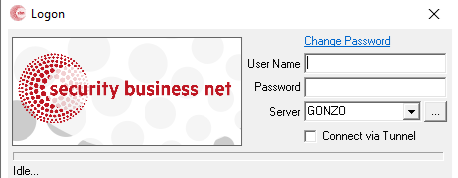
SBN opens the Tunnel dialog from a button on the login form.
SBN stores its tunnel license at %LOCALAPPDATA%\IBS\SBN\tunnels.json.
The Connect via Tunnel checkbox on the SBN logon screen controls whether this login goes through the tunnel. When checked, SBN reaches the server named in the Server field through the tunnel; when unchecked, SBN connects directly -- or through any VPN you already have active. The checkbox is remembered between sessions. The server name you type must match one of the destinations your license is authorized for.
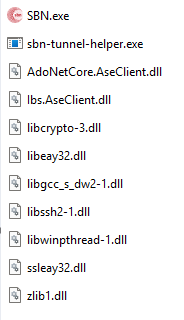
Every file shown above must be present in the same folder as SBN.exe for the tunnel to work. The install copies all of them automatically; if any one is missing, SBN cannot connect through the tunnel.
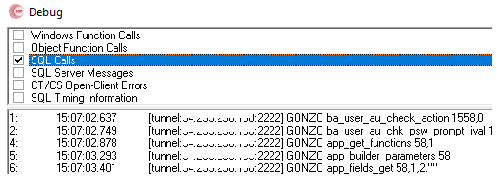
To confirm a connection is actually going through the tunnel, open the Debug window and check SQL Calls. When SBN is using the tunnel, each entry is prefixed with [tunnel:<host>:<port>] showing which tunnel server is in use. If the prefix is missing, SBN is connecting to that server directly.
Disabling the tunnel
Open the Tunnel dialog, clear the key, click Load, then OK. Subsequent logins will connect directly (VPN or direct network) as they did before the tunnel was configured.
Troubleshooting
Login says "There is no server listening at 127.0.0.1:<port>"
127.0.0.1 is your own PC, and the port is the tunnel's local relay, chosen at random each time SBN starts. The message means the tunnel could not reach the database at that moment, usually because the tunnel server was restarting or the network dropped. Close the message and log in again. If it keeps happening, open the Tunnel dialog and check that a server shows as connected, then contact support with the time it occurred.