
Contract Defaults
Contract Defaults
Contract Defaults
Module: System Administration
Overview
Use Contract Defaults (program #1803) to define contract defaults to associate with specific dealers. Contract Defaults also displays a blank dealer record that you can use to assign defaults to various contract types regardless of the dealer. A menu of Contract Defaults appears in the New dialog box of Contract Master (program #548).
To access this program, select Contract Defaults (program #1803) from the main menu of SBN.
The Contract Defaults Window
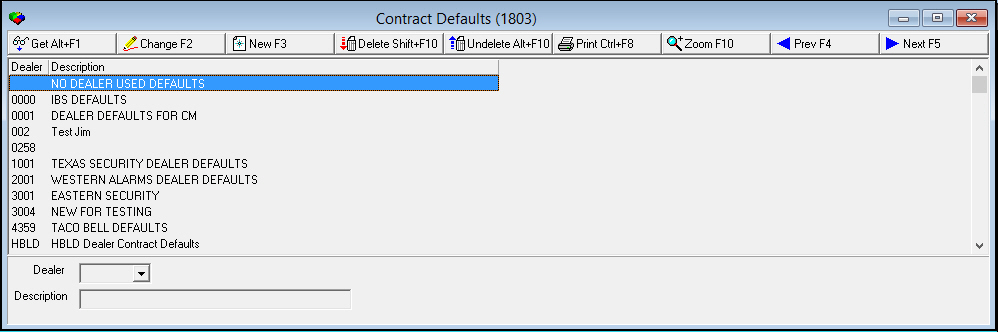
The following graphic shows Contract Defaults as the program opens. The upper pane displays previously defined contract defaults.
Field/Column Descriptions
The following table describes the fields and columns used in Contract Defaults.
|
Field/Column |
Description |
|
Dealer |
Dealer ID to which the selected contract defaults apply. |
|
Description |
Text description of the selected contract defaults. |
Using Common Functions
See the reference document Common Functions in SBN for more information.
Zooming into the Sublevel
Contract Defaults contains a sublevel in which you define defaults based on contract type for the selected dealer.
The Contract Defaults Details Tab
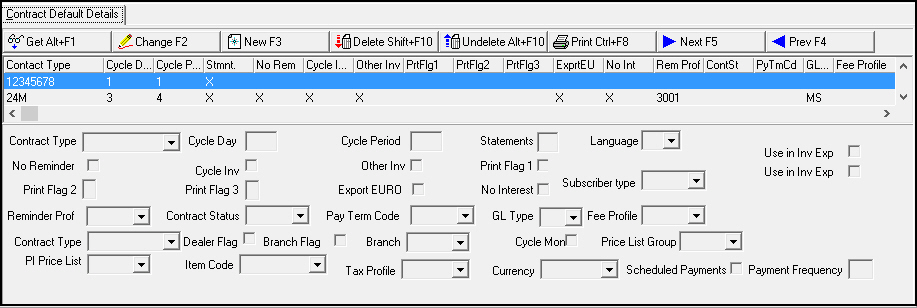
The Contract Default Details tab displays previously defined defaults by contract type.
Field/Column Descriptions
The following table describes the fields and columns used in the Contract Defaults Details tab.
|
Field/Column |
Description |
|
Contract Type |
Identifies the type of contract associated with selected dealer. (This menu originates from program #1531.) Field holds a maximum of 8 characters. |
|
Cycle Day |
Default cycle day for billing for the selected type of contract. |
|
Cycle Period |
Identifies the default cycle frequency, in months. |
|
Statements |
Type an X in this field if this type of contract receives statements. Type a + in this field to have SBN generate an interim statement. |
|
Language |
Select a language for this contract type from the drop-down menu. This is the default language for new contracts you create in Contract Master (program #548). |
|
No Reminder |
If this check box is selected, the selected contract type does not receive reminders. |
|
Cycle Inv |
If this check box is selected, the selected contract type receives cycle invoices. |
|
Other Inv |
If this check box is selected, the selected contract type receives one-time or other types of invoices. |
|
Print Flag 1 |
Identifies the information about taxes to include on invoices for the selected type of contract. Select this check box if amounts printed on invoices include tax. Leave this check box blank if amounts printed on invoices do not include tax. |
|
Use in Inv Exp (1) |
Select this check box to automatically select the Use in Inv Exp (1) check box when creating a new billing account for the selected contract type in Contract Master (program #548). This includes the email address for the account in Export 11. |
|
Print Flag 2 |
Identifies the information about the installation to include on invoices for the selected type of contract. l Blank = invoices contain only contract information l 1 = invoices contain the installation number l 2 = invoices include the installation number and the address l 3 = invoices include the installation name and city |
|
Print Flag 3 |
Identifies the information about installed components to include on invoices for the selected type of contract. l Blank = invoices do not include a list of installed components l 1 = only one-time invoices include a list of installed components l 2 = only cycle-fee invoices include a list of installed components l 3 = all invoices include a list of installed components |
|
Export EURO |
If this check box is selected, invoices for the selected contract type contain a conversion to EUROs. |
|
No Interest |
If this check box is selected, this contract type is not charged interest on late payments. |
|
Subscriber Type |
You may select a subscriber type to associate with the selected default. (This menu originates from program #1534.) |
|
Use in Inv Exp (2) |
Select this check box to automatically select the Use in Inv Exp (2) check box when creating a new billing account for the selected contract type in Contract Master (program #548). This includes the email address for the account in Export 11. |
|
Reminder Prof |
If the selected type of contract receives reminders, identifies the default reminder profile. (This menu originates from program #1562.) |
|
Contract Status |
Identifies the default contract status for the selected type of contract. (This menu originates from program #1532.) |
|
Pay Term Code |
Identifies the default code for payment terms for the selected type of contract. (This menu originates from program #1529.) |
|
GL Type |
Identifies the type of GL account. (This menu originates from program #1578.) |
|
Fee Profile |
You may select an invoice fee profile to attach to the selected contract default. (This menu originates from program #1619.) |
|
Contract Type |
You may select a second contract type to associate with the selected contract default. (This menu originates from program #1531 but displays only those contract types associated with the dealer selected in the main level of Contract Defaults). O Use this field with Partner Invoicing to default into the second contract created for active franchises. |
|
Dealer Flag |
If you enter a check mark in this box, in contracts that use the selected default SBN populates the Dealer ID in Contract Master and Installation Billing with the dealer ID selected in Data Entry for the installation. O Use this field with Partner Invoicing. |
|
Branch Flag |
If you enter a check mark in this box, in contracts that use the selected default SBN populates the Branch in Contract Master and Installation Billing with the installation branch selected in the Branch field of this tab. O Use this field with Partner Invoicing. |
|
Branch |
If you enter a check mark in the Branch Flag box in this tab, select the installation branch that will default into the Branch in Contract Master and Installation Billing. (This menu originates from program #1530 but displays only those installation branches associated with the dealer selected in the mail level of Contract Defaults.) O Use this field with Partner Invoicing. |
|
Cycle Mon |
If you enter a check mark in this box, in contracts that use the selected default SBN defaults the Cycle Mon in Contract Master with the cycle month selected in Data Entry for the installation. O Use this field with Partner Invoicing. |
|
PI Price List Group |
This field only applies to Securitas Partner Invoicing. Price List group attached to the Partner Invoice contract. |
|
Item Code |
This field only applies to Securitas Partner Invoicing. Item code for the auto-creation of the cycle fee on the Partner Invoice contract. |
|
Price List Group |
You may select a price list group to associated with the selected default. (This menu originates from program #1771 but displays only those price list groups associated with the dealer selected in the main level of Contract Defaults.) O Use this field with Partner Invoicing. |
|
Tax Profile |
You may select a tax profile to associate with the selected default. (This menu originates from program #1514.) |
|
Currency |
You may select a currency type to associate with the selected default. |
Button Functions
The following table displays the buttons, describes the shortcut keys, actions, and functionality.
|
Button |
Name |
Shortcut Key |
Action |
Description |
|
|
Get |
ALT+F1 |
1803/ 1 |
Get record. |
|
|
Change |
F2 |
1803/ 2 |
Change selected record. |
|
|
New |
F3 |
1803/ 3 |
Create new record. |
|
|
Delete |
SHIFT+F10 |
1803/ 4 |
Delete selected record. |
|
|
Undelete |
ALT+F10 |
1803/ 5 |
Restore deleted record. |
|
|
|
CTRL+F8 |
1803/ 6 |
Print selected records. |
|
|
Zoom |
F10 |
1803/ 7 |
Zoom in/out of sublevel |
|
|
Previous |
F4 |
1803/ 999 |
Select last record. |
|
|
Next |
F5 |
1803/ 999 |
Select next record. |









Modifications and Updates to Contract Defaults
The following table lists modifications and updates to the Contract Defaults document.
|
Mod Number |
Date |
Description |
|
n/a |
8/15/14 |
Images updated. |