
Send Email
Program #: 706
Module: Utilities
Overview
Use Send Email (program #706) to send emails from SBN. With this program, you can send Alarm Log records directly by email. You must have your email server configured in SBN Client Options before SBN can effectively send emails.
Navigating to Send Email
Use the following steps to navigate to Send Email:
1. From the main SBN toolbar, select Menu.
2. From the drop-down menu, select Go To [ALT+F1].
3. In the Go To Program dialog box, type in "706."
w The Send Email window opens.
The Send Email Window
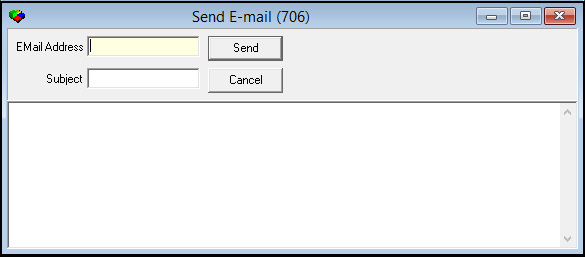
The following graphic shows the Send Email window as the program opens.
Field Descriptions
The following table describes the fields used in Send Email.
|
Field |
Description |
|
Email Address |
Enter the email address to which you want to send this email. |
|
Subject |
Appears as the subject line in the email. |
Configuring Email Options
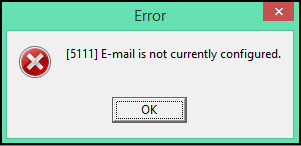
You must configure your email server in SBN Client Options before attempting to send an email from this program or from the Alarm Log. If you try to send an email without configuring your email settings, an error message appears.
Use the following steps to configure email:
1. From the main SBN toolbar, select View.
2. From the drop-down menu, select Options [CTRL+O].
w The Client Options window opens.
3. Select the Communications tab.
w The Communications tab opens.
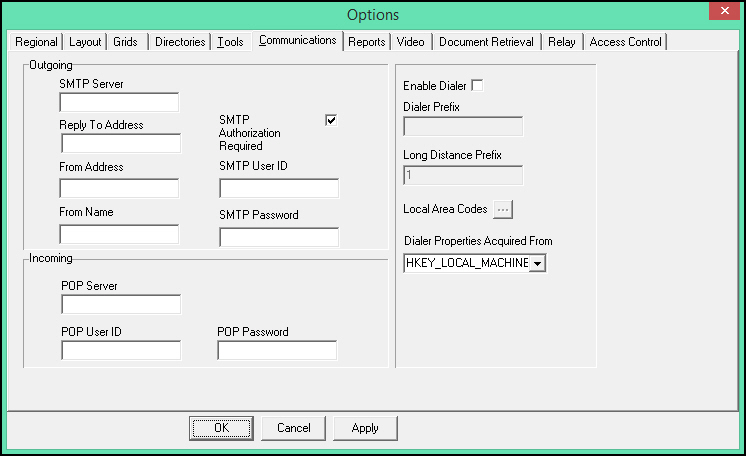
4. Complete the Outgoing fields:
-
In SMTP Server enter the email server information.
-
In Reply To Address enter the email address to which email recipients should reply.
-
In From Address enter the email address from which SBN emails are sent.
-
In From Name enter the name email recipients acknowledge as the sender.
-
Select the SMTP Authorization Required check box if your company's email server requires authorization. If you select this check box, enter a User ID and Password for secure log-in to your email server.
5. Choose Apply.
6. Choose OK.
Related Programs
The following table lists programs related to Send Email.
|
Program |
Number |
Document Link |
Description |
|
Email Queue |
545 |
Access a log of outstanding or failed email messages from SBN. |
|
|
Alarm Log tab |
N/A |
Email the current view of the Alarm Log. |
Button Functions
The following table describes the buttons and functionality.
|
Name |
Description |
|
Send |
Send email to the designated address. |
|
Cancel |
Exit without sending an email. |
Secure Email and Multiple Recipients
SBN can send email over SSL/TLS, and multiple recipient addresses separated by a semicolon are supported. Email address validation allows valid characters such as a minus sign.
Modifications and Updates to Send Email
The following table lists modifications and updates to the Send Email document.
|
Mod Number |
Date |
Description |
|
n/a |
12/23/08 |
document created |
|
n/a |
09/02/14 |
Images updated. |
|
|
|
|