
Autofeed Interrupt Reasons
Autofeed Interrupt Reasons
Autofeed Interrupt Reasons
Program #: 1669
Module: Utilities
Overview
Use Autofeed Interrupt Reasons (program #1669) to maintain interrupt reason codes, which indicate a reason that an operator has to interrupt handling an alarm and whether the interruption will disable the alarm autofeed feature in Dispatch (program #537).
Navigating to Autofeed Interrupt Reasons
Use the following steps to navigate to Autofeed Interrupt Reasons:
1. From the main SBN toolbar, select Menu.
2. From the drop-down menu, select Go To.
3. In the Go To Program dialog box, type in "1669" and press Enter.
w Autofeed Interrupt Reasons opens.
The Autofeed Interrupt Reasons Window
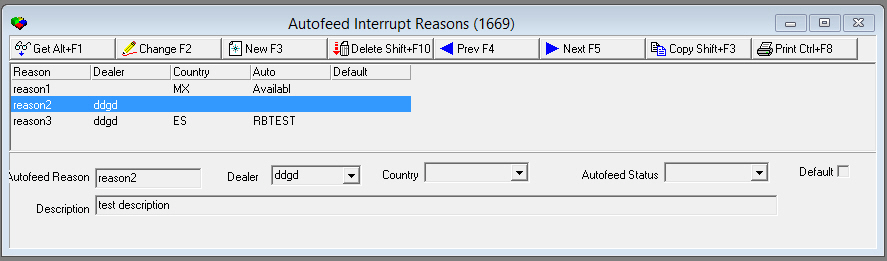
The following graphic shows Autofeed Interrupt Reasons.
Field/Column Descriptions
The following table describes the fields and columns used in Autofeed Interrupt Reasons.
|
Field/Column |
Description |
|
Autofeed Reason |
Name of the autofeed interrupt reason. |
|
Dealer |
Drop-down menu from which you can select a dealer. If you leave this field blank, it will include all dealers. |
|
Country |
Drop-down menu from which you can select a country. If you leave this field blank, it will include all countries. |
|
Autofeed Status |
Drop-down menu from which you can select an autofeed status code. The autofeed status code determines whether SBN disables alarm autofeed in Dispatch when you choose the selected interrupt reason. (This menu originates from program #1668.) |
|
Default |
Select this check box to indicate that the current reason is the default setting. |
Creating an Autofeed Interrupt Reason
Use the following steps to create a new autofeed interrupt reason:
1. Choose New Record.
w The fields open for changes.
2. Enter details of the new autofeed interrupt reason.
3. Choose Save.
Changing an Autofeed Interrupt Reason
Use the following steps to change an autofeed interrupt reason:
1. Select the autofeed interrupt reason you want to change by double-clicking it, or choose Get Record.
w The fields open for changes.
2. Enter changes.
3. Choose Save.
Deleting an Autofeed Interrupt Reason
Use the following steps to delete an autofeed interrupt reason:
1. Select the autofeed interrupt reason you want to delete.
2. Double-click your selection or choose Get Record.
3. Choose Delete Record.
w A confirmation dialog box opens.
4. Choose Yes.
w SBN removes the autofeed interrupt reason from the list.
Copying an Autofeed Interrupt Reason
Use the following steps to copy an autofeed interrupt reason:
1. Select the autofeed interrupt reason you want to copy.
2. Double-click your selection or choose Get Record.
3. Choose Copy Record.
w The fields open for editing.
4. Type a name in the Autofeed Reason field, and then change the other fields as needed.
w SBN saves the new autofeed interrupt reason.
Button Functions
The following table displays the buttons, describes the shortcut keys, actions and functionality.
|
Button |
Name |
Shortcut Key |
Action |
Description |
|
|
Get Record |
alt+f1 |
1669/1 |
View details of selected record. |
|
|
Change Record |
f2 |
1669/2 |
Change selected record. |
|
|
New Record |
f3 |
1669/3 |
Create new record. |
|
|
Delete Record |
shift+f10 |
1669/4 |
Delete selected record. |
|
|
Previous |
f4 |
1669/1 |
Scroll to previous record. |
|
|
Next |
f5 |
1669/1 |
Scroll to next record. |
|
|
Copy |
Shift+F3 |
1669/3 |
Copy selected record. |
|
|
Print Selected Records |
ctrl+f8 |
1669/5 |
Print displayed records. |








Modifications and Updates to Autofeed Interrupt Reasons
The following table lists modifications and updates to the Autofeed Interrupt Reasons document.
|
Mod Number |
Date |
Description |
|
08.79.09423, 07.79.22983, 08.79.09416, 07.79.22975, 08.79.09415, 07.79.22974, 08.79.09413, 07.79.22972 |
10/9/13 |
document created |
|
n/a |
8/27/14 |
Images updated. |