
Change Log
Module: Account Management
Overview
Use the Change Log tab to display all changes that users have made to a customer installation record. The log lists the changes in order, beginning with the most recent. The Change Log displays the data users changed both in its original and new forms and uses abbreviations to indicate which fields users changed. Option mo105 must be on in order for SBN to record changes in the log.
The Change Log displays all changes made in Data Entry (program #559) and some related tabs, depending on various option settings. (See Change Log Options.) Changes SBN records in the log include:
Changes to service tickets for an installation.
Additions or changes to information in the Inspections tab. (See Inspections.)
Changes to installation work orders, such as scheduling (allocating) or unscheduling (unallocating), if option ba362 is on.
Deletion of CIDs from an installation.
This document covers the following topics:
Viewing the Change Log Archive
Navigating to the Change Log
Use the following steps to access the Change Log:
1. From the main SBN toolbar, select Menu.
2. From the drop-down menu, select Go To.
3. In the Go To Program dialog box, type in "559" and press Enter.
w Data Entry Master and Basics opens.
4. Choose the Change Log tab in the lower pane of Data Entry.
Change Log Options
Options control many Change Log functions. The following list describes the options related to the Change Log. For detailed information on each option and its default setting, see SBN Options. Option mo105 must be on for the following options to take effect.
Option ba191 - When on, SBN records changes users make to Zones in the Change Log.
Option ba192 - When on, SBN records changes users make to Action Plan texts in the Change Log.
Option ba193 - When on, SBN records changes users make to Action Plan call lists in the Change Log.
Option ba227 - When on, if you choose Zone Test in the Zones tab and make changes, SBN records them in the Change Log.
Option ba229 - When on, SBN records changes users make to Open/Close Schedules in the Change Log.
Option ba289 - When on, if a user changes a passcard number in the Action Plans tab, SBN records the change in the Change Log of all customers who use the passcard.
Option ba362 - When on, SBN records scheduled (allocated) or unscheduled (unallocated) work orders for the installation in the Change Log.
Option ba418 - When on, SBN archives entries in the Data Entry Change Log, Contract Master Account Change Log, and Contract Master Contract Change Log. Job #38 in Background Tasks (program #1712) archives the change logs at customer-defined intervals. When off, SBN does not archive the change logs.
Option blccsec - When on, SBN masks credit card numbers in the Change Log.
Option mo105 - When on, SBN enables the Data Entry Change Log.
The Change Log Tab
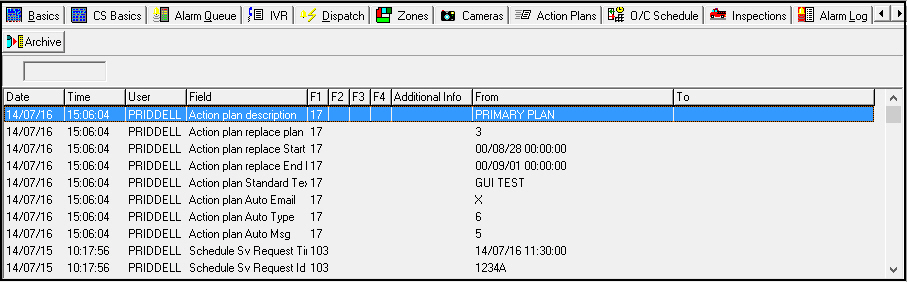
The following graphic shows the Change Log tab with installation changes displayed.
Field/Column Descriptions
The following table describes the field and columns in the Change Log tab.
Column |
Description |
Change Log Type (no label) |
Type of change log that you are currently viewing. l Blank — normal change log. This is the default Change Log view. l Archive — change log archive. Note: Option ba418 must be on in order for SBN to archive the Change Log. |
Date |
Date a user changed the data. |
Time |
Time a user changed the data. |
User |
ID of the user who made the change. |
Field |
Log abbreviation of the field where a user made the change. Note: For Change Log entries from 2007 and earlier, SBN used different field abbreviations. See Old Change Log Abbreviations for a list of old abbreviations and their descriptions. |
Field Ext 1 |
Field extension where a user made the change. Fields with multiple rows, such as fields in the CID grid and the Codewords grid, have an extension number for each row in the field. Depending on what data a user changed, this column may display other related information, such as: l a service request number l a work order number l an action plan contact sequence number |
Field Ext 2 |
Field extension where a user made the change, or other related information, such as: l a service request number l a work order number l an action plan contact sequence number |
Field Ext 3 |
Field extension where a user made the change, or other related information, such as: l a service request number l a work order number l an action plan contact sequence number |
Field Ext 4 |
Field extension where a user made the change, or other related information, such as: l a service request number l a work order number l an action plan contact sequence number |
Additional Info |
Additional information about the change. This may include zone details (zone ID, area number, and signal type code), action plan agency details, a passcard number and extension, or a general description of the change. |
From |
Original data, before a user changed it. Note: Deleted CIDs appear in the Change Log only in the From column. The To column is blank. |
To |
New data after the change. This column also displays the reason for a work order hold. Note: New CIDs appear in the Change Log only in the To column. The From column is blank. |
Viewing the Change Log Archive
You can toggle the Change Log view to display recent Data Entry changes or an archive of past Data Entry changes.
Note: Option ba418 must be on in order for SBN to archive the Change Log.
Use the following steps to toggle the Change Log view:
1. Choose Archive.
w SBN displays archived Change Log entries. The unlabeled Change Log Type field indicates that you are viewing the archive.
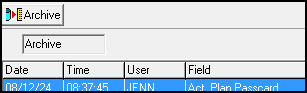
2. To return to the normal Change Log view, choose Archive again.
w SBN displays recent Data Entry changes.
Related Programs
The following table lists programs related to the Change Log.
Program |
Number |
Document Link |
Description |
Data Entry Master and Basics |
559 |
Create and maintain customer monitoring installation records. SBN records changes in the Change Log. |
|
Service Log Tab |
N/A |
Create and maintain installation service requests. SBN records changes in the Change Log. |
|
Inspections Tab |
N/A |
Establish installation inspection agencies and track inspection history. SBN records changes in the Change Log. |
|
Zones Tab |
N/A |
Define and maintain protected locations on installation premises. SBN records changes in the Change Log when option ba191 is on. |
|
Action Plans Tab |
N/A |
Create and maintain customer-defined alarm response plans and call lists. SBN records changes to Action Plan texts and call lists in the Change Log when options ba192 and ba193 are on. SBN records passcard changes when ba289 is on. |
|
Open/Close Schedule Tab |
N/A |
Manage schedules on installations for which you want to monitor open and close times. SBN records changes in the Change Log when option ba229 is on. |
|
Background Tasks |
1712 |
Set up background job #38 to archive the Change Log at defined intervals. |
Button Function
The following table displays the button, describes the shortcut key, action, and functionality.
Button |
Name |
Shortcut Key |
Action |
Description |
|
Archive |
f12 |
559/221 |
Toggle between the normal Change Log and archive views. |

Work-Order Approvals Logged
Work-order approvals are recorded in the location change log.
Modifications and Updates to the Change Log
The following table lists modifications and updates to the Change Log
document.
Mod Number |
Date |
Description |
n/a |
03/10/09 |
document rewritten |
n/a |
07/17/14 |
Images updated. |
07.92.26475, 07.92.26476 |
08/31/20 |
Change Log now keeps a record when creating, editing, and deleting phases from the Phasing Tab in Data Entry Master and Basics (#559) |
07.92.26482, 07.92.26471 |
08/31/20 |
Phasing now displays the last line of a comment made in the grid. |