
Background Tasks
Module: System Administration
Overview
Use Background Tasks (program #1712) to delete and clean information from SBN. Use this program to set all background cleaners to run. Run the tasks at off peak times to allow for the least amount of impact on SBN.
Only one or two people should have access to this program.
To access this program, select Background Tasks (program #1712) from the main menu of SBN.
The Background Tasks Window
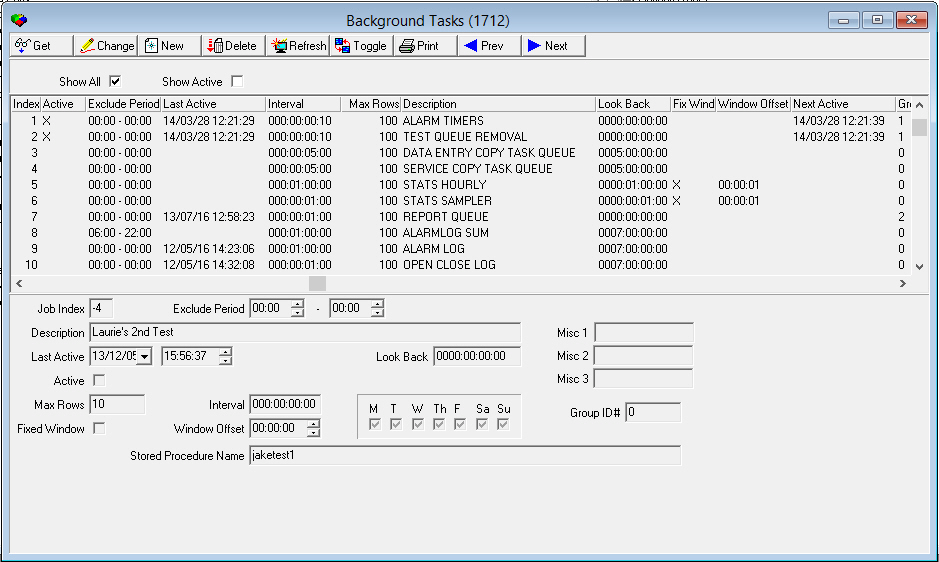
The following graphic shows Background Tasks as the program opens. Each line in the display represents a function in the system. The columns in the upper pane display a complete list of all tasks that you can run. The fields in the lower pane display details about each task.
Field/Column Descriptions
The following table describes the fields and columns used in Background Tasks.
Field/Column |
Description |
Index |
Identification number for this task. |
Active |
If this column displays an X, this task is active in SBN. |
Exclude Period |
Time period, in hours and minutes, that this task is not scheduled to run. |
Last Active |
Last date and time that this task was run. A default date of 80/01/01 is present if this task has never been run. |
Interval |
Shows how often this task is run. This depends on the type of task. Intervals are shown as Day:Hour:Minutes:Seconds. |
Max Rows |
Maximum number of rows of data the program may affect during each activation. |
Description |
Free format description of this task. |
Look Back |
For tasks that relate to deleting items, this field determines the length of time data is kept before it is deleted. For other tasks, this field is used to determine the grace period on alarms. |
Fixed Window |
A check mark in this field causes the task to run based on the deferred time shown in the offset window field rather than on the interval period. |
Window Offset |
Amount of time this task is delayed from the interval period. Only use this if the Fixed Window field has been marked. |
Next Active |
Next date and time that this task is scheduled to run. |
Group ID# |
Group number of the selected task. The Background Tasks Service runs a separate session for each background task group. |
Job Index |
Identification number for the selected task. User-created Background Tasks always have a negative number to distinguish them from default Background Tasks. |
Exclude Period |
The beginning of any period in which the Background Task should not run. The default is 00:00. |
Exclude Period 2 (unlabeled) |
The end of any period in which the Background Task should not run. The default is 00:00. |
Description |
The chosen descriptive name of the Background Task. |
Misc 1 |
Defines maintenance date range to generate service tickets for. Number of days entered in this field is added to the number of days in the Maintenance Frequency field of program #559. Service tickets are generated for all installations with Maintenance Dates that fall within the defined range. Used for Jobs 58 and 59. |
Misc 2 |
Service request status code. Used for Jobs 58 and 59. |
Misc 3 |
Service request priority. Used for Jobs 58 and 59. |
Last Active |
The date when this Background Task was last active. |
Last Active 2 (unlabeled) |
The time when this Background Task was last active. |
Look Back |
For tasks that relate to deleting items, this field determines the length of time data is kept before it is deleted. For other tasks, this field is used to determine the grace period on alarms. |
Active |
This checkbox notes whether this Background Task is currently active. |
Max Rows |
Maximum number of rows of data the program may affect during each activation. |
Interval |
Shows how often this task is run. This depends on the type of task. Intervals are shown as Day:Hour:Minutes:Seconds. If this field is set to 0, the maximum number of consecutive missing signals feature will not work. |
MTWThFSaSu |
A check mark in each field determines what days this task should be run. |
Group ID # |
Group number of the selected task. |
Fixed Window |
A check mark in this field notes that the Background Task will run during a fixed window of time on every day that it is scheduled. |
Window Offset |
The additional number of hours, minutes, and seconds past the default time when the Background Task will run. |
Stored Procedure Name |
The name of the stored procedure. This field is only accessible on user-created Background Tasks. |
Helpful hint: grace periods
It is often better not to define a grace period. For example, if a technician asks for one hour, he should be allotted that time. If he thinks it will take him longer to complete the task, then he should ask for extended time. Grace periods, if they are of considerable length, can throw off schedules for the day.
Task Descriptions
The following table describes the purpose of each task listed by index number. For all tasks, if an Exclude Period is set to 00:00, the task runs continuously.
Task # |
Task Name |
Description |
0 |
Copy Task Log |
Cleans the log of inter-machine copies. |
1 |
Alarm Timers |
Runs tasks for timers that are attached in monitoring. |
2 |
Test Queue Removal |
Removes active alarms from test and runaway mode after the test interval has expired. The process checks for "restore required" and generates a "prev reported" event, for all zones that are not considered restored. Note: This task no longer closes service requests that were created when users put installations in test mode. |
3 |
Data Entry Copy Task |
Deletes the Copy Queue for Data Entry copy task copies. This task only displays if option ba101 is on and includes ma_sim_phone. |
4 |
Service Copy Task |
Deletes the Copy Queue for Service copy tasks copies. This task only displays if option ba102 is on. |
5 |
Stats Hourly |
Runs miscellaneous statistics hourly. |
6 |
Stats Sampler |
Collects run-time statistics used by SBN Graphs. |
7 |
Report Queue |
Clears old entries from the Report Queue. |
8 |
Alarm Log Sum |
Clears summary Alarm Log information. This task only displays if option sys013 is on. |
9 |
Alarm Log |
Clears the alarm log. This task only displays if option sys013 is on. Note: If using option sys013, be sure to set the number of days you want to keep your Alarm Log history. |
10 |
Open/Close Log |
Clears the Open/Close log. This task only displays if option sys013 is on. Note: If using option sys013, be sure to set the number of days you want to keep your Open/Close Log history. |
11 |
Temp Comments |
Clears temporary comments that have expired. This task only displays if option sys013 is on. |
12 |
Item Log |
Clears entries from the Inventory log. This task only displays if option sys006 is on. |
13 |
Passcards |
Clears expired passcards. This task only displays if option sys013 is on. |
14 |
Mon Stat Change |
Changes the Monitoring Status of installations on the date specified in Data Entry to the status in the New Mon Stat field of Data Entry Master (program #559). Changes the Monitoring Status of CIDs on the date specified in the Data Entry CID grid to the status in the New Mon Stat column of the Data Entry CID grid. Note: To avoid losing the previous monitoring status of each changed installation or CID, do not use the Grace Period feature for this task. Enter 0000:00:00:00 in the Look Back field. |
15 |
Inventory Allocation |
Updates the current allocations in program #1757 Branch Inventory for use in the Pieces Allocated column. This is based on the Work Order date and the Look Back Time. |
16 |
Composite Schedule |
Updates the composite Open/Close Schedules by deleting old schedules and creating new ones. This task only displays if option sys013 is on. |
17 |
Contract Expiration Date |
Sets the expiration dates in Contract Master. This task only displays if option sys013 is on. |
18 |
Test Timer |
Controls monitoring test timers. If the missing test timer is less than 5 minutes over due when this task begins running, SBN uses the old time plus the interval when resetting the timer. If the missing test timer is more than 5 minutes over due when this task begins running, SBN uses the current time plus the interval when resetting the timer. This task only displays if option sys013 is on. Note: Your settings for test timers depend on the numbers of operators you have and how often you get expired test timers. You may want to set the exclude for nighttime. |
19 |
Spec Watch (no longer available) |
Defines the number of days ahead to create special watch tickets. This task is no longer supported in SBN. |
20 |
Billing Copy Task Queue |
Deletes the Copy Queue for Billing copy task copies. The Look Back Days define the number of days that Billing records are kept. This task only displays if option ba104 is on. |
21 |
Marketing Copy Task Queue |
Deletes old entries from the Copy Queue for Marketing copy tasks. The Look Back Days define the number of days that Marketing copy tasks are kept. This task only displays if option ba105 is on. |
22 |
Work Order Copy Task Queue |
Deletes the Copy Queue for Work Order inter-machine copies. The Look Back Days define the number of days that Work Order records are kept. This task only displays if option ba106 is on. |
23 |
Scheduling Copy Task Queue |
Deletes the Copy Queue for Scheduling copy task copies. The Look Back Days define the number of days that Scheduling records are kept. This task only displays if option ba113 is on. |
24 |
Schedule Generation Technicians |
Generates technician schedules for days defined in the Look Back field. This task only displays if option sys004 is on. Using this program to regenerate previously calculated schedules slows the process. |
25 |
Schedule Generation Installations |
Generates installer schedules for days defined in the Look Back field. Using this program to regenerate previously calculated schedules slows the process. This task only displays if option sys004 is on. |
26 |
Schedule Generation Sales |
Generates sales person schedules for days defined in the Look Back field. Using this program to regenerate previously calculated schedules slows the process. This task only displays if option sys004 is on. |
27 |
Work Order Transfer |
Transfers and purges Work Orders that have been sent to the Lawson tables. This task only displays if option in001 is on. |
28 |
Commission Transfer |
Transfers and purges commission information that has been sent to the Lawson tables. This task only displays if option in 001 is on. |
29 |
Referral Transfer |
Transfers and purges referral payment information that has been sent to the Lawson tables. |
30 |
Work Order Adjustment Transfer |
Transfers and purges work order adjustments that have been sent to the Lawson tables. |
31 |
Invoice Transfer |
Transfers and purges invoices that have been sent to the Lawson tables. |
32 |
Payment Transfer |
Transfers and purges payments that have been sent to the Lawson tables. |
33 |
Write Off Transfer |
Transfers and purges write offs that have been sent to the Lawson tables. |
34 |
Work Order Allocations |
Transfers and purges work order allocations that have been sent to the Lawson tables. |
35 |
Aut Post Payments |
Auto posts payments that have been placed on hold and are awaiting invoicing on a work order. This task only displays if option sys003 is on. |
36 |
Auto Run Onscreen Aging |
Runs update contract / account agings (program #576), which updates onscreen aging, collection database, and collector statistics. This is also needed for reminder calculations. |
37 |
SBN System Backup |
For IBS use only. |
38 |
DE Log |
Moves entries from the Change Log of Data Entry (program #559) into an archive. Moves entries from the Account Change Log of Contract Master (program #548) into an archive. Moves entries from the Contract Change Log of Contract Master (program #548) into an archive. Note: Look Back functions as a retention period for Data Entry Change Log. Option ba418 must be on to archive the change logs. |
39 |
Navision Item |
Deletes the nav-items table. The Look Back Days define the number of days that records with a status of -1 are kept. This task only displays if option in002 is on. |
40 |
Navision Allocations |
Deletes the nav_alloc table. The Look Back Days define the number of days that records with a status of -1 are kept. This task only displays if option in002 is on. |
41 |
Navision Satellite |
Deletes the nav_satellites table. The Look Back Days define the number of days that records with a status of -1 are kept. This task only displays if option in002 is on. |
42 |
Userlogin Log |
Purges Userlogin Log activity not within the previous one year period. |
43 |
Navision Inventory Calc |
Calculates inventory numbers. Should be set for 1 day back and a fixed window offset of 00:05:00. |
44 |
Navision Inventory Transfer |
Transfers to the work orders. This background job includes internal use transactions. |
45 |
Navision Vendors |
Synchronizes vendors with Navision. |
46 |
Navision Purcorders |
Synchronizes purchase orders with Navision. |
47 |
Old Quotes |
Flags work orders not closed and not invoiced with a change date <xxx as deleted. |
48 |
Book Delay |
Sets service ticket status to PTRL if:
|
49 |
Book Missed |
Sets service ticket status to PTRL if:
|
50 |
Alarm Log Sum Arc |
Clears summary Alarm Log information from archive tables. |
51 |
Alarm Log Arc |
Clears archived Alarm Log entries. |
52 |
Open Close Log Arc |
Clears archived Open / Close log entries. |
53 |
Call Out Log |
This job removes entries from the Call Out log that are not flagged with "Quality Control". |
54 |
Zone Ext |
This job removes rows from zone.ext if they are more than X days old. Warning: Do not set the number of days any shorter than the longest test period set in Test Queue. |
55 |
Error Account Alarm Log |
This job removes alarms older than date specified for all accounts in the Error Account program. |
56 |
Customer Specific |
Customer may create a large stored procedure, such as a scheduled update. (IBS recommends stopping background jobs when a procedure is replaced.) Note: For Customer Specific background tasks, IBS supplies a dummy procedure called cp_bg_jobs_userdef which does nothing. Customers can create their own procedure on the fly to do updates (or whatever procedure they need) which will execute under program #1712 control. Procedure receives 3 parameters:
When the user has completed his/her task, the user can put the default procedure back. |
57 |
Data Entry Log Arc |
Deletes entries from the Change Log archive of Data Entry (program #559) and the Account Change Log and Contract Change Log archives of Contract Master (program #548). Note: Option ba418 must be on to archive the change logs. |
58 |
Maintenance Tickets (701) |
Generates maintenance tickets for selected dates and installations as in program #701. |
59 |
Inspection Tickets (701) |
Generates inspection tickets for selected dates and installations as in program #701. |
60 |
Work Order Closing |
Closes work orders marked for billing when option ba385 is on. When option ba492 is on, this task approves and closes Cognito work orders for Company 105 that meet the conditions listed in the Options B document. Note: This task should only run on the Billing server in a Billing/Monitoring split system. |
61 |
Alarm Log Sum Arc Sec |
Determines what data from the Alarm Log SBN stores in the secondary archive. |
62 |
Alarm Log Arc Sec |
Determines what data from the Alarm Log SBN stores in the secondary archive. |
63 |
Open Close Log Arc Sec |
Determines what data from the O/C Log SBN stores in the secondary archive. |
64 |
Bluelink GL Export |
Allows interface with Bluelink software to run monthly GL exports. |
65 |
Bluelink PO Export |
Allows interface with Bluelink software to run LCT accruals. |
66 |
Test Queue Insert |
Inserts zones into the Test or Runaway Queue that have been set to go into Test or Runaway on a specific date and time in the Test Queue tab of Data Entry (program #559). |
67 |
POC Revenue Calc |
Calculates work order Percent of Completion values. |
68 |
Alarm Queue Transfer |
Transfers alarms from one queue to another according to setup in Alarm Queue Transfer (program #1696). |
69 |
Remove Old Schedule Req |
Removes schedule requests (work orders, service requests, and sales visits) from the Service Request List in Scheduling (program #563). The Max Rows field indicates the number of requests that will be removed per background job run. The Schedule Date field in Program #563 determines which jobs are old enough to be removed. |
70 |
Branch Move for Team Sold Ins |
Customer specific for company 120. |
71 |
QAS Address Update |
Updates addresses in Data Entry (program #559) from table w#qas_inst_addr. Note: If there is more than one address for an installation in the table, SBN uses the most recent address to update Data Entry. |
72 |
Sales Survey |
Processes sales survey emails in the survey queue. Note: Email Service must run for SBN to send emails. Option survey1 must be on to add a sales survey to the queue when a sales visit is scheduled in program #563 for a sales resource. |
73 |
Work Order Survey |
Processes work order survey emails in the survey queue. Note: Email Service must run for SBN to send emails. Option survey2 must be on to add a work order survey to the queue when a work order is closed. |
74 |
Maint SV Survey |
Processes maintenance service request survey emails in the survey queue. Note: Email Service must run for SBN to send emails. Option survey3 must be on to add a maintenance survey to the queue when a service request with a status defined by option sur3_val is outdated. |
75 |
Insp SV Survey |
Processes inspection service request survey emails in the survey queue. Note: Email Service must run for SBN to send emails. Option survey4 must be on to add an inspection survey to the queue when a service request with a status defined by option sur4_val is outdated. |
76 |
Cycle Fee Generation |
Creates cycle fees on installations with codes selected in the Class fields of program #559 that have cycle fees defined in Installation Classes (program #1555). Note: This task should only run on the Billing server in a Billing/Monitoring split system. |
77 |
Cognito Queue Cleaner |
Deletes Cognito Queue records that have been in the queue longer than the period of time in the Look Back field. |
78 |
Cycle Fee Delete |
Clears table ma_inst_class_cfee, which stores cycle fees to be created on installations with codes selected in the Class fields of program #559 that have cycle fees defined in Installation Classes (program #1555). Note: This task should only run on the Monitoring server in a Billing/Monitoring split system. |
79 |
Ext Reset |
Sends Reset commands to Sonitrol panels. (Not yet functional.) |
80 |
Queue 17 Cleaner |
Clears Alarm Queue 17. Note: When option fe015 is on, SBN makes backup copies of all signals that enter the Immediate Queue in Alarm Queue 17. |
81 |
Recurring Holidays |
Searches the oc_calendar table for records that:
This background task creates a new entry in oc_calendar for exactly one year from the current record's date for all records identified as Recurring. |
82 |
Access Control Log Cleaner |
Purges data in table ma_ac_log, the log file for tasks completed in Access Control tab of program #559, after the amount of time specified in the Look Back field. |
85 |
IVR Clean Up |
Clears IVR activity data rows. |
86 |
Emergency Routing Clean-Up |
Purges expired entries from ma_queue_routing table that are marked as active and emergency. |
87 |
Communication Log E-mail |
Adds emails to email queue for closed entries from the communications log queue that have reached or passed the follow-up date of the Communication Log entry, and have Key 5 set to one of the emails specified in option ma037. The subject of the emails is set to option ma039 and the res_code on the communication log entry is set to option ma038 after it is added to the email queue. |
88 |
ALF Device Onboarding |
This task is client-specific to company 162. Processes entries in the ma_wifi_queue table that have an op code of 101 or 102 (create or delete). Entries that have on opc of 101 are added to the ma_installed_components table and entries with opc 102 are removed from that table. |
100 |
Autofeed UserID Delete (531) |
Automatically deletes items within program #531. |
101 |
SEFCO Calculation Table Delete |
Deletes records from table ma_sefco. Look Back will determine the age of the record before deletion. |
102 |
Alarm Log Info |
Archives data from the Alarm Log Infor table by moving entries from the ma_alarmlog_info table to the ma_alarmlog_info_arc table. Requires option ba301 to be enabled. |
103 |
Alarm Log Info Archive |
Purges entries older than the specified lookback time from the Alarm Log Info archive table. Requires option ba301 to be enabled. |
104 |
Installation Access Log Cleaner |
Purges entries older than the specified lookback time from the ins_access_log table. |
105 |
Monitoring Dealers Activation Update |
Controls the Active From and To date fuctionality in Monitoring Dealers (program 2508). |
106 |
fe_bell Table Cleaner |
This task is client-specific to company 162. Purges entries older than the specified lookback time from the fe_bell table. |
107 |
Delete Account |
No current functionality. |
108 |
Delete Account Load |
No current functionality. |
109 |
Cycle Fee to Services |
Process Cycle Fees for Alarm.com (ADC). |
110 |
Purged Linked Payment Methods for Cancelled Contracts |
No current functionality. |
111 |
Purge Unlinked Payment methods |
Removes the payment method(s) used after a set amount of time. |
112 |
Purge Service Ticket/Invoiced Work Order Payment Methods |
Removes any payment method(s) linked to service tickets or Work Orders after a set amount of time. |
113 |
Communication Log Survey |
Processes communication log survey emails in the survey queue. Note: Email Service must run for SBN to send emails. Option survey5 must be on to add an communication log survey to the queue when a communication log matches the communication code selected in Report Messages (#1766). |
Row Count
The following table details if each task supports row count.
Task # |
Task Name |
Rows Supported |
Rows Not Supported |
0 |
Copy Task Log |
X |
|
1 |
Alarm Timers |
|
X |
2 |
Test Queue Rem |
|
X |
3 |
DE Copy Task |
X |
|
4 |
Service Copy Task |
X |
|
5 |
Stats Hourly |
|
X |
6 |
Stats Sampler |
|
X |
7 |
Report Queue |
|
X |
8 |
Alarm Log Sum |
X |
|
9 |
Alarm Log |
X |
|
10 |
Open / Close Log |
X |
|
11 |
Temp Comments |
X |
|
12 |
Item Log |
X |
|
13 |
Passcards |
X |
|
14 |
Mon Stat Change |
X |
|
15 |
Inv Allocation |
|
X |
16 |
Comp Schedule |
X |
|
17 |
Contract Exp |
|
|
18 |
Test Timers |
X |
|
19 |
Special Watch |
|
X |
20 |
Copy Task-Billing |
|
X |
21 |
Copy Task-Mkt |
|
X |
22 |
Copy Task-WO |
|
X |
23 |
Copy Task-Sch |
|
X |
24 |
Sch Gen-Tech |
|
X |
25 |
Sch Gen-Inst |
|
X |
26 |
Sch Gen-Sales |
|
X |
27 |
Transfer WO |
|
X |
28 |
Auto Post Payment |
|
X |
29 |
Referral Transfer |
|
|
30 |
Work Order Adjustment Transfer |
|
|
31 |
Invoice Transfer |
|
|
32 |
Payment Transfer |
|
|
33 |
Write Off Transfer |
|
|
34 |
Work Order Allocations |
|
|
35 |
Aut Post Payments |
|
|
36 |
Auto Run Aging |
|
X |
37 |
SBN System Backup |
|
|
38 |
DE Log |
X |
|
39 |
Navision Items |
|
X |
40 |
Navision Alloc |
|
X |
41 |
Navision Satellite |
|
|
42 |
User login Log |
|
|
43 |
Navision Inventory Calc |
|
|
44 |
Navision Inventory Transfer |
|
|
45 |
Navision Vendors |
|
|
46 |
Navision Purcorders |
|
|
47 |
Old Quotes |
X |
|
48 |
Book Delay |
X |
|
49 |
Book Missed |
X |
|
50 |
Alarm Log Sum Arc |
X |
|
51 |
Alarm Log Arc |
X |
|
52 |
Open Close Log Arc |
|
|
53 |
Call Out Log |
|
|
54 |
Zone Ext |
X |
|
55 |
Error Account Alarm Log |
X |
|
56 |
Customer Specific |
|
|
57 |
Data Entry Log Arc |
|
|
58 |
Maintenance Tickets (701) |
|
|
59 |
Inspection Tickets (701) |
|
|
60 |
Work Order Closing |
X |
|
61 |
Alarm Log Sum Arc Sec |
|
|
62 |
Alarm Log Arc Sec |
|
|
63 |
Open Close Log Arc Sec |
|
|
64 |
Bluelink GL Export |
|
|
65 |
Bluelink PO Export |
|
|
66 |
Test Queue Insert |
|
|
67 |
POC Revenue Calc |
|
X |
68 |
Alarm Queue Transfer |
|
|
69 |
Remove Old Schedule Req |
X |
|
70 |
Branch Move for Team Sold Ins |
|
|
71 |
QAS Address Update |
X |
|
72 |
Sales Survey |
|
|
73 |
Work Order Survey |
|
|
74 |
Maint SV Survey |
|
|
75 |
Insp SV Survey |
|
|
76 |
Cycle Fee Generation |
X |
|
77 |
Cognito Queue Cleaner |
X |
|
78 |
Cycle Fee Delete |
X |
|
79 |
Ext Reset |
|
|
80 |
Queue 17 Cleaner |
X |
|
81 |
Recurring Holidays |
X |
|
82 |
Access Control Log Cleaner |
X |
|
85 |
IVR Clean Up |
|
|
86 |
Emergency Routing Clean-Up |
|
X |
87 |
Communication Log Email |
|
X |
88 |
ALF Device Onboarding |
|
X |
100 |
Autofeed UserID Delete (531) |
|
|
101 |
SEFCO Calculation Table Delete |
|
|
102 |
Alarm Log Info |
X |
|
103 |
Alarm Log Info Archive |
X |
|
104 |
Installation Access Log Cleaner |
X |
|
105 |
Monitoring Dealers Activation Update |
X |
|
106 |
fe_bell Table Cleaner |
X |
|
107 |
Delete Account |
|
|
108 |
Delete Account Load |
|
|
109 |
Cycle Fee to Services |
|
X |
110 |
Purged Linked Payment Methods for Cancelled Contracts |
|
|
111 |
Purge Unlinked Payment methods |
X |
|
112 |
Purge Service Ticket/Invoiced Work Order Payment Methods |
X |
|
113 |
Communication Log Survey |
|
|
Look Back Codes
The following table details the Look Back code for each task.
1 = (Delete) - Length of time that data is kept. For example, the Alarm Log task has a Look Back time of 400 days. The background task deletes any data older than that.
2 = (Grace Period) - Amount of time SBN holds data after the expiration time has passed before the background task deletes any data.
3 = (Forward in Time) - How far in advance SBN generates a schedule or updates a transaction.
Task # |
Task Name |
Look Back Code |
0 |
Copy Task Log |
1 |
1 |
Alarm Timers |
2 |
2 |
Test Queue Removal |
2 |
3 |
Data Entry Copy Task |
1 |
4 |
Service Copy Task |
1 |
5 |
Stats Hourly |
N/A |
6 |
Stats Sampler |
N/A |
7 |
Report Queue |
1 |
8 |
Alarm Log Sum |
1 |
9 |
Alarm Log |
1 |
10 |
Open/Close Log |
1 |
11 |
Temp Comments |
2 |
12 |
Item Log |
1 |
13 |
Passcards |
2 |
14 |
Mon Stat Change |
2 Note: Do not use Grace Period for this task. Enter 0000:00:00:00. |
15 |
Inventory Allocation |
3 (work order date) |
16 |
Composite Schedule |
N/A |
17 |
Contract Expire |
N/A |
18 |
Test Timer |
2 |
19 |
Spec Watch (no longer available) |
N/A |
20 |
Billing Copy Task |
1 |
21 |
Marketing Copy Task |
1 |
22 |
Work Order Copy Task |
1 |
23 |
Scheduling Copy Task |
1 |
24 |
Sch Gen Technicians |
3 |
25 |
Sch Gen Installations |
3 |
26 |
Sch Gen Sales |
3 |
27 |
Work Order Transfer |
2 |
28 |
Commission Transfer |
2 |
29 |
Referral Transfer |
2 |
30 |
WO Adjustment Transfer |
2 |
31 |
Invoice Transfer |
2 |
32 |
Payment Transfer |
2 |
33 |
Write Off Transfer |
2 |
34 |
WO Allocations |
2 |
35 |
Aut Post Payments |
2 |
36 |
Auto Run Onscreen Aging |
N/A |
37 |
SBN System Backup |
|
38 |
DE Log |
1 |
39 |
Navision Item |
N/A |
40 |
Navision Allocations |
N/A |
41 |
Navision Satellite |
N/A |
42 |
Userlogin Log |
1 |
43 |
Navision Inventory Calc |
|
44 |
Navision Inventory Transfer |
|
45 |
Navision Vendors |
|
46 |
Navision Purcorders |
|
47 |
Old Quotes |
N/A |
48 |
Book Delay |
|
49 |
Book Missed |
|
50 |
Alarm Log Sum Arc |
1 |
51 |
Alarm Log Arc |
1 |
52 |
Open Close Log Arc |
1 |
53 |
Call Out Log |
1 |
54 |
Zone Ext |
1 |
55 |
Error Account Alarm Log |
1 |
56 |
Customer Specific |
|
57 |
Data Entry Log Arc |
1 |
58 |
Maintenance Tickets |
1 |
59 |
Inspection Tickets |
1 |
60 |
Work Order Closing |
|
61 |
Alarm Log Sum Arc Sec |
|
62 |
Alarm Log Arc Sec |
|
63 |
Open Close Log Arc Sec |
|
64 |
Bluelink GL Export |
|
65 |
Bluelink PO Export |
|
66 |
Test Queue Insert |
|
67 |
POC Revenue Calc |
|
68 |
Alarm Queue Transfer |
|
69 |
Remove Old Schedule Req |
1 |
70 |
Branch Move for Team Sold Ins |
|
71 |
QAS Address Update |
|
72 |
Sales Survey |
N/A |
73 |
WO Survey |
N/A |
74 |
Maint SV Survey |
N/A |
75 |
Insp SV Survey |
N/A |
76 |
Cycle Fee Generation |
|
77 |
Cognito Queue Cleaner |
1 |
78 |
Cycle Fee Delete |
|
79 |
Ext Reset |
|
80 |
Queue 17 Cleaner |
1 |
81 |
Holiday Calendar |
N/A |
82 |
Access Control Log Cleaner |
1 |
85 |
IVR Clean Up |
|
86 |
Emergency Routing Clean-Up |
N/A |
87 |
Communication Log Email |
N/A |
88 |
ALF Device Onboarding |
N/A |
100 |
Autofeed UserID Delete (531) |
|
101 |
SEFCO Calculation Table Delete |
1 |
102 |
Alarm Log Info |
N/A |
103 |
Alarm Log Info Archive |
1 |
104 |
Installation Access Log Cleaner |
1 |
105 |
Monitoring Dealers Activation Update |
N/A |
106 |
fe_bell Table Cleaner |
1 |
107 |
Delete Account |
1 |
108 |
Delete Account Load |
1 |
109 |
Cycle Fee to Services |
|
110 |
Purged Linked Payment Methods for Cancelled Contracts |
1 |
111 |
Purge Unlinked Payment methods |
1 |
112 |
Purge Service Ticket/Invoiced Work Order Payment Methods |
1 |
113 |
Communication Log Survey |
N/A |
Using Common Functions
See the reference document Common Functions in SBN for more information.
Button Functions
The following table displays the buttons, describes the shortcut keys, actions, and functionality.
Button |
Name |
Shortcut Key |
Action |
Description |
|
Get |
ALT+F1 |
1712/ 1 |
Get record. |
|
Change |
F2 |
1712/ 2 |
Change selected record. |
|
New |
F3 |
1712/ 3 |
Create new user record. |
|
Delete |
SHIFT+F10 |
1712/ 4 |
Delete user-created record. |
|
Refresh |
F6 |
1712/ 5 |
Refresh SQL. |
|
Toggle |
F7 |
1712/ 6 |
Toggle between active and inactive reports. |
|
CTRL+F8 |
1712/ 7 |
Print selected records. |
|
|
Previous |
F4 |
1712/ 1 |
Select last record. |
|
Next |
F5 |
1712/ 1 |
Select next record. |









Creating a new user-created Background Task
In addition to the included Background Tasks, users may create their own Background Tasks to perform functions not handled by the default tasks.
Follow this procedure to create a new Background Task.
1. In Background Tasks (program #1712), click the New button.
2. Enter your information on the new Background Task into the fields provided. The following fields MUST be completed, or the Background Task will not function:
Last Active and Last Active 2 (date and time)
Max Rows
Interval (Days, hours, minutes, seconds)
Misc 1: This parameter is for user functions, but it must have a value. (10 characters)
Misc 2: This parameter is for user functions, but it must have a value. (10 characters)
Misc 3: This parameter is for user functions, but it must have a value. (10 characters)
Stored Procedure Name
3. When finished, click Save to save the new task or Exit to leave without saving any information.
4. If the Background Task was entered correctly, it will now appear at the top of the page. User-created Background Tasks will have a negative index number (-1, -2, -3, etc.) to distinguish them from previously provided tasks.
Deleting a user-created Background Task
In certain circumstances, you may wish to remove a user-created Background Task from the Background Tasks list. Only user-created Background Tasks (Tasks with a negative number in the Index column) may be so deleted.
Note: Deleted Background Tasks cannot be restored in any way. Make sure you wish to delete a Background Task before doing so.
Follow this procedure to delete a Background Task.
1. Highlight the Background Task to be deleted.
2. Click the Delete button.
3. At the popup window asking "Are You Sure?", click Yes.
4. The Background Task is now removed from the available list.
Creating a New Stored Procedure
Background Tasks operate via procedures stored in a database for future access. All IBS-defined background tasks automatically have an assigned stored procedure, but customer-created background tasks need to have stored procedures assigned to them. If a background task already has a stored procedure assigned to it, the procedure's name appears in the Stored Procedure Name field in the Background Tasks window. Stored procedures are created outside of SBN.
Note: A background task may have only one stored procedure assigned to it.
Use the following steps to create a new stored procedure:
1. Using Administrator privileges, create a new procedure in the database. The stored procedure must exist in the same database as the standard SBN stored procedures with the same rights as the standard stored procedures.
2. The new stored parameters MUST have input parameters in this exact format:
create proc <procedure_name>
@nowdt int,
@rcnt int,
@ldt int,
@parm1 varchar(10)='',
@parm2 varchar(10)='',
@parm3 varchar(10)=''
as
3. In Background Tasks (program #1712), enter the procedure's name in the Stored Procedure Name field at the bottom of the window. Ensure that the name used is spelled the same as the name of the new stored procedure.
Modifications and Updates to Background Tasks
The following table lists modifications and updates to the Background Tasks document.
Mod Number |
Date |
Description |
07.79.22797, 07.79.22783 |
07/23/13 |
Added job 82, Access Control Log Cleaner |
08.80.09488, 07.80.23104 |
03/28/14 |
Added New and Delete buttons and instructions on how to create new Background Tasks and Stored Procedures. |
n/a |
09/15/14 |
Images updated. |
08.88.11302, 07.88.25730, 08.88.11277, 07.88.25679 |
03/22/18 |
Added Task 101 SEFCO Calculation Table, Description, and Look Back. |
07.89.25939, 07.89.25942 |
07/24/18 |
Background Task "Installation Access Log Cleaner" has been created under Index 104. When Active, it will delete 100 rows every minute to keep the Installation Access Log table from growing too big thus preventing possible deadlocks. |
N/A |
09/30/20 |
Several Loopback Codes and Row information missing for several Background Tasks has been corrected with proper information. |
07.93.26667, 07.93.26682 |
08/31/21 |
Background Tasks 111 and 112 added, as well as Loopback and Row information. |
08.93.12234,07.93.27009,07.93.27003, 08.93.12229 |
08/17/22 |
Background Tasks 113 added, as well as Loopback and Row information. |