
On Demand Statement Print
On Demand Statement Print
On-Demand Statement Print
Module: Accounting
Overview
Use the On-Demand Statement Print report to print an individual statement of invoices that were created within a specified period.
To access this report, select On-Demand Statement Print (report #2161) from the main menu of SBN.
The On-Demand Statement Print Report
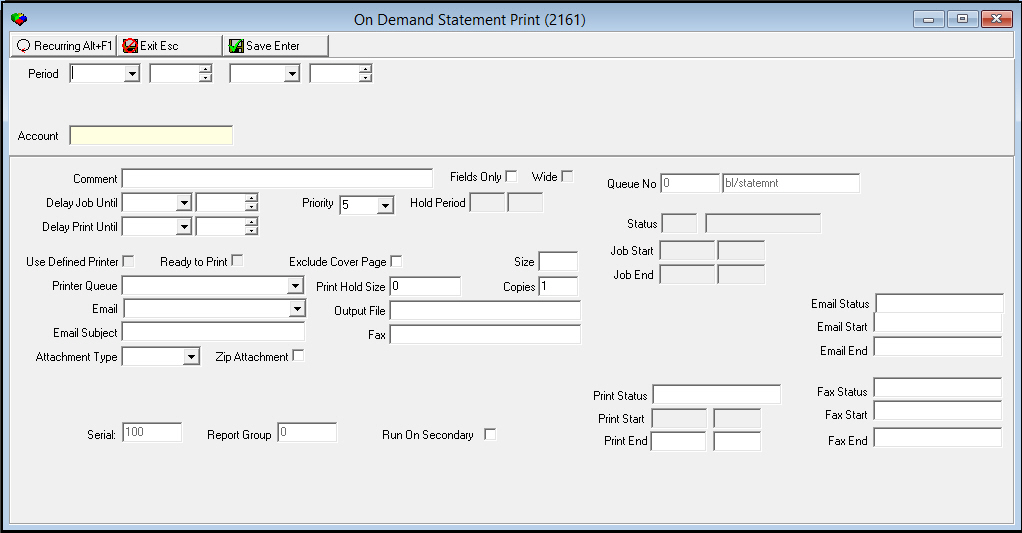
This window contains two panes: use the upper pane to define the content of the report; use the lower pane to define the job output - how, when, and where you want to print the report.
Note: See Report Parameters Pane for information on the fields in the lower pane, which are the same in every report.
Field Descriptions
The following table describes the fields used in the upper pane of this report.
Field |
Description |
Period |
|
Date - From (No label) |
You may select a range of dates to limit the report to invoices that were created within that range. Select the beginning date of the range. |
Time - From (No label) |
You may select a range of time to limit the report to invoices that were created within that range. Select the beginning time of the range. |
Date - To (No label) |
You may select a range of dates to limit the report to invoices that were created within that range. Select the ending date of the range. |
Time
- To |
You may select a range of dates to limit the report to invoices that were created within that range. Select the ending time of the range. |
Account |
Type the specific account number for which you want to print a statement. |
Running and Viewing a Report
For information on running and viewing a report, see Common Functions in SBN.
Report Example
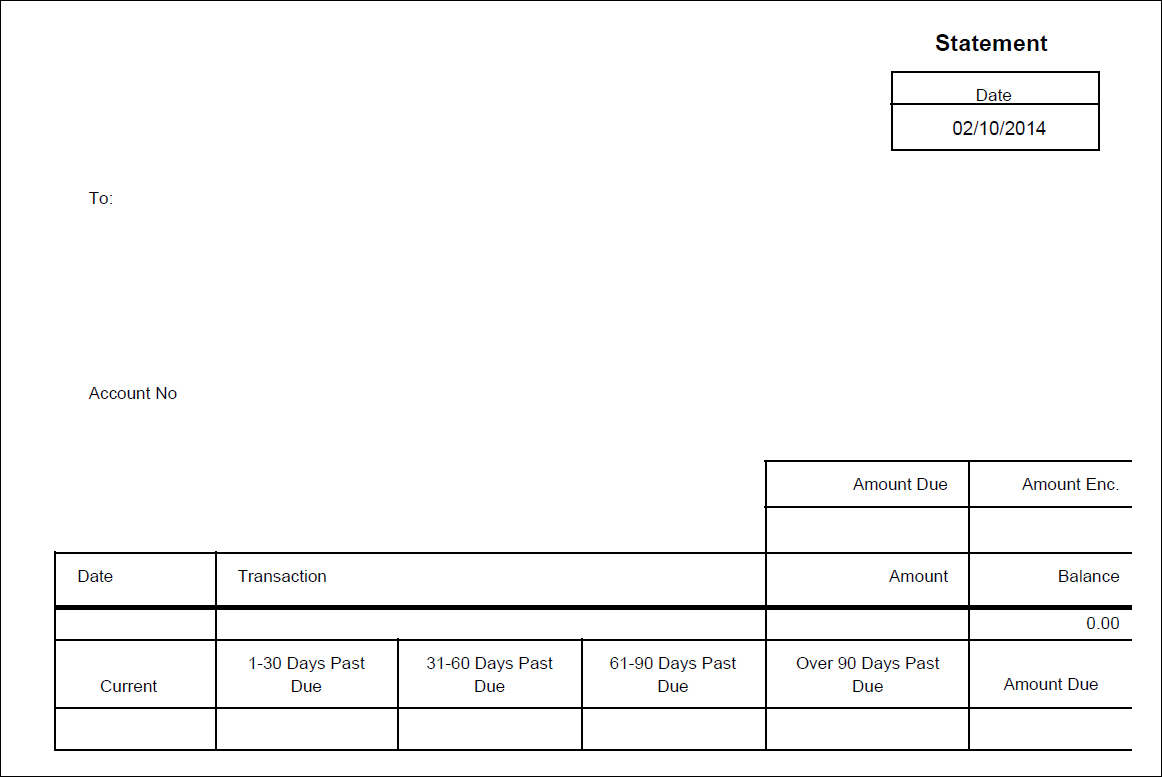
The following graphic shows the output of the On-Demand Statement Print report.
Column Descriptions
The following table describes the columns used in the output of the report.
Column |
Description |
Date |
Date the statement prints. |
To |
Name and address of the person who receives statements for the installation. |
Account No |
Account number to which the statement refers. |
Amount Due |
Amount due for this statement. |
Amount Enc. |
Space for payor to enter amount of payment enclosed. |
Date |
Date the selected transaction occurred. |
Transaction |
The type of transaction. |
Amount |
Amount of the selected transaction. |
Balance |
Balance of the account. |
Current |
Charges for the current billing period. |
__ Days Past Due |
Columns to display any past due amount according to aging categories. |
Amount Due |
Total amount due for this statement. |
Button Functions
The following table displays the buttons, describes the shortcut keys, actions, and functionality.
Button |
Name |
Shortcut Key |
Action |
Description |
|
Open fields for recurring/template reports |
alt+f1 |
Open fields for recurring/template reports. |
|
|
Exit without saving |
esc |
Exit without saving changes to selected record. |
|
|
Save Existing Record |
enter |
Save changes to selected record. |



Modifications and Updates to On Demand Statement Print
The following table lists modifications and updates to the On Demand Statement Print document.
Mod Number |
Date |
Description |
n/a |
09/08/14 |
Images updated. |