
Invoice Templates
Invoice Templates
Invoice Templates
Program #: 1826
Module: System Administration
Overview
Use Invoice Templates (program #1826) to create templates from frequently specified invoicing parameters. You may create templates with parameters that pull data from either the contract or account level of records.
To access this program, select Invoice Templates (program #1826) from the main menu of SBN.
The Invoice Templates Window
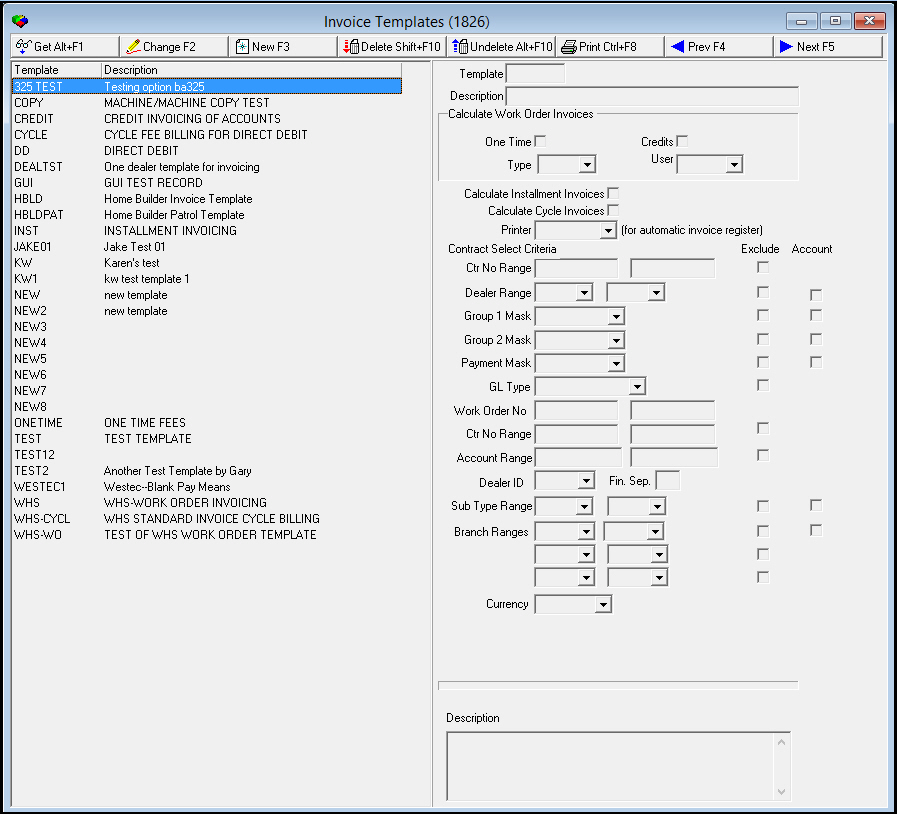
The following graphic shows Invoice Templates as the program opens.
Field/Column Descriptions
The following table describes the fields and columns used in Invoice Templates.
|
Field/Column |
Description |
|
Template |
Identifies the selected invoice template. |
|
Description |
Text description of the selected invoice template. |
|
Calculate Work Order Invoices |
|
|
One Time |
Enter a check mark in this field to include all work orders with one-time fees in this template. |
|
Credits |
Enter a check mark in this field to include all credit work orders in this template. |
|
Type |
You may select a specific work order type to include in this template. (This menu originates from program #1796.) O To include all work order types when this template is selected, use the % wildcard. For more information on using wildcards, see Searches. |
|
User |
You may select a specific user ID to include in this template. (This menu originates from program #1811.) |
|
Calculate Installment Invoices |
Enter a check mark in this field to include any installment billings that are due in this template. |
|
Calculate Cycle Invoices |
Enter a check mark in this field to include all previously set cycle fees that are due in this template. |
|
Printer |
Select the printer for the Invoice Listing report. |
|
Contract Select Parameters |
|
|
Contract Number Range |
|
|
Ctr No Range - From |
You may type a range of contract numbers to use when this template is selected. Type the beginning contract number of the range. |
|
Ctr No Range - To (No label) |
You may type a range of contract numbers to use when this template is selected. Type the ending contract number of the range. |
|
Exclude |
You may exclude a range of contract numbers by typing the range and then entering a check mark in this field. |
|
Dealer Number Range |
|
|
Dealer - From |
You may select a range of dealer IDs to include when this template is selected. Select the beginning dealer ID of the range. (This menu originates from program #1537.) O If option ba325 is on, when a user selects a dealer from the Dealer ID menu, this field becomes required. |
|
Dealer - To |
You may select a range of dealer IDs to include when this template is selected. Select the ending dealer ID of the range. (This menu originates from program #1537.) O If option ba325 is on, when a user selects a dealer from the Dealer ID menu, this field becomes required. |
|
Exclude |
You may exclude a range of dealer IDs by selecting the range and then entering a check mark in this field. |
|
Account |
Enter a check mark in this field to limit a batch created with this template to records that contain a dealer ID - at the account level - within the range. |
|
Masks |
|
|
Group 1 Mask |
You may select a Contract Group 1 Mask to include when this template is selected. (This menu originates from program #1868.) |
|
Exclude |
Enter a check mark in this field to exclude the Group 1 Mask from the calculation. |
|
Account |
Enter a check mark in this field to limit the a batch created with this template to records with this Group 1 mask at the account level. |
|
Group 2 Mask |
You may select a Contract Group 2 Mask to include when this template is selected. (This menu originates from program #1868.) |
|
Exclude |
Enter a check mark in this field to exclude the Group 2 Mask from the calculation. |
|
Account |
Enter a check mark in this field to limit a batch created with this template to records with this Group 2 mask at the account level. |
|
Payment Mask |
You may select a pay means code to include when this template is selected. (This menu originates from program #1528.) |
|
Exclude |
Enter a check mark in this field to exclude the pay means code from the calculation. |
|
Account |
Enter a check mark in this field to limit a batch created with this template to records with this pay means mask at the account level. |
|
GL Type |
You may select a GL Type to include when this template is selected. (This menu originates from program #1578.) |
|
Exclude |
Enter a check mark in this field to exclude the GL Type from the calculation. |
|
Work Order Number Range |
|
|
Work Order No - From |
You may type a beginning work order number of a range of work orders to include when this template is selected. |
|
Work Order No - To (No label) |
You may type an ending work order number of a range of work orders to include when this template is selected. |
|
Contract Number Range |
|
|
Ctr No Range - From |
You may type a beginning contract number of a range of contract numbers to include when this template is selected |
|
Ctr No Range - To (No label) |
You may type an ending contract number of a range of contract numbers to include when this template is selected |
|
Exclude |
Enter a check mark in this field to exclude the range of contract numbers from the calculation. |
|
Account No Range |
|
|
Account - From |
You may type a range of account numbers to limit a batch created with this template to records with an account number within the range. Type the beginning account number of the range. |
|
Account - To |
You may type a range of account numbers to limit a batch created with this template to records with an account number within that range. Type the ending account number of the range. |
|
Exclude |
You may exclude a range of account numbers from a batch created with this template by typing the range and then entering a check mark in this field. |
|
Dealer ID |
Select a dealer ID to associate a specific dealer to the template. O Only users with this dealer ID in their user profiles can view invoice templates associated with this dealer in the menu of invoice templates in Invoice Manager (program #1557). O If option ba325 is on, when a you select a dealer from this menu, the Dealer - From and Dealer - To fields become required. |
|
Fin Sep |
This field is active when option ba278 is on. Financial Separation; use with Securitas Partner Invoicing. You may enter a flag in this field to define batches created with this template based on the Fin Sep flag in Branch Profiles (program #1530) for the associated branch: l X - Use only accounts associated with branches flagged to use Financial Separation. l % - Use all accounts regardless of the Financial Separation flag for their associated branches. |
|
Sub Type Range |
|
|
Sub Type Range - From |
You may select a Subscriber type range. Select the beginning sub type of the range. (This menu originates from program #1534.) |
|
Sub Type Range - To (No label) |
You may select a Subscriber type range. Select the ending sub type of the range. (This menu originates from program #1534.) |
|
Exclude |
You may exclude a range of sub types from a batch created with this template by selecting the range and then entering a check mark in this field. |
|
Account |
Enter a check mark in this field to limit a batch created with this template to records that contain a sub type - at the account level - within the range. |
|
Branch Ranges |
|
|
Branch Range - From (1) |
You may select branch ranges to include when this template is selected. Select the beginning branch of the first range. (This menu originates from program #1530.) |
|
Branch - To (1) |
You may select branch ranges to include when this template is selected. Select the ending branch of the first range. (This menu originates from program #1530.) |
|
Exclude (Branch Range 1) |
You may exclude the first range of branches from a batch created with this template by selecting the range and then entering a check mark in this field. |
|
Account |
Enter a check mark in this field to limit a batch created with this template to accounts within the range of branches. |
|
Branch - From (2) |
You may select branch ranges to include when this template is selected. Select the beginning branch of the second range. (This menu originates from program #1530.) |
|
Branch - To (2) |
You may select branch ranges to include when this template is selected. Select the ending branch of the second range. (This menu originates from program #1530.) |
|
Exclude (Branch Range 2) |
You may exclude the second range of branches from a batch created with this template by selecting the range and then entering a check mark in this field. |
|
Branch - From (3) |
You may select branch ranges to include when this template is selected. Select the beginning branch of the third range. (This menu originates from program #1530.) |
|
Branch - To (3) |
You may select branch ranges to include when this template is selected. Select the ending branch of the third range. (This menu originates from program #1530.) |
|
Exclude (Branch Range 3) |
You may exclude the third range of branches from a batch created with this template by selecting the range and then entering a check mark in this field. |
|
Description |
You may enter instructions to attach to the selected invoice template. |
|
Currency |
Type of currency to be used for the invoice. |
Using Common Functions
See the reference document Common Functions in SBN for more information.
Button Functions
The following table displays the buttons, describes the shortcut keys, actions, and functionality.
|
Button |
Name |
Shortcut Key |
Action |
Description |
|
|
Get |
ALT+F1 |
1826/ 1 |
Get record. |
|
|
Change |
F2 |
1826/ 2 |
Change selected record. |
|
|
New |
F3 |
1826/ 3 |
Create new record. |
|
|
Delete |
SHIFT+F10 |
1826/ 4 |
Delete selected record. |
|
|
Undelete |
ALT+F10 |
1826/ 5 |
Restore deleted record. |
|
|
|
CTRL+F8 |
1826/ 6 |
Print selected records. |
|
|
Previous |
F4 |
1826/ 999 |
Select last record. |
|
|
Next |
F5 |
1826/ 999 |
Select next record. |








Modifications and Updates to Invoice Templates
The following table lists modifications and updates to the Invoice Templates document.
|
Mod Number |
Date |
Description |
|
n/a |
8/19/14 |
Images updated. |