
Time Zones
Time Zones
Time Zones
Module: System Administration
Overview
Use Times Zones (program #1739) to set up and manage time zones. The entries in this program define the choices in several menus throughout SBN. You can also attach a time zone to a zip code in Zip Codes (program # 1718). SBN then defaults to that time zone when a user assigns that zip code to an installation or other record.
Time Zones defines the difference in time between Greenwich Mean Time and normal times as well as Daylight Saving Time. Many locales observe Daylight Saving Time, which is generally one hour different from the normal time. Daylight Saving Time begins on different dates in different countries.
The accounts that you maintain in your database determine the range of time zones that you need to define. It is better to create too many time zones than not enough.
IBS advises that you adjust Daylight Saving Time through this program and that you do not define Daylight Saving Time on your server. You may define dates and times in several different places, or layers throughout your operating system. You must set all of these properly for the correct local and premises times to display in the SBN system in windows, reports, queues and logs.
SBN relies on the Daylight Saving definitions to create future schedules and maintain past historical data, so we recommend you set up your definitions well in advance, and leave them permanently.
Note: Do not remove old entries because IBS uses them when looking at historic data.
To access this program, select Time Zones (program #1739) from the main menu of SBN.
The Time Zones Window
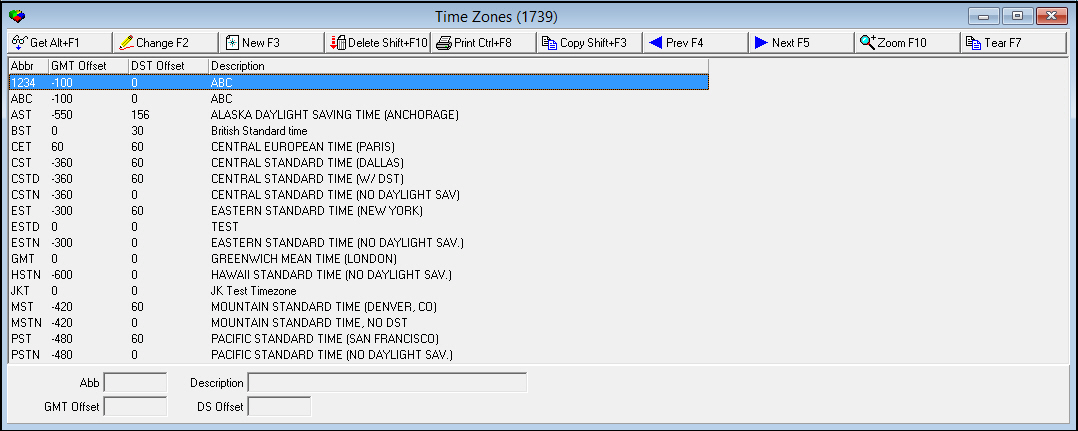
The following graphic shows Time Zones as the program opens. The upper pane displays previously defined time zones.
Field/Column Descriptions
The following table describes the fields and columns used in the main window of Time Zones.
Field/Column |
Description |
Abbreviation |
Code to identify the time zone. |
GMT Offset |
The time difference, in minutes, from Greenwich Mean Time and this time zone. For example, the offset for Pacific Standard Time (California) in the US from GMT is -9 hours or -540 minutes. The offset from GMT and MET, (Paris) is +1 or +60 minutes. |
DS Offset |
The time offset, in minutes, for Daylight Saving Time for this time zone. |
Description |
Text description of the time zone. |
Using Common Functions
See the reference document Common Functions in SBN for more information.
Zooming into the Sublevel of Time Zones
Time Zones contains a sublevel in which you can manage details of Daylight Saving Time for a time zone.
The Time Zone Details Tab
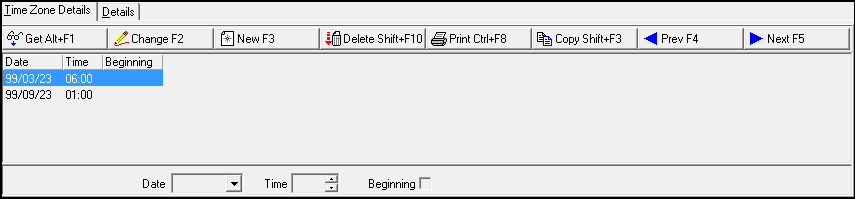
The following graphic shows the Time Zone Details tab. The tab displays previously defined details for Daylight Saving Time.
Field/Column Descriptions
The following table describes the fields and columns used in the Time Zone Details tab.
Field/Column |
Description |
Date |
The date on which Daylight Saving Time takes affect or ends for the year. |
Time |
The time of day at which Daylight Saving Time takes affect or ends for the year. |
Beginning |
If this column displays an X the date and time refer to the beginning of Daylight Saving Time. |
Button Functions
The following table displays the buttons, describes the shortcut keys, actions, and functionality.
Button |
Name |
Shortcut Key |
Action |
Description |
|
Get |
ALT+F1 |
1739/ 1 |
Get record. |
|
Change |
F2 |
1739/ 2 |
Change selected record. |
|
New |
F3 |
1739/ 3 |
Create new record. |
|
Delete |
SHIFT+F10 |
1739/ 4 |
Delete selected record. |
|
CTRL+F8 |
1739/ 5 |
Print selected records. |
|
|
Copy |
SHIFT+F3 |
1739/ 999 |
Copy selected field. |
|
Zoom |
F10 |
1739/ 999 |
Zoom in/out of sublevel. |
|
Tear |
F7 |
1739/ 999 |
Display time zone details. |
|
Previous |
F4 |
1739/ 999 |
Select last record. |
|
Next |
F5 |
1739/ 999 |
Select next record. |










Modifications and Updates to Time Zones
The following table lists modifications and updates to the Time Zones document.
Mod Number |
Date |
Description |
n/a |
8/26/14 |
Images updated. |