
Concentrator Immediate Queue
Concentrator Immediate Queue
Concentrator/Immediate Queue
Module: System Administration
Overview
Use Concentrator/Immediate Queue (program #1824) to assign multiple concentrators to Immediate Queues. The Immediate Queue you assign a concentrator to determines which ALGEN will process that concentrator's signals and insert them into SBN alarm queues and logs. You may have several ALGENs that produce many output files. To ensure efficient ALGEN processing, monitor disk space and delete any old output files that you no longer need.
SBN directs queue routing based on the Concentrator ID, Port number, and CID Mask.
To access this program, select Concentrator/Immediate Queue (program #1824) from the main menu of SBN.
Options
-
Option ba523 - option added to be able to look at the unix logs for Dormant Check.
-
Option ba524 - option added to be able to look at the unix logs for Dormant Change.
The Concentrator/Immediate Queue Window
The following graphic shows the Concentrator/Immediate Queue window with information displayed.
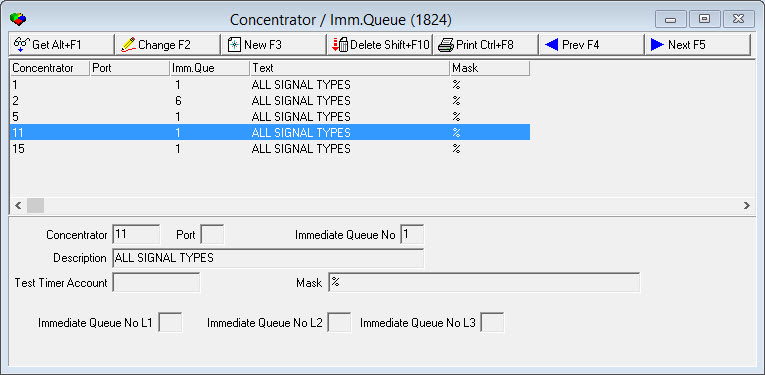
Field/Column Descriptions
The following table describes the fields and columns used in Concentrator/Immediate Queue window.
|
Field/Column |
Description |
|
Concentrator |
ID of the concentrator. |
|
Port |
Identifies a specific port (receiver) of the selected concentrator. |
|
Immediate Queue |
The immediate queue to which this concentrator is assigned. Note: The immediate queue number must be between 1-16. |
|
Description/Text |
Text description of the concentrator. |
|
Test Timer Account |
CID of the account used with the Frontend Time-out Alarms feature. |
|
Mask |
Enter a CID mask to direct immediate queue routing based on Concentrator, Port, and Mask. |
|
Immediate Queue No L1 |
This queue coincides with the designation Priority Ranges in Program # 1727. Algen determines from the (DL-Core) watermark signal, if the alarm signal is low or high priority, then sends the alarm to Queue No L1 or L2. L1 is high priority, level 2-8 and L2 is lower priority Level, 9-16. |
|
Immediate Queue No L2 |
This queue coincides with the designation Priority Ranges in Program # 1727. Algen determines from the (DL-Core) watermark signal, if the alarm signal is low or high priority, then sends the alarm to Queue No L1 or L2. L1 is high priority, level 2-8 and L2 is lower priority Level, 9-16. |
|
Immediate Queue No L3 |
This queue coincides with the designation Priority Ranges in Program # 1727. L3 is currently an extra Queue, set up for future use. |
Using Common Functions
See the reference document Common Functions in SBN for more information.
Button Functions
The following table displays the buttons, describes the shortcut keys, actions, and functionality.
|
Button |
Name |
Shortcut Key |
Action |
Description |
|
|
Get |
ALT+F1 |
1824/ 1 |
Get record. |
|
|
Change |
F2 |
1824/ 2 |
Change selected record. |
|
|
New |
F3 |
1824/ 3 |
Create new record. |
|
|
Delete |
SHIFT+F10 |
1824/ 4 |
Delete selected record. |
|
|
|
CTRL+F8 |
1824/ 6 |
Print selected records. |
|
|
Previous |
F4 |
1824/ 999 |
Select last record. |
|
|
Next |
F5 |
1824/ 999 |
Select next record. |







Modifications and Updates to Concentrator Immediate Queue
The following table lists modifications and updates to the Concentrator Immediate Queue document.
|
Mod Number |
Date |
Description |
|
n/a |
8/15/14 |
Images updated. |
|
07.84.24600 07.84.24599 08.84.10440 |
02/24/16 02/23/16 02/05/16 |
Options ba523 and ba524 Imm queue insert change Prioriy Routing |