
Report Groups
Report Groups
Report Groups
Program #: 1587
Module: System Administration
Overview
Use Report Groups (program #1587) to define groups for SBN reports and the maximum number of reports that can be run simultaneously in each report group. A menu of report groups appears in Report Default Parameters (program #1561). The report group assigned to each report in program #1561 appears in the Report Parameters Pane at the bottom of each report.
To access this program, select Report Groups (program #1587) from the main menu of SBN.
The Report Groups Window
The following graphic shows Report Groups as the program opens. The upper pane displays previously defined Report Groups.
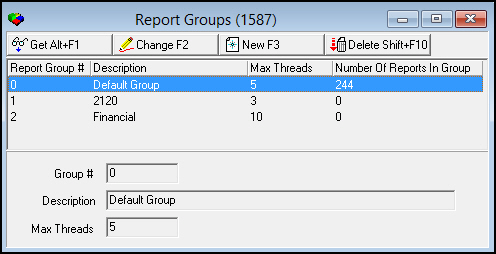
Field/Column Descriptions
The following table describes the fields and columns used in Report Groups.
|
Field/Column |
Description |
|
Report Group # |
Identifies the selected report group. (Group 0 appears on all systems by default and cannot be deleted.) |
|
Description |
Text description of the selected report group. |
|
Max Threads |
Maximum number of reports that can be run simultaneously in the selected group. |
|
Number of Reports in Group |
Number of reports in the selected group. |
Viewing Details of a Report Group
Use the following steps to view report group details:
1. Select the report group you want to view.
2. Choose Get Record.
w The report group details appear in the fields in the lower pane.
Creating a Report Group
Use the following steps to create a new report group:
1. Choose New Record.
w The fields in the lower pane open for changes.
2. Enter details for the report group.
3. Choose Save.
w The new report group appears in the list in the upper pane.
Changing a Report Group
Use the following steps to change report group details:
1. From the upper pane, select the report group you want to change by double-clicking or choosing Get Record.
w The report group details appear in the lower pane.
2. Choose Change Record.
w The fields in the lower pane open for changes.
3. Change report group details as necessary.
4. Choose Save.
Deleting a Report Group
You may delete report groups except for Group 0. (Group 0 appears on all systems by default and cannot be deleted.)
Use the following steps to delete a report group:
1. From the upper pane, select the report group you want to delete.
w The report group details appear in the lower pane.
2. Choose Delete Record.
w A confirm dialog box opens: "Are you sure?"
3. Choose Yes.
4. SBN removes the report group from the list in the upper pane.
Button Functions
The following table displays the buttons, describes the shortcut keys, actions, and functionality.
|
Button |
Name |
Shortcut Key |
Action |
Description |
|
|
Get |
ALT+F1 |
1587/ 1 |
Get record. |
|
|
Change |
F2 |
1587/ 2 |
Change selected record. |
|
|
New |
F3 |
1587/ 3 |
Create new record. |
|
|
Delete |
SHIFT+F10 |
1587/ 4 |
Delete selected record. |




Modifications and Updates to Report Groups
The following table lists modifications and updates to the Report Groups document.
|
Mod Number |
Date |
Description |
|
n/a |
8/22/14 |
Images updated. |