
Change Log Report
Change Log Report
Change Log Report
Report #: 1994
Module: Account Management
Overview
Use the Change Log report to view those changes entered in the Data Entry Log. User’s branch restrictions apply.
To access this report, select Change Log Report (report #1994) from the main menu of SBN.
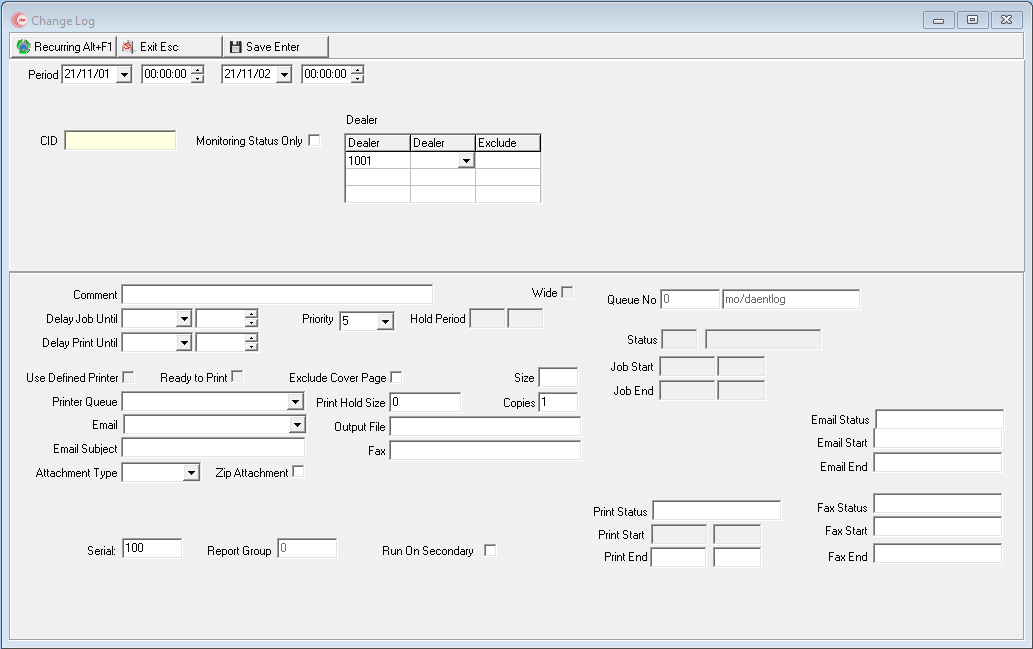
The Change Log Report
This window contains two panes: use the upper pane to define the content of the report; use the lower pane to define the job output - how, when, and where you want to print the report.
Note: See Report Parameters Pane for information on the fields in the lower pane, which are the same in every report.
Field Descriptions
The following table describes the fields used in the upper pane of the report.
Note: You can use wildcard characters in selected fields. For more information about using wildcards, see Searches.
Field |
Wildcards Allowed |
Description |
Period |
||
Date
- From |
No |
You may select a range of dates to limit the report to Data Entry Log entries that occurred during that range. Select the beginning date of the range. O This field defaults to the current date. |
Time
- From |
No |
You may select a range of dates to limit the report to Data Entry Log entries that occurred during that range. Select the beginning date of the range. O This field defaults to the current date. |
Date
- To |
No |
You may select a range of dates to limit the report to Data Entry Log entries that occurred during that range. Select the ending date of the range. O This field defaults to tomorrow’s date. |
Time
- To |
No |
You may select a range of time to limit the report to Data Entry Log entries that occurred during that range. Select the ending time of the range. O This field defaults to 00:00 (Midnight). |
CID |
Yes |
You must either type a specific CID to limit the report to Data Entry Log entries for that CID or use the % wildcard with a partial CID to include all matching CIDs in the report. O You may not use the % wildcard without a partial CID. O Regardless of the typed CID, CID1 appears on the report. |
Monitoring Status Only |
No |
You may select this check box to activate the monitoring only status field. |
Dealer - From |
Yes |
You must either select a range of dealer IDs to limit the report to dealer IDs within the range or use the % wildcard to include all dealer IDs. Select the beginning dealer ID of the range. (This menu originates from program #1537.) |
Dealer - To (No label) |
Yes |
You must either select a range of dealer IDs to limit the report to dealer IDs within the range or use the % wildcard to include all dealer IDs. Select the ending dealer ID of the range. (This menu originates from program #1537.) |
Exclude |
No |
|
Running and Viewing a Report
For information on running and viewing a report, see Common Functions in SBN.
Report Example
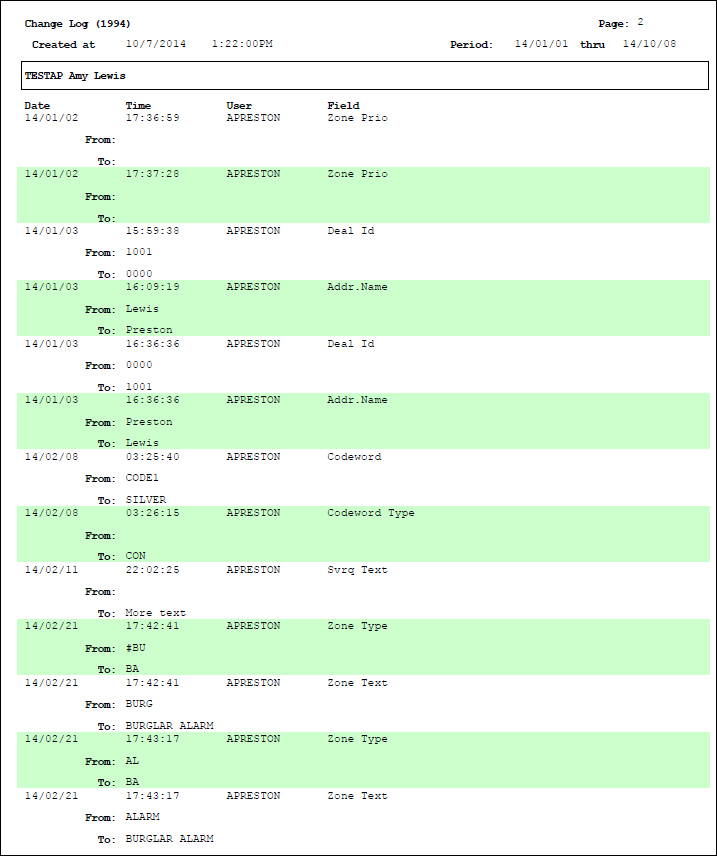
The following graphic shows an example of the output of the Change Log report.
Column Descriptions
The following table describes the columns used in the output of the report.
Column |
Description |
(No label) |
Displays the CID and installation name. |
Date |
Date of the log entry. |
Time |
Time of the log entry. |
User |
ID of the user who changed the record of the displayed CID. |
Field |
Identifies the changed field. |
From |
Displays the content of the selected field before the change. |
To |
Displays the content of the selected field after the change. |
Available Abbreviations
The following table lists abbreviations that may appear on the report based on changes made in the Billing module.
Acct Num 1 |
Acct Num 2 |
Acct Num 3 |
Act Pull Dt |
Addem Dt |
Bank |
Canc Com Flg |
Canc Inv to Term |
Canc Reason |
Canc Reinstate |
Cance Trk Stat |
Ctr Branch |
Ctr Cyc Day |
Ctr Cyc Frq |
Ctr Cyc Mon |
Ctr Dt |
Ctr Exp Dr |
Ctr Ext |
Ctr Grp 1 |
Ctr Grp 2 |
Ctr Num |
Ctr Stat Dt |
Ctr Status |
Ctr Term |
Ctr Type |
Ctr Warnty |
Cyc Inv Flg |
Del Fee Adj |
Del Fee Amo |
Del Fee Cyc Day |
Del Fee Cyc Dt |
Del Fee Cyc Per |
Del Fee Disc Reas |
Del Fee End Flg |
Del Fee Incr Amo |
Del Fee Incr Dt |
Del Fee Item |
Del Fee Item Ct |
Del Fee Per Ln |
Del Fee Rev |
Del Fee Tax Inc Flg |
Del Fee Text |
Del Fee Valid Fr |
Del Fee Valid To |
Discont Dt |
Fee Adj |
Fee Amo |
Fee Cyc Day |
Fee Cyc Dt |
Fee Cyc Per |
Fee Disc Reas |
Fee End Flg |
Fee Incr Amo |
Fee Incr Dt |
Fee Item |
Fee Item Ct |
Fee Per Ln |
Fee Rev |
Fee Tax Inc Flg |
Fee Text |
Fee Valid Fr |
Fee Valid To |
Inhibit Dt |
Ins GL Tp |
Ins Grp 1 |
Ins Grp 2 |
Inserv Dt |
No Int Flg |
No Rem Flg |
Notice Dt |
Oth Inv Flg |
Out Serv Dt |
Pay Means Cd |
Pay Means Dt |
Pay Means Num |
Pay Terms |
Plan Pull Dt |
Price List |
Prt Flgs |
Tax Free Flg |
Tax Num |
Tax Num 2 |
Tax Prof |
Button Functions
The following table displays the buttons, describes the shortcut keys, actions, and functionality.
Button |
Name |
Shortcut Key |
Action |
Description |
|
Recurring |
Alt+F1 |
1994 |
Open fields for recurring/template reports. |
|
Exit |
Esc |
1994 |
Exit without saving. |
|
Save |
Enter |
1994 |
Save existing record. |



Modifications and Updates to Change Log Report
The following table lists modifications and updates to the Change Log Report document.
Mod Number |
Date |
Description |
n/a |
07/17/14 |
Images updated. |
08.93.12081, 07.93.26803, 08.93.12078, 07.93.26801 |
11/01/21 |
This report is now dealer-specific. Images updated. |