
NATS Configuration for SBN Media
SBN Media is a mesh of small services that coordinate over NATS. Every host that runs SBN Media also runs a local nats-server, and those servers join a single cluster so the whole deployment behaves as one logical message bus. Running SBN Media on more than one host — for scale or fault tolerance — comes down to clustering their NATS servers and choosing which services each host runs.
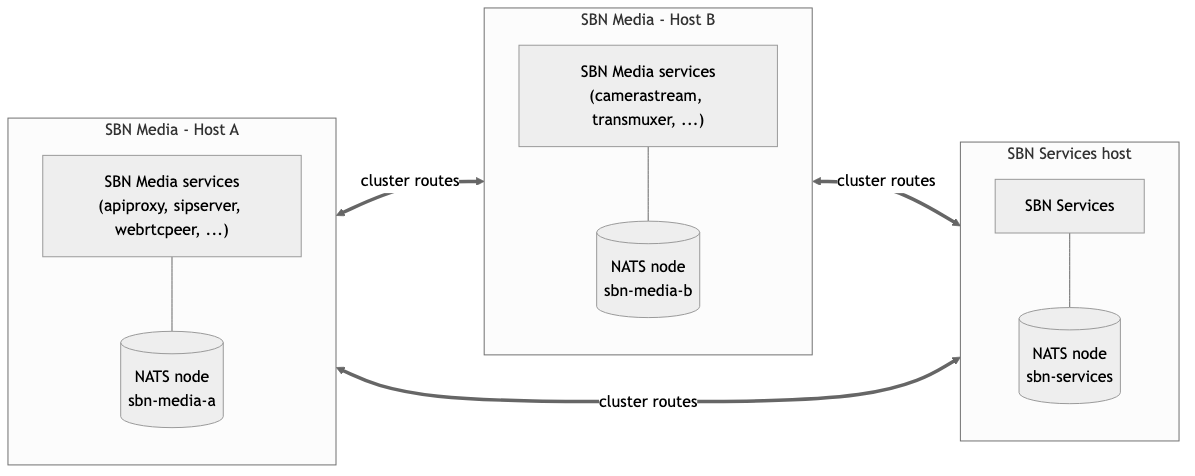
How the mesh fits together
- The watchdog on each host starts
nats-serverfirst (thenatsservice), then brings up that host's other services. - Each service connects to the local NATS node —
broker.connectionString, normallynats://localhost:4222. - The NATS nodes cluster with one another, so a service on host A reaches a service on host B without either knowing where the other runs.
- Adding a host means pointing its NATS node at the existing cluster and letting the watchdog start its services. Nothing changes on the other hosts.
The cluster configuration file
Each NATS node starts from a config file — nats-server -c nats-cluster.local.conf, run for you by the watchdog. Give every node its own copy and change the lines marked FIXME.
What matters:
cluster.nameis identical on every node;server_nameis unique on every node. Get these backwards and the cluster either won't form or nodes collide.routeslists the other nodes' cluster ports. A node does not list itself. The list need not be exhaustive on every node — NATS gossips the full topology from any single connection — but listing all peers everywhere is the clearest and most resilient setup.- The cluster port (4282) carries server-to-server traffic; the client port (4222) is what SBN Media services connect to. Open 4282 between hosts; keep 4222 reachable only by local services.
TOKENmust equalbroker.authorizationin each host'ssbn-media.local.yaml, or that host's services cannot connect.
To give the dashboard its own credentials, replace the top-levelauthorizationblock with a NATSaccountsblock that enablesjetstreamfor the service user and grants the dashboard user read access to$SYS.>. The single-token form above is the simplest working setup.
JetStream (required)
SBN Media relies on JetStream — the NATS persistence layer — for durable signal delivery and shared state, so it must be enabled on every node (the jetstream { … } block). The mesh will not work without it. SBN Media creates the streams and key-value buckets it needs automatically, including:
media-streams— the registry of live streams, so any host can locate a stream that lives on another.held-calls— two-way alarm calls waiting for an operator callback.healthcheck— service health shared across the mesh.camera-captures/routing-captures— recorded media and call captures.
Give each node its own store_dir on persistent disk, and size max_file for the signal and media volume you retain. A clustered JetStream keeps this state available as nodes restart and rejoin; a single non-clustered node is a single point of failure for it.
Connecting SBN Media to the cluster
On each host, point SBN Media at its local node in sbn-media.local.yaml:
Confirm the cluster is healthy from any node's monitoring page:
http://<host>:8222/routez— the peer nodes this server is connected to.http://<host>:8222/connz— the SBN Media services connected to this node.
Running services on more than one host
Every SBN Media service takes its work through NATS queue subscriptions: a job — a new call, a stream, an alarm signal — is delivered to exactly one instance, wherever that instance runs. That single mechanism gives you both scale and failover. Run more instances and the work spreads across them; lose a host and its peers keep serving, because the queue simply delivers to the instances that remain.
So you do not run "SBN Media" once. You run a watchdog on each host, decide which services that host should keep running, and — for anything that must survive a host failure — run it on two or more hosts.
Services you can run many of
These carry per-call, per-stream, or per-signal work and scale horizontally — run as many as the load needs, on one host or spread across several:
webrtcpeer, transmuxer, camerastream / cameraloader, sipmedia, recordedstream, filestream, alarmreceiver, routing, sbnfrontend, scriptexecutor, texttospeech, audioxlate, imageclassifier, and the other stream / observer services.
Adding instances adds capacity, and the streams of a single call stay together through stream affinity, so nothing is duplicated.
Services limited to one per host
Some services are marked maxHostInstances: 1 — at most one instance per host — because each owns a host-level resource such as a listening port, a local process, or a store:
Service | Why one per host |
|---|---|
| The host's broker node |
| The host's HTTP entry point |
| Owns the host's SIP ports |
| Owns the host's TURN control port |
| Single owner of the device registry |
| Own and query the analytics stores |
| One supervisory-signal injector |
| One MLR2 receiver endpoint |
| Each owns its inbound listener |
One per host is not one per deployment. For high availability you still run these on several hosts — one instance on each. Because they queue-subscribe like every other service, only one instance handles a given message and the others stand ready; if the active host goes down, a peer picks the work up with no reconfiguration. sbnfrontend is the clearest example: run it on two hosts and either can carry all signal injection into SBN alone, so an upgrade or a host failure never stops signals getting through.
The services reached from outside the mesh — apiproxy (HTTP) and sipserver (SIP) — need one more thing in front to spread callers across the hosts. That is the next section.
Telling a host what to keep running
The watchdog does not place services for you. Each host's watchdog keeps its own configured set of services alive using NATS health checks, and two settings in sbn-media.local.yaml tune that:
watchdog.host— how many instances of each service the watchdog keeps running on this host. It starts instances up to the count and stops any surplus;0keeps a service off the host entirely.watchdog.system— a cluster-wide health check only. It logs a warning when the number of reachable instances of a service across the whole cluster falls belowminor rises abovemax. It does not start, stop, or move services — it exists to alert you, not to place work.
Load balancing and high availability
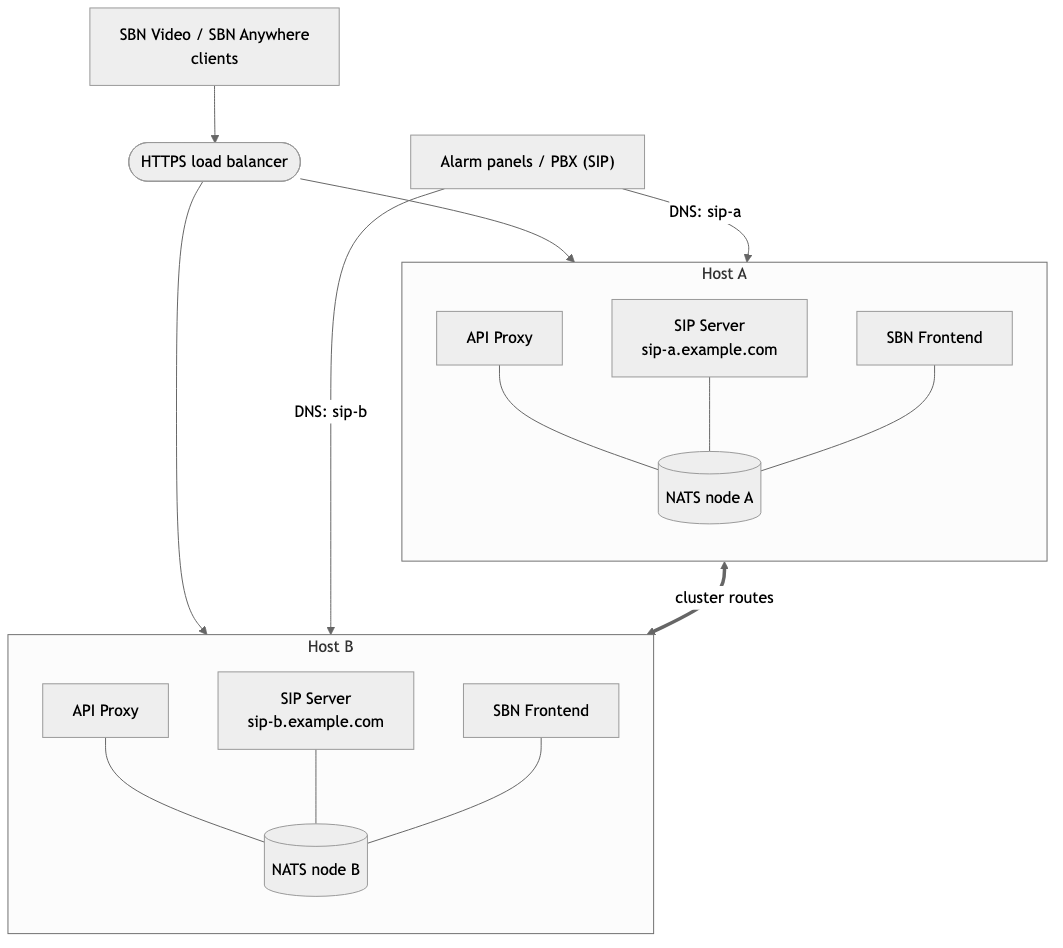
The two services reached from outside the mesh are limited to one per host, so to make them highly available you run them on several hosts. The API Proxy sits behind a load balancer; SIP is spread by DNS instead. Inside, every request lands on NATS and reaches the whole mesh, so a caller can be served by workers on any host.
 API Proxy (HTTP)
Run apiproxy on two or more hosts and front them with an HTTPS load balancer, or DNS round-robin:
- Health-check each proxy on
/ping(always on, unauthenticated). - Terminate TLS at the balancer, or per proxy with
apiproxy.protocol: https. - In production, restrict
apiproxy.allowOriginsto your client origins rather than*. - The proxy only validates the caller's token and bridges onto NATS, so any proxy serves any client.
SIP Server (SIP and media)
SIP does not sit behind the HTTPS balancer, and it needs no SIP proxy or SIP-aware balancer in front of it. Spread inbound calls across the sipserver hosts with DNS — round-robin A records, or SRV records, that resolve to every SIP host (sip-a.example.com, sip-b.example.com, …). A caller resolves the name and its INVITE lands on one host.
From there the call pins itself to that host with nothing stateful in the middle. Each SIP server advertises its own DNS name — set sipserver.publishedUrl to the host's name, e.g. sip-a.example.com — in the SIP messages it returns, so every later message in the dialog, and the RTP media, goes straight back to that specific server. Affinity is a property of SIP plus the server naming itself; there is nothing to keep sticky.
This is why each SIP host needs its own DNS name. It also lets you address one server on its own to verify it — which matters most during a rolling upgrade: point a test panel or SIP client at sip-a.example.com, confirm it handles a call, then return it to the shared DNS pool.
Each sipserver host must be reachable at the name it advertises (sipserver.publishedUrl; sipserver.publicIP is resolved automatically if unset) and have its RTP range (10000–65000 by default) open to the callers. Field devices behind firewalls reach SIP through sbn-tunnel.
A two-node example
One host carries the client edge and telephony; the other does video processing. Both run a clustered NATS node, and the shared services run on both for failover.
Host A — edge / telephony | Host B — video | |
|---|---|---|
NATS |
|
|
|
|
|
One instance per host |
|
|
Scaled services |
|
|
Both API Proxies sit behind one HTTPS balancer, while the two SIP Servers are reached directly by their own DNS names (sip-a, sip-b). Clients have a single address, panels resolve to a specific host, and the mesh keeps serving if either host is taken down.
Related pages
- Installing and Configuring SBN Media (SBN-Media/installation) — first-time setup of a host.
- SBN Media Overview (SBN-Media/overview) — what the services do.
- API Proxy (SBN-Media/Platform/api-proxy) — the HTTP edge in detail.