
GL Export
GL Export
GL Export
Overview
Use GL Export (program #561) to export GL data.
To access this program, select GL Export (program #561) from the main menu of SBN.
The GL Export Window
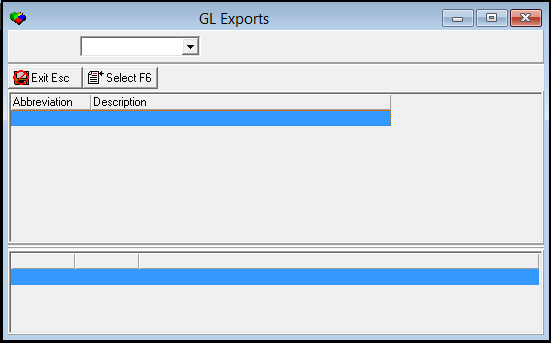
The following graphic displays the GL Export program as it opens. You may have different exports available for your company.
Column Descriptions
The following table describes the columns used in this window.
Column |
Description |
Abbreviation |
Identifies the GL export. |
Description |
Text description of the GL export. |
Exporting GL Data
You may have one or several GL Exports available.
Use the following steps to export GL data:
1. In GL Exports (program #561), select the GL export you want to use.
2. Double-click your selection or highlight the export and choose Select Export.
‰ The GL Export dialog box appears.
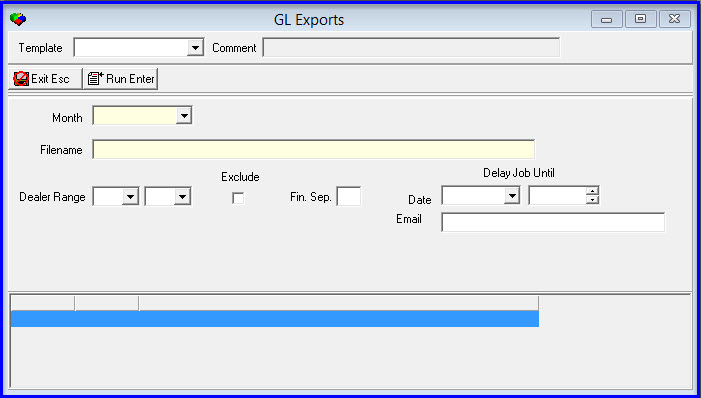
3. Complete the fields. For more information about these fields, see Field Descriptions - Export.
4. Choose Run Export.
‰ SBN displays the export events as the program processes.
5. Choose Exit to return to the main dialog box.
Field Descriptions - Export
The following table describes the fields used in the GL Export dialog box.
Field |
Description |
Output File |
You must type a name for the Output File that SBN creates when you run the export. |
Month |
Select the month of the report to export |
File name |
Select the document file name |
Fiscal Period Range |
|
Fiscal
Period - From |
You must select a range of fiscal periods to limit the export to GL data from within that range; select the beginning fiscal period of the range. |
Fiscal
Period - To |
You must select a range of fiscal periods to limit the export to GL data from within that range; select the ending fiscal period of the range. |
Group by |
You must select a grouping parameter for this report. |
Use Branch From |
You must select a type of branch on which to report: l Accounts l Contract l Installation |
Masks |
|
Ctr Group 1 |
You must either select a Contract Basics Group 1 to limit the export to accounts associated with that group, or use the % wildcard to include all Contract Basics Group 1 groups. (This menu originates from program #1868.) |
Exclude |
You may exclude a Contract Basics Group 1 from the export by selected the group and then entering a check mark in this field. |
Ctr Group 2 |
You must either select a Contract Basics Group 2 to limit the export to accounts associated with that group, or use the % wildcard to include all Contract Basics Group 2 groups. (This menu originates from program #1868.) |
Exclude |
You may exclude a Contract Basics Group 2 from the export by selected the group and then entering a check mark in this field. |
Include Details |
You may enter a check mark in this field to include details in the GL export. |
Include Balance Sheet Items |
You may enter a check mark in this field to include balance sheet items in the GL export. |
Include Revenue |
You may enter a check mark in this field to include revenue in the GL export. |
Branch Range |
|
Branch
- From |
You may select a specific branch or a range of branches to limit the export to GL data from that branch or range; select the specific branch or the beginning branch of the range. |
Branch
- To |
You may select a range of branches to limit the export to GL data from branches within the range; select the ending branch of the range. |
Exclude |
You may exclude a branch or a range of branches from the export by selecting the branch or range and then entering a check mark in this field. |
Dealer Range |
|
Dealer
- From |
You may select a specific dealer ID or a range of dealer IDs to limit the export to GL data associated with that dealer or range; select the specific dealer ID or the beginning dealer ID of the range. |
Dealer
- To |
You may select a range of dealer IDs to limit the export to GL data associated with dealers within the range; select the ending dealer ID of the range. |
Exclude |
You may exclude a dealer or a range of dealers from the export by selecting the dealer ID or range and then entering a check mark in this field. |
Delay Job Until |
|
Delay – Date |
You may select a future date and time to run the invoice batch.
|
Delay – Time |
You may select a future date and time to run the invoice batch.
|
You can either type a specific Email address or choose an email distribution from the menu |
|
Modifications and Updates to GL Export
The following table lists modifications and updates to the GL Export document.
Mod Number |
Date |
Description |
n/a |
8/04/14 |
Images updated. |