
Customer Information Report
Report #: 2033
Module: Account Management
Overview
The Customer Information report provides information for the customer and period specified. You may only run the report for branches in your branch access profile. If option ma002 is on, the output of the report does not display contacts that have a sequence number of 0 on action plan 0.
To access this report, select Customer Information (report #2033) from the main menu of SBN.
The Customer Information Report
This window contains two panes: in the upper pane you define the content of the report; in the lower pane you defining the job output - how, when, and where you want to print the report.
Note: See Report Parameters Pane for information on the fields in the lower pane, which are the same in every report.
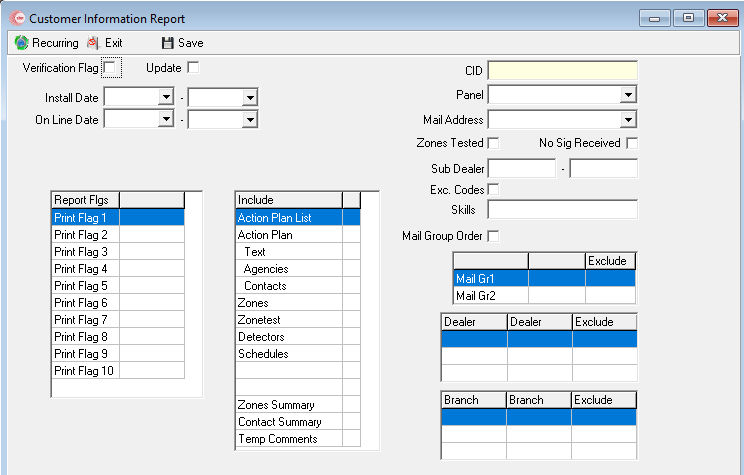
Field Descriptions
The following table describes the fields used in the upper pane of this report.
Note: You can use wildcard characters in selected fields. For more information about using wildcards, see Searches.
| Field | Wildcards Allowed |
Description |
| Verification Flag | No | Enter a check mark in this box to compile all records that have been changed in Data Entry and to set the verification flag on the installation. |
| Update | No | Use this check box only when you use the Verification Flag. If you set the update flag, when you complete the report SBN resets the verification flag. |
| Install Date Range | ||
| Date - From (No label) |
No | You may select a range of install dates to limit the report to log entries that occurred during the range. Select the beginning date of the range. |
| Date - To (No label) |
No | You may select a range of install dates limit the report to log entries that occurred during the range. Select the ending date of the range. |
| On-Line Date Range | ||
| Date -From (No label) |
No | You may select a range of on-line dates to limit the report to installations that went on-line during the range. Select the beginning date of the range. |
| Date - To (No label) |
No | You may select a range of on-line dates to limit the report to installations that went on-line during the range. Select the ending date of the range. |
| Alarm / Test / Sig Range | ||
| A / T / S - From (No label) |
No | You may select a range of dates that correspond to the flags Zones Tested or No Sig Received. Select the beginning date of the range. |
| A / T / S - To (No label) |
No | You may select a range of dates that correspond to the flags Zones Tested or No Sig Received. Select the ending date of the range. |
| Service Period | ||
| Date - From (No label) |
No | If you include the Service Log in the report, you may select a range of Service Log dates to limit the report to Service Log entries that occurred during that range. Select the beginning date of the range. |
| Date - To (No label) |
No | If you include the Service Log in the report, you may select a range of Service Log dates to limit the report to Service Log entries that occurred during that range. Select the ending date of the range. |
| CID | Yes | You must either type a specific CID to include in the report or use the % wildcard to include all CIDs. |
| pane | Yes | You may select a pane type to limit the report to log entries from that pane type or use the % wildcard to include all pane types. (This menu originates from program #1742.) |
| Mail Address | No |
Menu of addresses to use as the mailing address. O If the mailing address differs from the installation address, this report uses the mailing address. |
| Zones Tested | No | Enter a check mark in this box if the range of dates you selected in the Alarm / Test / Sig fields refers to Zones Tested. |
| No Sig Received | No | Enter a check mark in this box if the range of dates you selected in the Alarm / Test / Sig fields refers to installations that did not receive any signals received during the range. |
| Sub Dealer Range | ||
| ID - From (No label) |
No | You may type a range of sub dealer IDs to limit the report to records associated with sub dealer IDs within that range. Type the beginning sub dealer ID of the range. |
| ID - To (No label) |
No | You may type a range of sub dealer IDs to limit the report to records associated with sub dealer IDs within that range. Type the ending sub dealer ID of the range. |
| Exc Codes | No | Enter a check mark in this box to exclude passcards and codewords from the report. |
| Skills | No | You may type a specific to skill to limit the report to those accounts that contain a matching skill. |
| Report Flags | ||
| Print Flag 1-10 | No |
You may include records with specific report flags by clicking in the field to the right of any of ten corresponding print flags, and selecting the report flag from the corresponding menu. (These menus originate from program #1555.) O If you leave all fields blank, the report includes all report flag values. O If you set up Mail Groups as report selection parameters, you must leave all report flag fields blank. |
| Mail Group Order | No |
Enter a check mark in this box to sort the report by mail order. O If you leave this field blank, SBN sorts the report by CID and date. |
| Mail Groups | ||
| Mail Gr1 | Yes |
You may select a specific Mail Group 1 group to limit the report to those records that match that group, or use the % wildcard to include all Mail Group 1 groups in the report. O If you set up Mail Groups as report selection parameters, you must leave all report flag fields blank. |
| Exclude | No | You may exclude a Mail Group 1 group from the report by selecting the group and then entering a check mark in this box. |
| Mail Gr2 | Yes |
You may select a specific Mail Group 2 group to limit the report to those records that match that group, or use the % wildcard to include all Mail Group 2 groups in the report. O If you set up Mail Groups as report selection parameters, you must leave all report flag fields blank. |
| Exclude | No | You may exclude a Mail Group 2 group from the report by selecting the group and then entering a check mark in this box. |
| Branch Ranges | ||
| Branch | Yes | You may select up to three ranges of branches to limit the report to branches within the ranges. Select the beginning branch number of a range. (These menus originate from program #1530.) |
| Branch | Yes | You may select up to three ranges of branches to limit the report to branches within the ranges. Select the ending branch number of a range. (These menus originate from program #1530.) |
| Exclude | No | You may exclude ranges of branches from the report by selecting the ranges and then entering a check mark in the corresponding Exclude box. |
| Dealer Ranges | ||
| Dealer | Yes | You may select up to three ranges of dealer IDs to limit the report to dealer IDs within the ranges. Select the beginning dealer ID of a range. (These menus originate from program #1537.) |
| Dealer | Yes | You may select up to three ranges of dealer IDs to limit the report to dealer IDs within the ranges. Select the ending dealer ID of the range. (These menus originate from program #1537.) |
| Exclude | No | You may exclude ranges of dealer IDs from the report by selecting the ranges and then entering a check mark in the corresponding Exclude box. |
| Include | No |
Contains 14 check boxes to specify the information to include in the report: l Action Plan List l Action Plan l Text (from the Action Plan) l Agencies l Contacts l Zones l Zonetest l Detectors l Schedules l Service Log l Alarm Log l Zones Summary l Contact Summary l Temp Comments |
Running and Viewing a Report
For information on running and viewing a report, see Common Functions in SBN.
Report Example
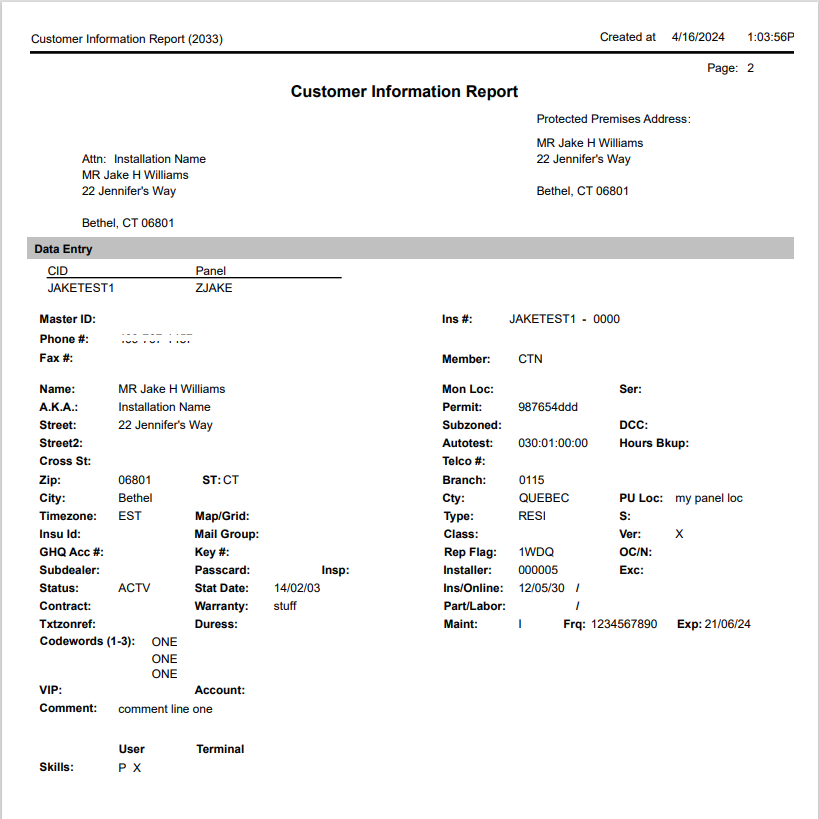
The following graphics show an example of the output of the Customer Information report.
Column Descriptions
The following table describes the columns used in the report output. The parameters you selected determine the columns used on your actual report.
| Column | Description |
| Mailing Address | Mailing address associated with the billing account. |
| Premises Address | Installation Address. |
| Data Entry Basics | |
| CID | Customer identification number; used throughout SBN as a unique identifier for this account. |
| pane | pane number that identifies the physical pane installed at this location. |
| Master ID |
For a sub-zoned installation, this field displays a master CID account to which this sub-zone belongs. Linking the sub-zoned installations to a master CID enables you to view a combined alarm log for the master account and its sub-zones. |
| Ins # | User-assigned number that identifies the installation. This number is unique and works together with Dealer ID. |
| Phone # | Primary phone number for the installation. |
| Fax # | Fax number for the installation. |
| Member | Customer or member number with which your company has a marketing alliance. |
| A.K.A. | Also Known As or alias. An optional field for a customer who may be known by more than one name. |
| Permit | Permit number. |
| Street | Street address for the installation. |
| Subzoned | If this field displays a check mark, this account is a master CID that contains related subzone installations. |
| DCC |
Code for tracking the installation DCC scanner number. O DCC is a telecommunication method involving two-way receivers, which requires special handling. |
| Street 2 | An additional line for the street address. |
| Autotest | Maximum time, in hours, between signals for this CID. If a signal is not received within this time, SBN generates a missing test signal. |
| Hours Bkup | If this field displays an X, a verification backup signal is required at this installation. In this case, every signal received from the first CID must get a corresponding signal from the second CID within sixty (60) seconds. If the backup signal is not received, SBN generates a missing backup signal exception. |
| Cross St | Nearest major cross street to the installation for dispatch information. |
| Telco # | Phone number or leased line connected to the pane. |
| Zip | Zip code of the installation address. |
| State | State of the installation address. |
| Branch | The monitoring branch for the installation. |
| Telco Loc | Location of the telephone company termination block. This field accepts up to 30 characters. |
| City | City of the installation address. |
| Cty | County of the installation address. |
| PU Loc | Physical pane location at the premises. |
| Timezone | Timezone for the installation. |
| Map / Grid | Map coordinates for the installation site. |
| Type | The type of customer, such as residential or commercial. (This menu originates from program #1534.) |
| S | Customer Since date. Generally use this field for chain accounts to indicate the date on which the first installation for a chain was made. |
| Insu ID | Insurance company responsible for the premises on this installation. (This menu originates from program #1541.) |
| Mail Group | Used to group mailings for those subscribers with more than one account, so that they receive a single mailing of reports. |
| Class | Field that contains up to ten codes for tracking services provided, or other customer specific information. (This menu originates from program #1555.) |
| Ver |
Indicates whether verification reports run for this installation. Verification reports show changes made to data entry for this installation. O A - indicates that you should never run verification reports for this installation. If you leave this field blank, SBN enters an X when you make changes and then SBN runs a new verification report. |
| GHQ # | General Headquarters Account number field; for company information only. |
| Key # | Fifty-character field for the identification number of the key held at the monitoring station. |
| Rep Flag | Codes for tracking customer-specific report functionality.You may type up to 10 codes. (This menu originates from program #1555.) |
| OC / N |
If this field displays a check mark, the Open / Close report prints both the user ID and the actual passcard holder name. If you leave this field blank, the Open / Close report prints only the user ID. |
| Subdealer | Information provided by the dealer, generally in the form of a a four-digit code. |
| Passcard | If this field displays a check mark, this installation requires passcards. |
| Insp | Inspection authority code assigned to the fire system devices in the Inspections tab. |
| Installer | Installer ID of the person who installed the system for this installation. |
| Exc | Billing rates for excessive signal traffic at this installation. (This menu originates from program #1817.) |
| Status | Current monitoring status for the installation. |
| Stat Date | Date when the current status went into effect. |
| Ins / Online | Date the system was installed and the date when monitoring of signals began. |
| Contract | Contract start date. |
| Warranty | Warranty number information. |
| Part / Labor | Part warranty and Labor warranty end dates. |
| Txtzoneref |
Bulletin ID that cross references to program #1720, where text messages are posted to a bulletin board using a match type on TXTREF. When you make a change in this field, the change appears in the Change Log as a change to field Textzonfef. When installations have something in common they can share messages by using the same bulletin ID. A shared bulletin ID prevents the user from having to separately attach the same message to each installation. |
| Duress | Special downloaded code for duress. When used instead of the normal disarm code, this generates an alarm signal to monitoring. |
| Maint | Maintenance type for installations with a maintenance contract or scheduled services. (This menu originates from program #1555.) |
| Freq | Frequency of the maintenance visits in days. |
| Exp | Last maintenance date for this installation. When you generate maintenance tickets, SBN updates this field. |
| VIP | Free-form text. |
| Account | Installation number. |
| Comment | Line 1 from the comment field. |
| Skills |
The first set of skills apply to the user. For example, if the user services or monitors this installation, they would posses fluency in a specific language. The second set of skills apply to the terminal. For example, if the terminal services or monitors this installation, it would require access to 2-way voice equipment. |
| Comment (No label) |
Temporary comment for the installation. O This comment originates from the Texts tab in Data Entry. |
| Action Plans | |
| Plan | Action plan number. |
| Description | Text description of the action plan. |
| Repl | Replacement plan number. |
| From | Start date for the replacement plan. |
| To | End date for the replacement plan. |
| Contact Summary: | |
| Name | Contact name. |
| Passcard | Passcard number issued to the selected contact. |
| Codeword | Codeword used by the selected contact. |
| Phone 1 / 3 | Phone numbers 1 and 3 for the contact. |
| Phone 2 | Phone number 2 for the contact. |
| Zones Summary: | |
| Zone | Zone number. |
| Area | Area number for the zone. |
| Code | Code number for the zone. |
| Typ | Zone type. |
| Pr | Zone priority. |
| Apl | Action plan attached to the zone. |
| Sch | Open / Close schedule attached to the zone. |
| Area | Zone text description. |
| Text | Protected area text description. |
| Zone Test | |
| Zone | Zone number. |
| ZTY | Zone type. |
| Insp ID | Inspection ID for the company responsible for inspecting the fire devices. |
| Ins. Co | Insurance company code for the installation. |
| Test Date | Date of last test. |
| Time | Time of last test. |
| Int. | Number of days between the tests. |
| Group | Zones tested together. Groups must have the same test interval. |
| Sub | Subgroup for testing. |
| Cnt | Number of signals (up to 14) required to complete the test. |
| Detectors | |
| Inspection Authority | Company responsible for inspecting the fire devices. |
| Difficulty Factor | Percentage added to standard inspection times to cover additional time required to access the devices, walkthrough, etc., or type 0 (zero) to skip. |
| Rewind | If this field displays a check mark, the system requires a manual rewind after testing. |
| Comm | Comment of up to 100 characters to display in the Test field on the Fire Inspection Service Request that program #701 generates. |
| Device | SBN-assigned line index number for each device. |
| Zone | Zone attached to this device. |
| Item | Item code attached to this device. |
| Insp. Type | Inspection type attached to the item entered. |
| Freq | Test frequency attached to the item entered for the inspection authority. |
| M / A | Type of inspection: manual, or alternating between manual and visual, attached to the item entered for the inspection authority. |
| Last Test | Last scheduled test date for this device. |
| T | Last type of test performed. |
| Stat | Status of the last test--Pass or Fail. |
| Next Test | Next scheduled test date, based on the initial last test date plus the frequency, regardless of actual last test date. |
| Schedules | |
| Sch# | Schedule number. |
| Open +/- |
Range of minutes that an open signal can arrive before or after the scheduled time. If a signal arrives more than the first amount of minutes before the open or more than the second amount of minutes after the scheduled open, SBN takes action according to the exceptions selected. |
| Close +/- |
Range of minutes that an close signal can arrive before or after the scheduled time. If a signal arrives more than the first amount of minutes before the close or more than the second amount of minutes after the scheduled close, SBN takes action according to the exceptions selected. |
| Dual Auth | A check mark indicates that the schedule requires authorization from two passcard holders (within a 4 hour period) to change the schedule. |
| UL | UL Security grade code. |
| SHMP |
Enter a check mark to allow an authorized person to open the premises (outside of the open window) with a code without generating an alarm. The box to the right displays the time, in minutes, at which SBN inserts an automatic close after the unscheduled authorized open. The default is 30 minutes. You may override the default. |
| Non Mon Acc |
Non-monitored access status. l If you leave the field blank, multiple openings and closings are allowed in a period. l - - SBN logs any additional openings or closings in the Open / Close Log. l X - each line of the schedule can be used only once and any additional signals create an alarm. |
| User Numbers | A check mark indicates the schedule requires user numbers for all openings at the premises. |
| Trouble |
l X - requires SBN to do a trouble check regardless of the options chosen. l + - requires SBN to log trouble only. l - - requires SBN to NOT do a trouble check regardless of options. |
| Period |
Displays special periods of time that need specific hours of operation. Used for schedule changes for multiple days, which differ from the permanent Open / Close schedule. O You can schedule two special periods at one time. |
| Open | Open time for that specific line of the schedule. |
| Close | Close time for that specific line of the schedule. |
| MTWTFSS | Days of the week when the open / close times are in effect. |
| 123456789 | Special days when the open / close times are in effect. |
| MO | If this field displays an X, SBN reports a Missed Open exception. |
| LO | If this field displays an X, SBN reports a Late Open exception. |
| EC | If this field displays an X, SBN reports an Early Close exception. |
| MC | If this field displays an X, SBN reports a Missed Close exception. |
| EO | If this field displays an X, SBN reports an Early Open exception. |
| LC | If this field displays an X, SBN reports a Late Close exception. |
| Service Log | |
| CID | Customer ID number for this installation. |
| pane | pane code for the pane attached to this installation. |
| Request No | SBN-generated number to identify the service request. |
| In Date | Date this request was created. |
| Out Date | Displays the date the request was closed, if applicable. |
| Req Stat | Code to define the status of this request. |
| Prio | Priority of this service request. |
| Prt Cnt | Number of times this request has been printed. |
| Last Print | Date this request was last printed. |
| Req By | Name of the person that requested this service. |
| Access Hrs | Hours available to access the premises for this service request. |
| Contact | Name of the customer to contact about this service request. |
| Phone | Phone number of the contact customer. |
| Desc | Text description of the service needed. |
| Sch Date | Date requested to schedule this service. |
| Tech | ID of the technician assigned to this service request. |
| Inst | ID of the installer for this request. |
| Pay Mean | Method of payment for the service. |
| No. | Bank account or credit card number used for payment. |
| Auth | Authorization code for the payment. |
| Date | In date of the service request. |
| Time | Time the service request was entered. |
| Call | Reason the customer called about this installation. |
| Code | Code to define the problem covered in this service request. |
| Item | Code for the item that is having problems. |
| Zone | Zone that requires service. |
| Cause | Cause of the problem as determined by the service technician. |
| Code | Code to define the resolution to this service request. |
| Item | Item identified as being the malfunctioning item. |
| Zone | Zone identified as being the malfunctioning zone. |
| User | User ID of the person who outdated the request. |
| Tech | Tech ID of the person who completed the service request. |
| Disp | Time the service request was dispatched. |
| Enro | Time the technician or installer left for the premises. |
| On-S | Time the technician or installer arrived at the premises. |
| Off-S | Time the technician or installer left the premises. |
| Tran | Total transit time. |
| Work | Total work time. |
| Mile-T | Mileage reading before leaving for job. |
| Mile-O | Mileage reading after total travel. |
| Mileage | Total mileage for job. |
| Alarm Log: | |
| Day | Month, day of the week and date the event occurred. |
| Zone | Zone from which the incident was reported, if the incident came from a specific zone. |
| Event | Type of event for this incident. For example, alarm, false, or missing. |
| Time | Specific time this event entered the Alarm Log based on the customer's time zone. |
| Comment | Additional comments about the incident. |
Button Functions
The following table displays the buttons, describes the shortcut keys, actions, and functionality.
| Button | Name | Shortcut Key | Action | Description |
 |
Recurring | Alt+F1 | 2033 | Open fields for recurring/template reports. |
 |
Exit | Esc | 2033 | Exit without saving. |
 |
Save | Enter | 2033 | Save existing record. |
Read-Only Secondary Report Server
Report 2033 can run on a read-only secondary report server.
Modifications and Updates to Customer Information Report
The following table lists modifications and updates to the Customer Information Report document.
| Mod Number | Date | Description |
|
07/17/14 |
Images updated. | |
|
Release 94, 93, 92 Cloud |
04/15/2024 |
Report redesigned |