
Active Active
Module: Active / Active
Overview
Active / Active Primer and Understanding.
The goal of Active / Active is to increase overall throughput in the system and make SBN truly high availability.
Implementing Active / Active should double or triple the capacity of the number of signals SBN can handle.
In Active / Active mode you will have multiple Sybase servers acting as primary, and Sybase MSA replication will keep them all in sync.
MSA is a complicated and powerful replication tool, but great care must be taken to prevent conflicts. This means the same data is updated at the same time on more than one server.
The following document describes the decisions that needs to be made, and the care you must take to successfully implement and deploy Active / Active.
Number of servers
SBN will support up to 4 servers, they will all act as active and connect with MSA engines.
If you have 3 servers (designated as SBNA / SBNB and SBNC) you will configure and run MSA between SBNA and SBNB, SBNA and SBNC, and SBNB and SBNC.
Configuring MSA is out of the scope for this document, but you will need to follow the database guidelines described in the subsequent sections.
Partitioning
To prevent replication conflicts customer data must be partitioned in the database. SBN Active / Active is done with application level partitioning (Sybase offers a partitioning tool which is not required for this).
The key resources that needs to be protected are as follows:
Immediate Queues: This is where alarms are injected either by concentrators or by direct inject API calls.
Alarm Queues: This is where exceptions are stored and operators work.
Misc associated tables (All dealt with internally).
Basic Data Entry meaning work done in program 559 / 562 / 548 are not currently partitioned. This is relatively slow moving data and IBS suggest you do a business process partitioning by only allowing data entry and billing process on one of the 4 primaries.
IF you have 4 primaries, you could designated one of them with no alarm load for this purpose.
Each of the alarm queues and immediate queues must be assigned as ‘owned’ by one of the 4 servers.
SBN will support 3 different partitioning concepts. You should decide on one of the 3 from the beginning and not change this while the system is running.
CID partitioning - Using standard SQL wildcard matches you will assign a subset of the customers to each server. Example %[0-2] (All CIDs ending in 0,1,2) will belong to server 1, %[3-5] will belong to server 2, and %[6-9] to server 3. The key will be compared to the PRIMARY CID on the installation in case of multiple CIDs on an installation.
S#ins partitioning - A string representation of s#ins is compared to a key using wildcards. Example: %[0-1] (All s#ins numbers ending in 0 and 1 will be assigned to server 1 etc.
Branch partitioning - The branch ID is compared to a key . Example: %[0-1] All branch ID’s ending in 0 and 1 will belong to server 1.
Each system has its pros and cons.
Pro: Easy to understand. Con: slightly more expensive that #2.
Pro: Cheapest in terms of resources. Con: Not immediately visible what server a customer belongs to.
Pro: Easy to understand and could be conducive for phone routing as well. Con: The most expensive in terms of resources.
These decisions have to be made before any further setup can be done.
Where do each immqueue and alarm queue belong.
Immediate queues. You will need to decide on which immediate queues belong on what server.
First decide on the number of algens and immediate queue you want to use.
Before Active / Active SBN supported 16 immediate queues. This number has now been expanded to 64.
Spread out the numbers to keep a logical system that is easier to expand later.
With 4 servers, a suggested setup could be:
Server |
Immediate Queue |
SBNA |
1,2,3,4 |
SBNB |
5,6,7,8 |
SBNC |
9,10,11,12 |
SBND |
13,14,15,16 |
Algen 1 that used to be reserved for system generated alarms can now be used like any other algen. A special algen 0 has been created to do the job originally done by algen 1 in the past.
The setup suggested in the table is just a suggestion. Any mix of assignment is possible but IBS suggests you keep it logical and simple.
An alternative that would make future expansion easier could be like this:
Server |
Immediate Queue |
SBNA |
1,2,3,4 |
SBNB |
11,12,13,14 |
SBNC |
21,22,23,24 |
SBND |
31,32,33,34 |
This example would make it easier to expand on the number of algens in the future.
Database layout and options.
To make MSA work the easiest, IBS has arranged tables that should NOT be replicated in separate databases. To take advantage of that you will need to make sure your options are set, so the options controlling those table groups are set appropriately.
Option |
Suggested value |
Function |
Tables |
Dbwrk |
Sbnwork |
All worktables used during invoicing and exports. |
W#.... |
Dbint |
Sbnint |
All seed tables |
S#..... |
Dbnrep |
Sbn_nrep |
All control tables |
|
TablesDbnrepq |
Sbn_nrep |
Immediate queues |
|
The actual names of the databases are irrelevant for IBS.
Notice that as of release 85 the last w# tables have moved from being controlled by dbsta to being controlled by dbwrk.
If you change any of these options during installation of 85, make sure you eliminate the tables from their old location.
This is to avoid confusion.
It is ESSENTIAL that all seed numbers in sbnint are different on the different primaries.
Example s#inc should be set to 1 on server 1, 100.000.001 on server B, and 200.000.001 on server C.
Note: Not doing this will result in replication errors!
Alarm Queues
If you want to use Active / Active you can no longer just use one alarm queue.
Each server must have its own alarm queue and maybe more than one.
So, a decision must be made on how to partition the alarm queues.
IBS recommends a similar approach to this like the one used for immediate queues.
It is essential that each server processes the same subset of accounts through algen and subsequently insert the exception in a queue owned by that server.
Depending on what mechanism you picked for immediate queues you should pick the same approach for alarm queues.
Server |
Alarm Queue |
SBNA |
1,2,3,4 |
SBNB |
5,6,7,8 |
SBNC |
9,10,11,12 |
SBND |
13,14,15,16 |
The actual numbers do not matter but keep it clean to make it easier to maintain.
If you picked CID as the hash key for immediate queue you should also pick CID for alarm queues.
Since each server can have multiple queues you can still maintain further division.
Once all the decisions have been made we can start setting up the system.
Mx_compinfo
The table mx_compinfo is used to control the majority of the partitioning.
Taskid 11. Controls BG jobs.
Taskid |
Status |
Name |
Istop |
Ostop |
Mstop |
Ix |
seq |
11 |
PRIM |
|
%[0-3] |
|
|
1 |
1 |
11 |
PRIM |
|
%[4-7] |
|
|
2 |
2 |
11 |
PRIM |
|
%[8-9] |
|
|
3 |
3 |
| Istop: | Used for CID hash |
| Ostop: | Used for S#ns hash |
| Mstop: | Used for br hash |
| Seq: | Owner service |
So in the example above Server 1 owns CID %[0-3] Server 2 CID %[4-7] and server 3 CID %[8-9].
This should reflect your partitioning decisions.
The rows are used by BG jobs to make decisions about which sub set of the database to process.
There is NO user interface for this table.
If you elected to use s#ins, it could look like the following table:
Taskid |
Status |
Name |
Istop |
Ostop |
Mstop |
Ix |
seq |
11 |
PRIM |
|
|
%[0-3] |
|
1 |
1 |
11 |
PRIM |
|
|
%[4-7] |
|
2 |
2 |
11 |
PRIM |
|
|
%[8-9] |
|
3 |
3 |
Immediate queue ownership:
Taskid 0 controls immediate queues.
Taskid |
Status |
Name |
lx |
Seq |
0 |
PRIM |
|
1 |
1 |
0 |
PRIM |
|
2 |
1 |
0 |
PRIM |
|
3 |
1 |
0 |
PRIM |
|
4 |
1 |
0 |
PRIM |
|
5 |
2 |
0 |
PRIM |
|
6 |
2 |
0 |
PRIM |
|
7 |
2 |
0 |
PRIM |
|
8 |
2 |
0 |
PRIM |
|
9 |
3 |
0 |
PRIM |
|
10 |
3 |
0 |
PRIM |
|
11 |
3 |
0 |
PRIM |
|
12 |
3 |
0 |
PRIM |
|
13 |
4 |
0 |
PRIM |
|
14 |
4 |
0 |
PRIM |
|
15 |
4 |
0 |
PRIM |
|
16 |
4 |
lx in this case means immediate queue number.
Seq is the owner.
In the above example server A (1) owns immediate queue 1-4 Server B (2) owns immediate queue 5-8, Server C owns immediate queue 9-12 and server D (4) owns immediate queue 13-16.
There is no need for entries for immediate queues you are not using.
lx = 0 as usual contains whether server is considered primary or not.
Alarm queue ownership:
Taskid 10 controls alarm queues.
Taskid |
Status |
Name |
lx |
Seq |
10 |
PRIM |
|
1 |
1 |
10 |
PRIM |
|
2 |
1 |
10 |
PRIM |
|
3 |
1 |
10 |
PRIM |
|
4 |
1 |
10 |
PRIM |
|
5 |
2 |
10 |
PRIM |
|
6 |
2 |
10 |
PRIM |
|
7 |
2 |
10 |
PRIM |
|
8 |
2 |
10 |
PRIM |
|
9 |
3 |
10 |
PRIM |
|
10 |
3 |
10 |
PRIM |
|
11 |
3 |
10 |
PRIM |
|
12 |
3 |
10 |
PRIM |
|
13 |
4 |
10 |
PRIM |
|
14 |
4 |
10 |
PRIM |
|
15 |
4 |
10 |
PRIM |
|
16 |
4 |
lx in this case means immediate queue number.
Seq is the owner.
In the above example server A (1) owns alarm queue 1-4 Server B (2) owns alarm queue 5-8, Server C owns alarm queue 9-12 and server D (4) owns alarm queue 13-16.
There is no need for entries for immediate queues you are not using.
ix = 0 as usual controls whether server is considered primary or not.
Table ba_servlist.
Servname |
Rol |
lx |
Seq |
SBNA |
P |
0 |
0 |
SBNB |
P |
1 |
2 |
SBNC |
P |
1 |
3 |
SBND |
P |
1 |
4 |
Smart SBN will interpret this table and make connections to ALL servers.
Basic setup is now complete. At this stage, we have to do the various routing tables. These are done through SBN.
Program 1824.
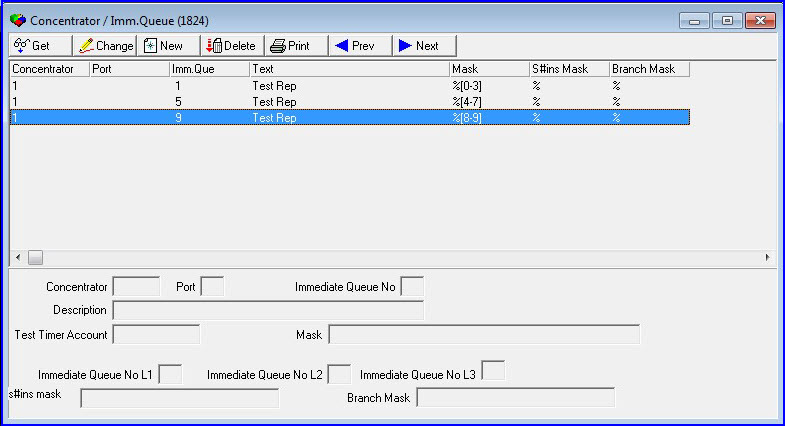
In Program 1824 you now have the ability to define either of your three hash keys (CID S#ins or BR) to direct signals to a specific immediate queue.
It is crucial (but not verifiable by SBN) that you keep to your initial decision.
In the example above CID %[0-3[ is directed to immediate queue 1, which is owned by SBNA. CID %[4-7] is directed to immediate queue 5, and CID %[8-9] is sent to immediate queue 9.
If you are using concentrators, then only two servers are supported. If you are using direct inject, you should execute the inject calls against ALL servers that are primary.
Alternatively, you can inject only into the ‘correct’ server. You will however run a risk of losing signals, when primaries are switched since immediate queues are NOT replicated.
Program 1738
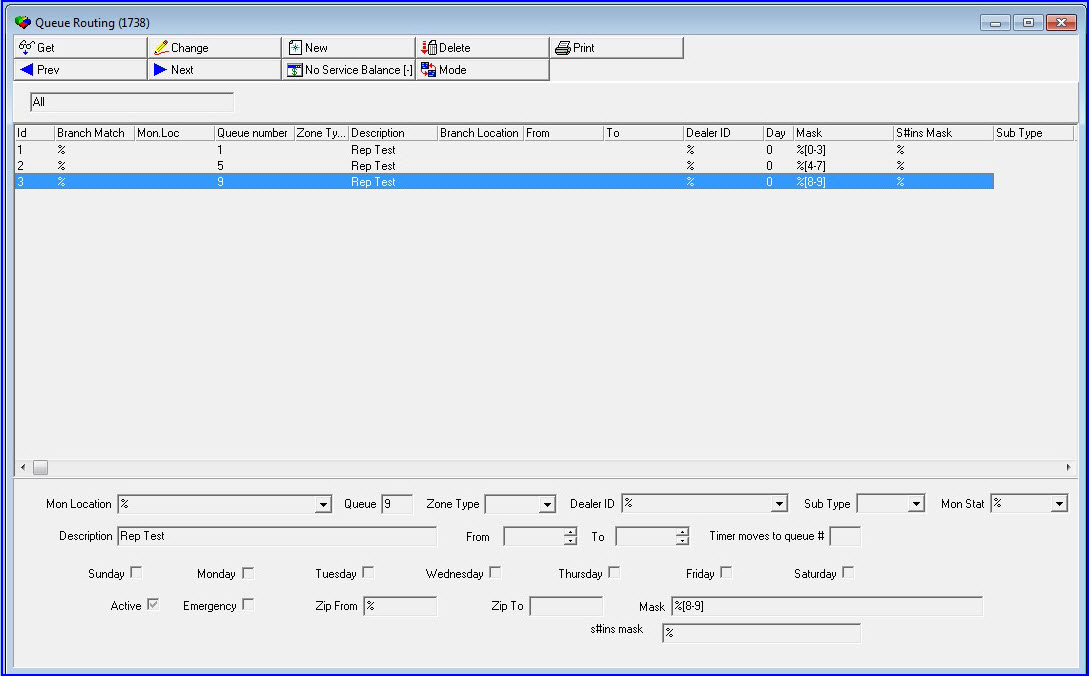
In Program 1738 you now have the ability to define either of your three hash keys (CID S#ins or BR) to direct signals to a specific alarm queue.
It is crucial (but not verifiable by SBN) that you keep to your initial decision.
In the example above CID %[0-3[ is directed to alarm queue 1, which is owned by SBNA.
CID %[4-7] is directed to alarm queue 5, and CID %[8-9] is sent to alarm queue 9.
It is crucial that care is taken, so this partitioning matches the rest of the setup.
Program 1712
All the jobs done with Program 1712 (BGJOBS) have been revised. The ones that are crucial have been update to reflect that they can run on ALL servers.
This is indicated by an ‘A/A’ prefix on the job name.
In addition, all 90+ jobs will show up 5 times.
Once for the original and once for each server in the Active / Active configuration.
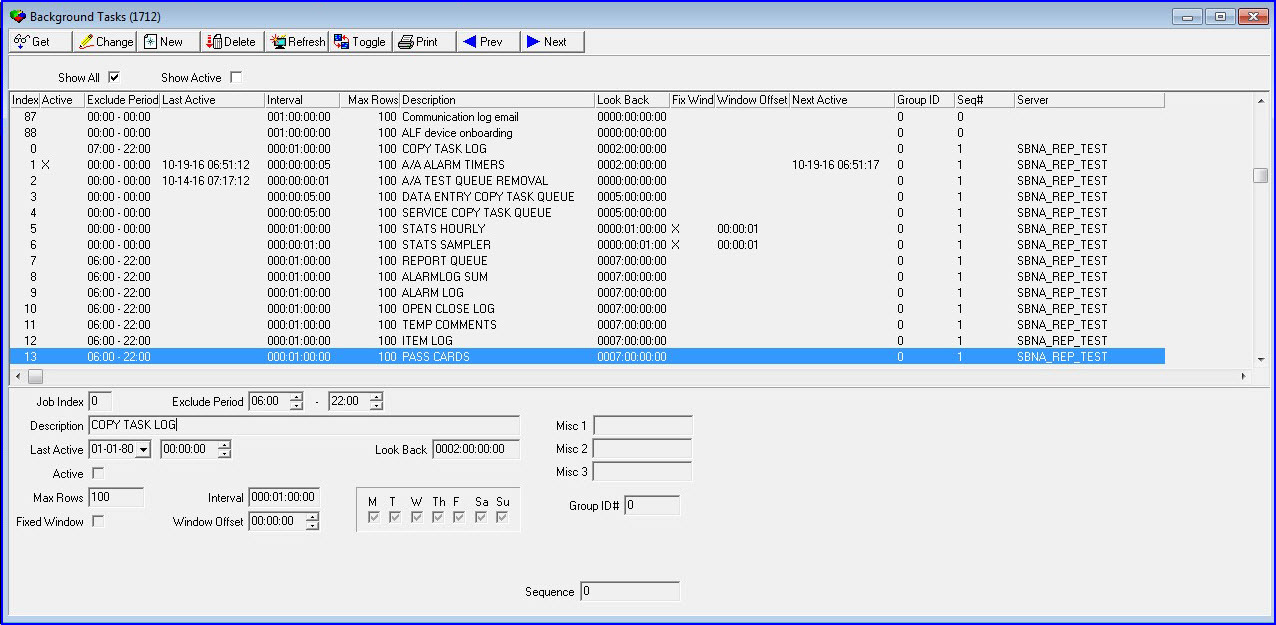
An extra column has been added to show which server you will configure the job.
The following jobs are designed to run on ALL servers.
1 - Alarm Timers
2 - Test queue removal
16 - composite schedules
18 - test timers
XX immqueue17 (now 65) clean up.
For ALL other jobs, you should decide on one and only one server. Not all job need to run on the same server, but they can and should only be active on one.
Algens
Multiple changes have taken place.
A number of algens have been expanded from 16 to 64 (65)
A number of 0 algen has been introduced to handle system generated alarms and timers.
Immqueue 17 which used to hold copies of alarms, if option fe015 was on has been moved to immqueue 65.
In an Active / Active world, ALL algens used for the immediate queues MUST run on ALL servers.
On the server that is the ‘owner’ of an immqueue the algen job will process alarms. On the other servers that do not ‘own’ the queue the algens will be idle.
Algen 0 is special. It will process signals on ALL primary servers but will only process the subset of customers assigned to that server.
Partitioned tables:
Oc_control:
Control table for open close. This table now has one record for each server.
Ma_alarmsource
This table holds the last processed alarm for each source ID (concentrator / injector).
An additional field has been added for immqueue.
It now holds last signal per source ID per immediate queue.
Ma_alarmqdelay
Holds pending alarms waiting for OC signals. A server sequence number has been added.
Ma_alarmqmisc
Holds signals waiting for restores. A field for immediate queue and server has been added.
User Experience:
If you are NOT using smart SBN.
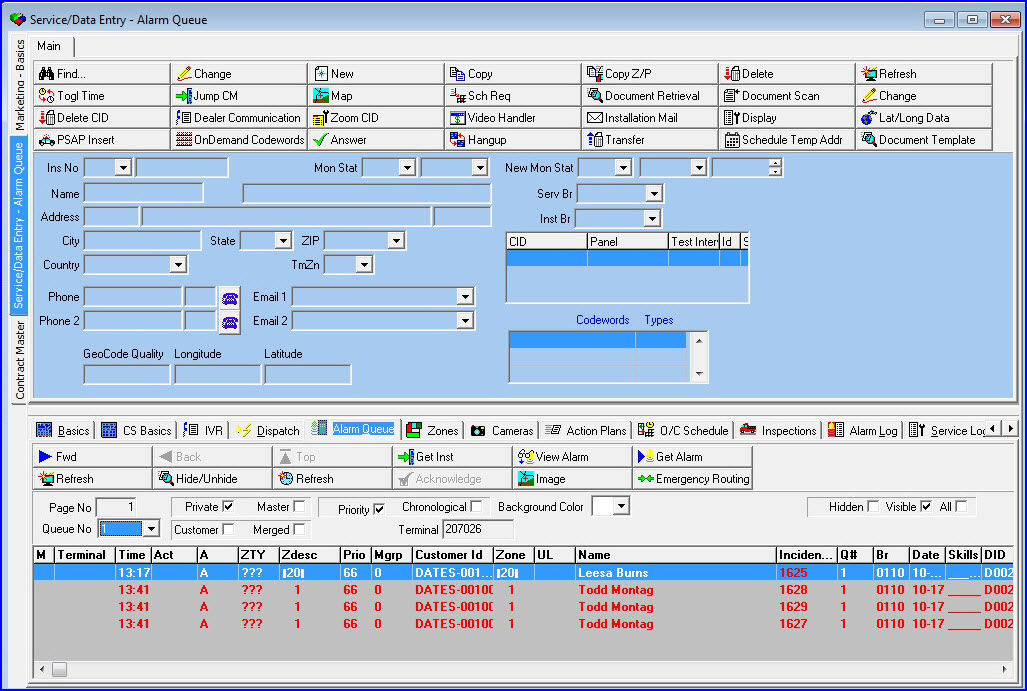
If you are working in a alarm queue owned by the server you are logged into, everything will work as usual.
If you are looking at a queue NOT owned by the server you are logged into, then the ‘Get Alarm’ button will be disabled.
On the dispatch tab, ALL commands relating to the handling of the alarm will be disabled as well.
Basically, SBN will prevent you from violating the ownership of the queue. (Which would lead to replication conflicts almost immediately).
Active / Active was developed with Smart SBN in mind, so it is highly recommended you use it.
If you ARE using Smart SBN you will get the following experience:
On the debug screen:
106: SBNA alive
107: SBNB alive
108: SBNC alive
109: SBNA ba_servlist_geta 1,-1,"SBNA_REP_TEST"
SBN.exe connects to ALL servers found in ba_servlist.
It will execute all queries against the server you logged into.
Looking at the example above you see that SBN.exe is constantly tracking if connections are working.
None of the buttons are disabled and SBN functions seamlessly across the different primaries.
If you look at the debug below:
207: SBNA ma_alarmqueueget 1,1,"207026",0,5,-2147483647,1,-1,-1,0,0,"",1,0,0,1,99
208: SBNB ma_alarmqueueget 1,1,"207026",0,5,-2147483647,5,-1,-1,0,0,"",1,0,0,1,99
211: SBNC ma_alarmqueueget 1,1,"207026",0,5,-2147483647,11,-1,-1,0,0,"",1,0,0,1,99
Sbn.exe redirects queries regarding the alarm queue and alarm handling to the server which is the owner of the queue selected.
In the example above (highlighted with red) queries against alarm queue 5 is directed against server SBNB, and queries against alarm queue 11 are directed against server SBNC.
The same goes when you are handling the alarm. All queries touching or modifying the alarm queues will be sent to the correct server.
This is to preserve the integrity of your replication and to prevent replication errors.
Great care should be taken when using simulated alarms. IBS is recommending disabling it in Active / Active setup.
Program 559
In Program 559, just like alarm queues and operator actions program 559 has been partitioned.
This means that after lookup of a customer, SBN will determine where the customer belongs and redirect the procedure calls associated with the customer to the right server.
At this stage the following tabs / popup windows have been partitioned.
Zones
Action plans
OC schedules
Inspections.
Service.
Work orders.
Codewords
Permits
Main data entry in 559
Contained Database Users
Microsoft SQL Server contained database users are supported, which simplifies replication by replicating users and passwords together.
Replication Integrity Improvements
Replication-integrity improvements address account-ownership and partitioning problems across multi-server deployments.
Microsoft SQL Server Performance
Performance and reliability improvements on Microsoft SQL Server cover alarm-queue retrieval, alarm translation, dispatch look-ups, open/close log reads, and transaction handling.