
Priority Routing
Priority Routing
System Administration
Priority Routing
Module: System Administration
Overview
Use Priority Routing (Program #1727) to define a modification to the current alarm delivery strategy to address systemic outage scenarios such as network outages, where large numbers of alarms may be waiting to be delivered to SBN. The modification to the current delivery strategy will address this across the alarm delivery path including DLA, DL-Core (AIA/ADS), and SBN. The solution is to divide alarms into high and low priority alarms and to have each DLA send high priority alarms first.
SBN will implement a high priority and low priority queuing mechanism. High priority alarms will be handled first. If a low water mark is hit in the high priority queue, then low priority alarms will be processed. Once the high priority queue hits a high water mark, then the low priority alarms will not be processed.
Options
Option ba523 - option added to be able to look at the unix logs for Dormant Check.
Option ba524 - option added to be able to look at the unix logs for Dormant Change.
Parameters
To support the Alarm designation, SBN modified the existing ATOM call, inet_rr_generate_alarm to accept the Alarm designation as an optional parameter.
The modified inet_rr_generate_alarm ATOM call will accept a new optional parameter, the Alarm designation passed from DL-Core.
If the Alarm designation parameter is not passed, then regular operation is performed.
If the Alarm designation is passed, then Alarm Routing mechanism will be utilized.
The Alarm designation parameter will be a numeric value that will correspond to a particular designation. The value will be an Integer starting at 1 with 1 being the highest designation.
The Priority Routing Window
The following graphic shows the Priority Routing window with information displayed.
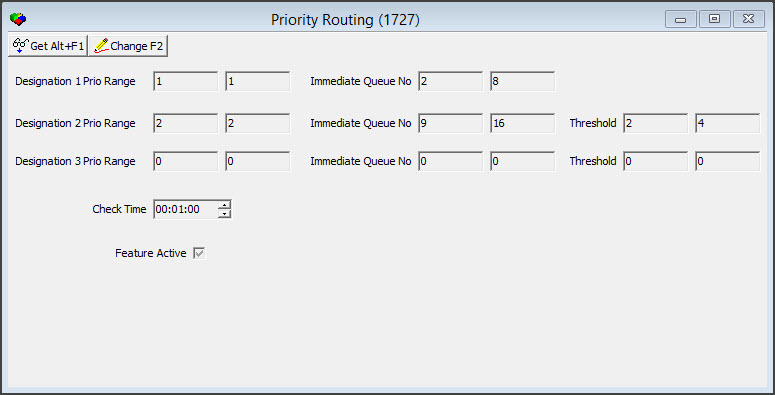
Field/Column Descriptions
The following table describes the fields and columns used in Priority Routing window.
Field/Column |
Description |
Designation 1 Prio Range |
Designation 1 (High) Min and Max levels (from DL-Core) For current implementation 1-1. |
Designation 2 Prio Range |
Designation 2 (Low) Min and Max levels (from DL-Core) For current implementation 2-2. |
Designation 3 Prio Range |
Designation 3 (Future) Min and Max levels (from DL-Core) For current implementation blank. |
Immediate Queue No |
This allocates immqueue 1 - 8 for Designation 1 alarms. |
Immediate Queue No |
This allocates immqueue 9 - 16 for Designation 2 alarms. |
Immediate Queue No |
This allocates immqueue 16 for Designation 3 alarms. (This is to be used in future release) Implement 0 for now. |
Threshold 2.1 |
Designation 2 max threshold. This value designates the number of signals pending in designation 1 queues that will trigger designation 2 algens entering dormant mode. |
Threshold 2.2 |
Designation 2 min threshold. This value designates the number of signals pending in designation 2 queue that will trigger designation 2 algens exiting dormant mode after have entered dormant mode based on previous paragraph. |
Threshold 3.1 |
Designation 2 max threshold. This value designates the number of signals pending in designation 1 queues that will trigger designation 2 algens entering dormant mode. |
Threshold 3.2 |
Designation 2 min threshold. This value designates the number of signals pending in designation 2 queue that will trigger designation 2 algens exiting dormant mode after have entered dormant mode based on previous paragraph. |
Check Time |
The number designates the number of seconds between checks by designation 2 and desgination 3 algens to check for the threshold value. Changes will be recorded in general change log. |
Feature Active |
The check box in Feature Active, turns the feature on and off. |
Using Common Functions
See the reference document Common Functions in SBN for more information.
Button Functions
The following table displays the buttons, describes the shortcut keys, actions, and functionality.
Button |
Name |
Shortcut Key |
Action |
Description |
|
Get |
ALT+F1 |
1727/ 1 |
Get record. |
|
Change |
F2 |
1727/ 2 |
Change selected record. |


Modifications and Updates to Concentrator Immediate Queue
The following table lists modifications and updates to the Concentrator Immediate Queue document.
Mod Number |
Date |
Description |
n/a |
8/15/14 |
Images updated. |
07.84.24600 07.84.24599 08.84.10440 |
02/24/16 02/23/16 02/05/16 |
Options ba523 and ba524 Immqueue insert change Priority Routing |
F1 Help
| Delphi Forms | maimmprioform |
| Program Numbers | 1727 |