
Current Cycle Fees by Revenue Type Report
Current Cycle Fees by Revenue Type Report
Current Cycle Fees by Revenue Type Report
Module: Accounting
Overview
Use the Current Cycle Fees by Revenue Type to view a summary of active cycle fees by revenue type.
To access this report, choose Current Cycle Fees by Revenue Type (report #1165) from the main menu of SBN.
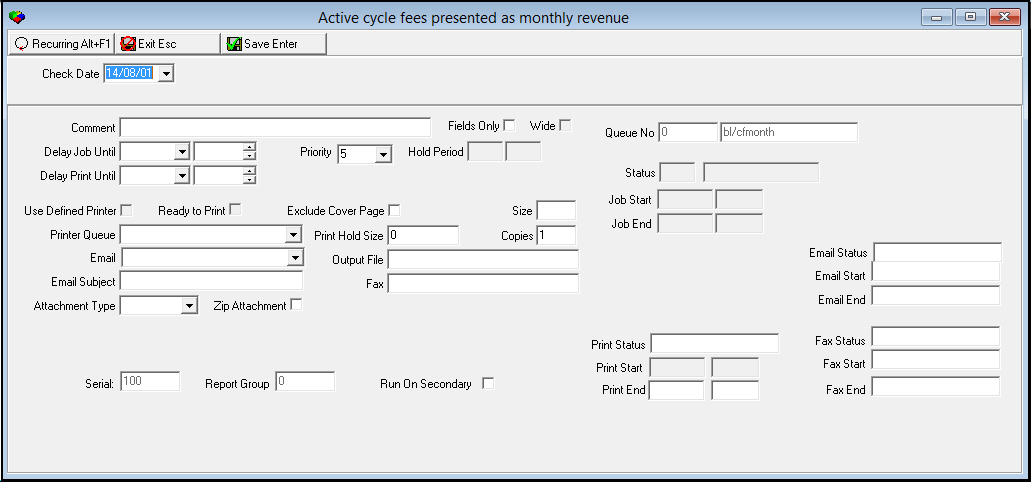
The Current Cycle Fees by Revenue Type Report Screen
This screen contains two panels: use the upper panel to define the content of the report; use the lower panel to define the job output - how, when, and where you want to print the report.
Note: Because all reports have the same lower panel, these fields are described in detail in the reference document Report Parameters Pane.
Field Descriptions
The following table describes the fields used in the upper section of the Current Cycle Fees by Revenue Type Report.
Field |
Description |
Check Date |
Select a date to limit the report to cycle fees with a Valid From date that occurred on or before this date. O This field defaults to today’s date. |
Running and Viewing the Report
To run the report
1. In Current Cycle Fees by Revenue Type (report #1165), define the parameters for the report.
2. Choose Save to save the report to the Report Queue.
Note: For more information on using the Report Queue, see Report Queue.
3. In Report Queue (program #1558), choose Own to display the report list.
4. In the report list, locate the report.
5. Choose Own again to refresh the status of the report.
6. When the report displays an X in the Print Flag column, which indicates the report is ready, double-click it to open the report.
7. Choose Display Report.
‰ The Print Preview window opens.
Column Descriptions
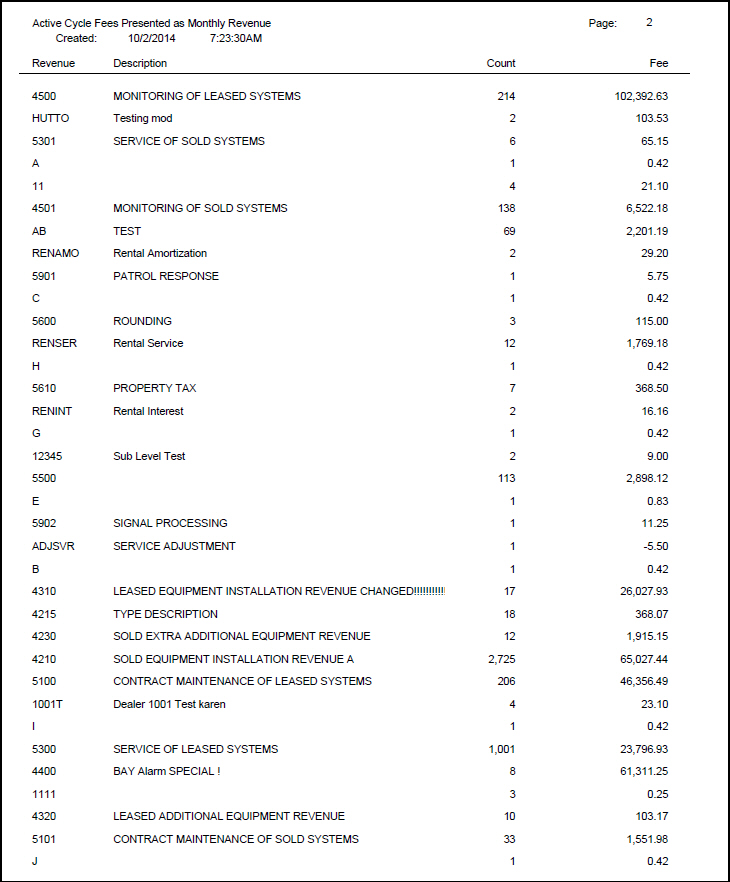
The following table describes the columns used in the output of the report.
Column |
Description |
Revenue |
Code that identifies the revenue type. |
Description |
Text description of the revenue type. |
Count |
Number of contracts associated with the selected revenue type that have cycle fees with a Valid From date that occurred on or before the specified date. |
Fee |
Total monthly cycle fees for the selected revenue type. |
Grand Total |
Displays totals of all contracts for the displayed revenue types and totals for all monthly cycle fees that match the report parameters. |
Button Functions
The following table displays the buttons, describes the shortcut keys, actions, and functionality.
Button |
Name |
Shortcut Key |
Action |
Description |
|
Open fields for recurring/template reports |
alt+f1 |
Open fields for recurring/template reports. |
|
|
Exit without saving |
esc |
Exit without saving changes to selected record. |
|
|
Save Existing Record |
enter |
Save changes to selected record. |



Modifications and Updates to Current Cycle Fees by Revenue Type Report
The following table lists modifications and updates to the Current Cycle Fees by Revenue Type Report document.
Mod Number |
Date |
Description |
n/a |
8/1/14 |
Images updated. |