
Fax Queue
Fax Queue
Fax Queue
Module: Utilities
Overview
Use Fax Queue (program #578) to access a log of outstanding or failed faxes that SBN has sent automatically.
Sent faxes are automatically logged in the Fax Queue and can be viewed in this program. You can delete a fax from the queue or reset it so that SBN sends it again to the original recipient. Once a fax is sent successfully, SBN clears it from the queue.
To access this program, select Fax Queue (program #578) from the SBN main menu of SBN.
The Fax Queue Window
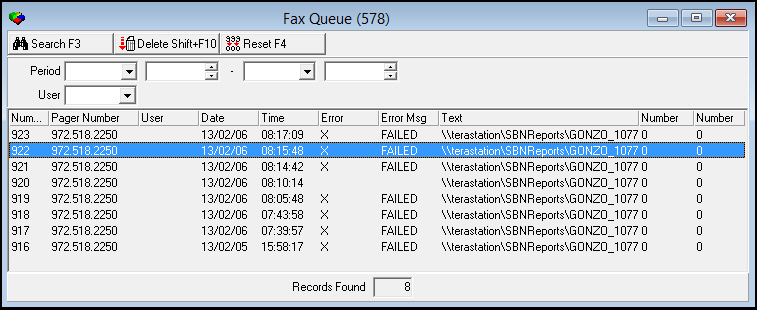
The following graphic shows Fax Queue as the program opens.
Field/Column Descriptions
The following table describes the fields and columns used in Fax Queue.
|
Field/Column |
Description |
|
Period |
Start date for this search. |
|
Start Time |
Start time for this search. |
|
Period End |
End date for the search. |
|
End Time |
End time for the search. |
|
User |
User ID of the person who generated the fax. |
|
Number |
|
|
Date |
Date that the fax was inserted in the queue. |
|
Time |
Time that the fax was inserted in the queue. |
|
Error |
An x displays if an error occurred while sending this fax. |
|
Error Message |
Explanation of the error that occurred when this fax was sent. |
|
Text |
Additional text sent within the fax. |
Searching for a Fax
You can search for faxes that have been sent from SBN and then view information regarding those faxes. When you perform a search you can narrow the search by selecting specific parameters. If SBN finds no records that match your search parameters, the window remains blank.
Use the following steps to search for a fax:
1. In the search fields, select your search parameters.
2. Choose Search.
‰ SBN displays the results that match your search parameters.
Deleting a Fax
Use the following steps to delete a fax from the Fax Queue:
1. Select the fax you want to delete.
2. Choose Delete Record.
‰ SBN removes the selected fax from the Fax Queue.
Resetting a Fax
Use the following steps to reset a fax to resend it to the intended recipient:
1. Select the fax you want to resend.
2. Choose Reset.
Button Functions
The following table displays the buttons, describes the shortcut keys, actions and functionality.
|
Button |
Name |
Shortcut Key |
Action |
Description |
|
|
Search |
f3 |
578/ 5 |
Search for faxes. |
|
|
Delete Record |
shift+f10 |
578/ 7 |
Delete selected fax from queue. |
|
|
Reset |
f4 |
578/ 8 |
Reset selected fax to resend to intended recipient. |
|
|
Exit without saving |
esc |
Exit without saving changes to selected record. |
|
|
|
Save Existing Record |
enter |
Save changes to selected record. |





Modifications and Updates to Fax Queue
The following table lists modifications and updates to the Fax Queue document.
|
Mod Number |
Date |
Description |
|
n/a |
9/2/14 |
Images updated. |