
Outbound User Profiles
Outbound User Profiles
Outbound User Profiles
Program #: 1714
Module: System Administration
Overview
Outbound User Profiles (program #1714) enables you to further define and maintain outbound users who are already defined in SBN. The program defines the times when SBN users can make outbound telemarketing calls, and for which Marketing inquiry Sources, Programs, and Statuses. Defining outbound users in Outbound User Profiles affects the output of the Get Next Record button in Marketing (program #562).
To access this program, select Outbound User Profiles (program #1714) from the main menu of SBN.
The Outbound User Profiles Window
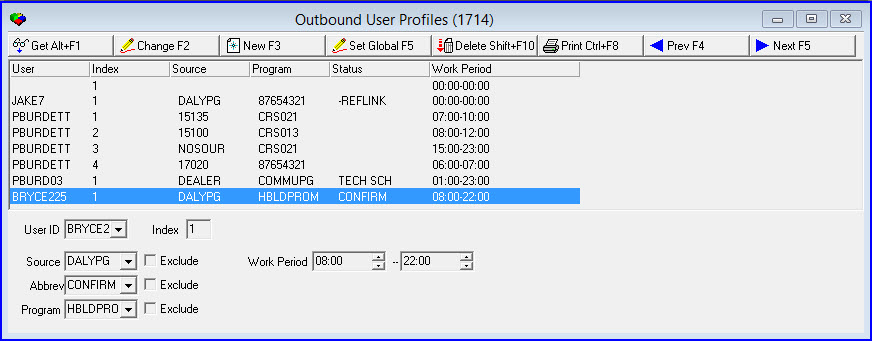
The following graphic shows Outbound User Profiles as the program opens. The upper pane displays previously defined Outbound User Profiles.
Field/Column Descriptions
The following table describes the fields and columns contained in Outbound User Profiles.
Field/Column |
Description |
User |
Identifies the selected user. |
Source |
Source code assigned to the selected user. O If an X appears with the source code, that source is excluded for the selected user. |
Program |
Program code assigned to the selected user. O If an X appears with the program code, that program is excluded for the selected user. |
Status |
Event code assigned to the selected user. O If an X appears with the event code, that event is excluded for the selected user. |
Work Period |
Effective maximum work period for the selected user. |
User ID |
Select a User ID. O If you leave this field blank, the definition can apply to any user. |
Index |
User can create multiple profiles with different work periods using the same User ID. SBN will auto generate an Index number to accommodate the multiple profile. |
Source |
Select a source. O If you leave this field blank, the selected user may use any source. |
Exclude |
If this box displays a check mark, the selected source is excluded for the user. |
Abbrev |
Select a status. O If you leave this field blank, the selected user may use any status. |
Exclude |
If this box displays a check mark, the selected status is excluded for the user. |
Program |
Select a program. O If you leave this field blank, the selected user may use any program. |
Exclude |
If this box displays a check mark, the selected program is excluded for the user. |
Work Period Range |
|
Time
- From |
Select a beginning time for the selected user’s work period. |
Time
- To |
Select an ending time for the selected user’s work period. |
Using Common Functions
See the reference document Common Functions in SBN for more information.
Multiple Profiles for Same User
Multiple profiles with different work periods can be set up in Program #1714 using the same User ID. When setting up the multiple profiles, SBN will auto generate an Index Number to accommodate the various work periods for the user. In Marketing Basics Program #562, the user can click Get Next, and SBN will display profiles that match the work period within the current time period. SBN will search the User Outbound Profiles in Program #1714 for the work period that match the Sources or Programs in Program #562.
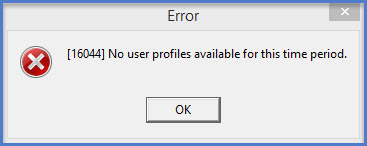
If no inquiry is found it will continue with the next profile until a record is returned or there are no profiles left to return. If no profiles match is located during the time period, the following error message will display.
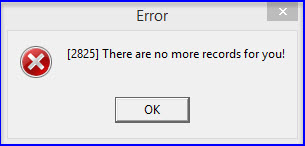
If there are no matches for the source, program, or status, then the following error message will display.
Setting a Global Definition for Outbound User Profiles
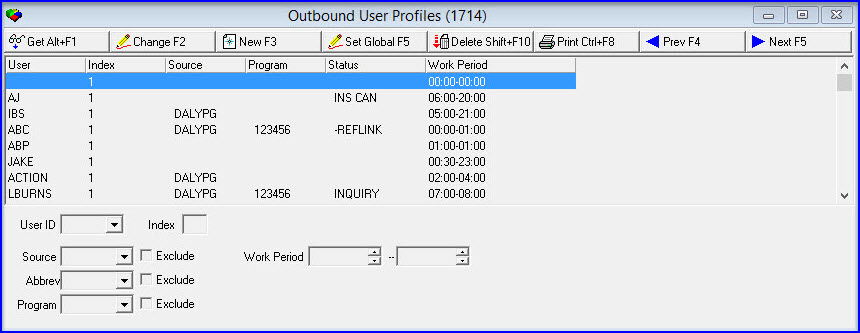
Use the following steps to set a global definition for outbound user profiles:
1. In Outbound User Profiles, choose Set Global.
‰ The fields in the lower pane open.
Modifications and Updates to Outbound User Profiles
The following table lists modifications and updates to the Outbound User Profiles document.
Mod Number |
Date |
Description |
n/a |
8/20/14 |
Images updated. |
n/a |
11/25/14 |
Added note about Get Next feature in Marketing and Marketing Basics. |
08.85.10605, 07.85.24791, 08.85.10598, 07.85.24776, 07.85.24765, 08.85.10584 |
05/24/16 |
Multiple profiles with different work periods can be set up in Program #1714 using the same User ID. When setting up the mulitiple profiles, SBN will auto generate an Index Number to accommodate the various work periods for the user. SBN will search the User Outbound Profiles in Program #1714 for the work period that match the Sources or Programs in Program #562. |
F1 Help
| Delphi Forms | tmoutusersform |
| Program Numbers | 1714 |