
Inclusion-Exclusion Management
Program #: 2503
Module: System Administration
Overview
Use Inclusion-Exclusion Management (program #2503) to define the text for each Inclusion and Exclusion.
The Inclusion-Exclusion Management Window
The following graphic shows Inclusion-Exclusion Management Window as the program opens.
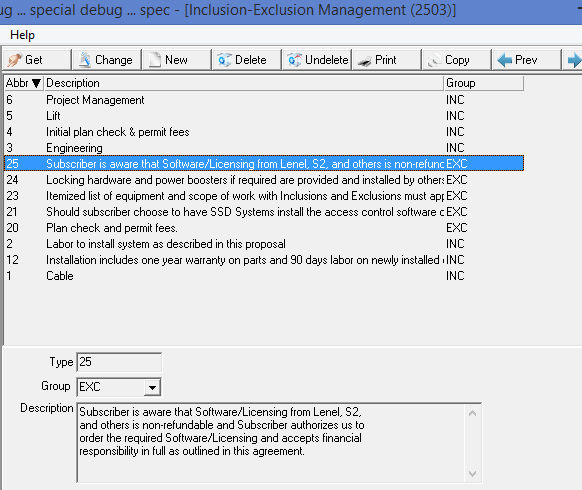
When typing in the text box (bottom of form), a user can press Ctrl-Enter for a line break.
Field/Column Descriptions
The following table describes the fields and columns used in Inclusion-Exclusion Management.
Field/Column |
Description |
Type |
Abbreviation represented by a numerical value. |
Group |
Inclusions or Exclusions (Defined in program #1764) |
Description |
A description associated with the Inclusion-Exclusion type. |
Button Functions
The following table displays the buttons, describes the shortcut keys, actions, and functionality.
Button |
Name |
Shortcut Key |
Action |
Description |
|
Get |
ALT+F1 |
2503/1 | Get record. |
|
Change |
F2 |
2503/2 | Change selected record. |
|
New |
F3 |
2503/3 | Create new record. |
|
Delete |
SHIFT+F10 |
2503/4 | Delete selected record. |
|
Undelete |
ALT+F10 |
2503/5 | Restore deleted record. |
|
CTRL+F8 |
2503/6 | Print selected records. |
|
|
Copy |
Shift+F3 |
2503/3 | Copy selected records. |
|
Previous |
F4 |
2503/1 | Select last record. |
|
Next |
F5 |
2503/1 | Select next record. |



Description Field Length
The description field on the Inclusion/Exclusion Management screen accepts up to 4,000 characters.
Modifications and Updates to Inclusion-Exclusion Management
The following table lists modifications and updates to the Inclusion-Exclusion Management document.
Mod Number |
Date |
Description |
08.88.11325, 07.88.25770, 08.88.11322, 07.88.25761 |
05/15/18 |
Document Created |
|
|
|
|
|
|