
Collection Queue Users
Collection Queue Users
Collection Queue Users
Module: System Administration
Overview
Use Collection Queue Users (program #1730) to define profiles for collection users. These profiles determine which accounts collection users can access when they use Get Next in the Collections tab of the Contract Master (program #548). Option blagesho determines whether collection users see contract aging or account aging first. Collection Queue Users contains a sublevel in which you can create multiple branch profiles for each collection user.
To access this program, select Collection Queue Users (program #1730) from the main menu of SBN.
The Collection Queue Users Window
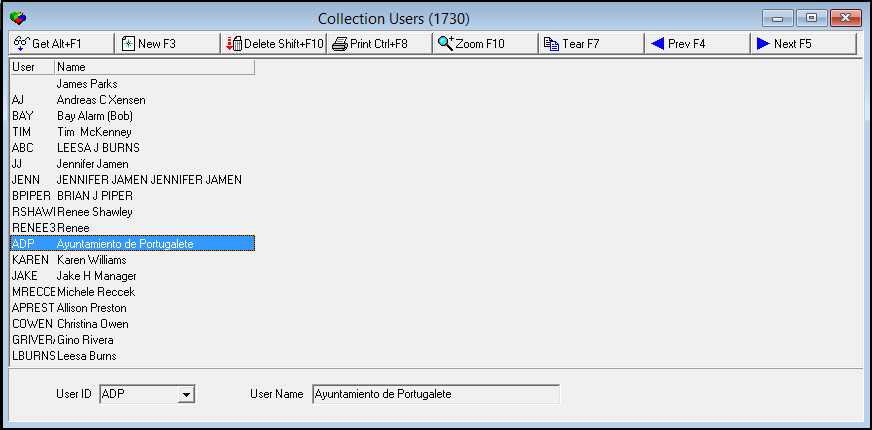
The following graphic shows Collection Queue Users as the program opens. The upper pane displays previously defined collection queue users.
Field/Column Descriptions
The following table describes the fields and columns used in Collection Queue Users.
Field/Column |
Description |
User |
Select a user ID for the collections queue user. |
User Name |
The name of the user associated with the selected user ID. |
Using Common Functions
See the reference document Common Functions in SBN for more information.
Zooming into the Sublevel of Collection Queue Users
Collection Queue Users contains a sublevel in which you can create multiple branch profiles for each collection user.
The Users Details Tab
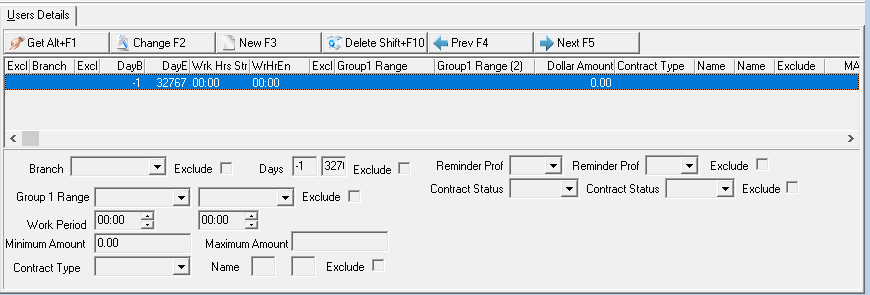
The Users Details tab displays previously defined branch profiles for the selected collection user.
Field/Column Descriptions
The following table describes the fields and columns used in the Users Details tab.
Field/Column |
Description |
Branch |
Identifies a Billing Account Branch that the selected collection queue user may access. (This menu originates from program #1530.) |
Exclude |
Enter a check mark in this field to exclude the selected collection queue user from access to the Billing Account Branch. |
Days Range |
|
Days - From |
The beginning day of a range of days past due that the selected collection queue user may access. |
Days
- To |
The ending day of a range of days past due that the selected collection queue user may access. |
Exclude |
Enter a check mark in this field to exclude the selected collection queue user from access to accounts past due for the entered range of days. |
Group 1 Range |
|
Group 1 - From |
You may select a range of financial groups that the selected collection queue user may access; select the beginning financial group of the range. (This menu originates from program #1868.) User's dealer restrictions apply. O The financial group must exactly match the Billing Account Group 1 field. |
Group
1 - To |
You may select a range of financial groups that the selected collection queue user may access; select the ending financial group of the range. (This menu originates from program #1868.) User's dealer restrictions apply. O The financial group must exactly match the Billing Account Group 1 field. |
Exclude |
Enter a check mark in this field to exclude the selected collection queue user from access to accounts in the Group 1 range. |
Work Period Range |
|
Work Period - From |
The beginning time of normal working hours for the selected collection queue user. |
Work
Period - To |
The ending time of normal working hours for the selected collection queue user. |
Minimum Amount |
The minimum amount for accounts that the selected collection queue user may access. |
Maximum Amount |
The maximum amount for accounts that the selected collection queue user may access. |
Contract Type |
You may select a specific contract type that the selected collection queue user may access. (This menu originates from program #1531.) |
Name Range |
|
Name - From |
You may type the beginning characters of a billing account last name or AKA field that the selected collection queue user may access. |
Name
-To |
You may type the ending characters of a billing account last name or AKA field that the selected collection queue user may access. |
Exclude |
Enter a check mark in this field to exclude the selected collection queue user from access to accounts that contain the range of name or AKA characters. |
Reminder Profile 1-2 |
Enter a Reminder Profile ID code to search for. (This menu originates from program #1562.) |
Contract Status 1-2 |
Status of Contracts. (This menu originates from program #1532.) |
Exclude 1-2 |
Enter a check mark in this field to exclude the selected Reminder Profile or Contract Status. |
Button Functions
The following table displays the buttons, describes the shortcut keys, actions, and functionality.
Button |
Name |
Shortcut Key |
Action |
Description |
|
Get |
ALT+F1 |
1730/ 1 |
Get record. |
|
Change |
F2 |
1730/ 2 |
Change selected record. |
|
New |
F3 |
1730/ 3 |
Create new record. |
|
Delete |
SHIFT+F10 |
1730/ 4 |
Delete selected record. |
|
CTRL+F8 |
1730/ 6 |
Print selected records. |
|
|
Zoom |
F10 |
1730/ 999 |
Zoom in/out of sublevel. |
|
Tear |
F7 |
1730/ 999 |
Open the Details tab in a full-sized separate window. |
|
Previous |
F4 |
1730/ 999 |
Select last record. |
|
Next |
F5 |
1730/ 999 |
Select next record. |









Modifications and Updates to Collection Queue Users
The following table lists modifications and updates to the Collection Queue Users document.
Mod Number |
Date |
Description |
n/a |
08/14/14 |
Images updated. |
07.89.26034, 08.89.11547, 07.89.26036 |
01/09/19 |
Images updated. Reminder Profile 1-2, Contract Status 1-2, and 2-Excludes added while in Zoom view. |