
Signal Billing Discovery
Signal Billing Discovery
Utilities
Signal Billing Discovery
Program #: 1641
Module: System Administration
Overview
Use the Signal Billing Discovery window to define criteria for the signal billing discovery.
Note: The following options have been added to start the discovery process:
If option ba437 is active, lookup occurs when sub type, line type, primary and/or classes are validated.
If option bl167 is active, the service discovery is active.
Signal Billing Discovery Window
The following graphic shows the Signal Billing Discovery window.
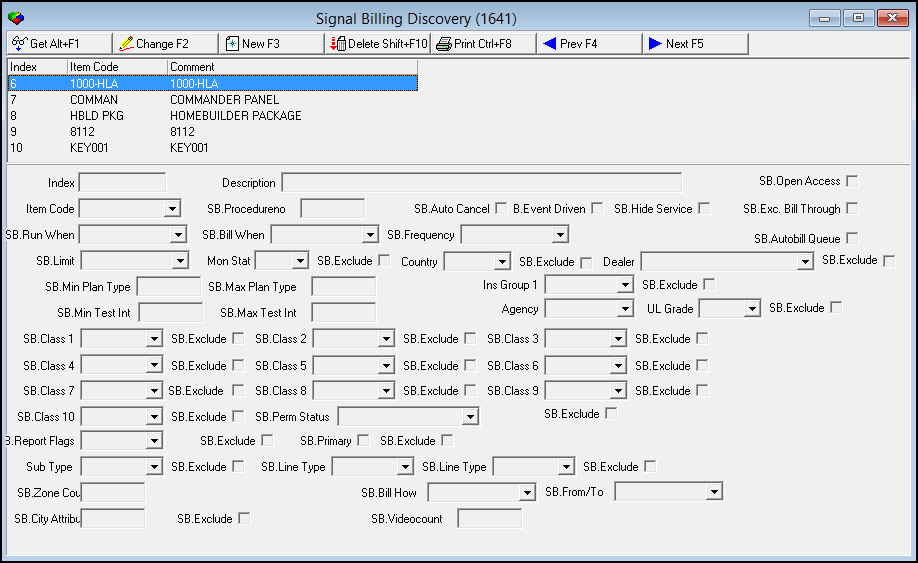
Use the lower pane of the Signal Billing Discovery window to define the following mandatory fields:
Item Code - Selected from Items (program #1535)
SB (Signal Billing) Run When - Options are Immediately or Nightly
SB Bill When - Options are End of month or Next day
SB Frequency - Options are:
Contract
One Time
12
36
SB Limit - Options are:
1/Active CID
1/Install
Once/Installation
Field/Column Descriptions
The following table describes the fields and columns used in Signal Billing Discovery.
Field/Column |
Description |
Index |
Number of the item code |
Item Code |
Code for the specified item |
Comment |
Field for additional comments |
Description |
Description of the selected item |
SB Open Access |
Indicates whether Open Access program is used |
SB Procedure No |
Client-defined number |
SB Auto Cancel |
Indicates whether the signal is Auto Cancel |
SB Event Driven |
Indicates whether signal billing is event-driven |
SB Hide Service |
Indicates whether Signal Billing is hidden from the user |
SB Exc. Bill Through |
Signal Billing is excluded from Bill Through service |
SB Run When |
Determines whether the billing will run immediately or nightly. |
SB Bill When |
Determines whether you are billed on the end of the month or the next day. |
SB Frequency |
Determines the frequency setting as contract, one time, 12, or 36. |
SB Autobill Queue |
Indicates whether the signal enters the Signal Based Autobill queue |
SB Limit |
Determines whether the setting is 1/Active CID, 1/Install, or Once/Installation |
Mon Stat |
Monitoring status |
Country |
Country where the specified item is located |
Dealer |
Dealer for the specified item |
SB Min Plan Type |
Minimum plan number for the specified item |
SB Max Plan Type |
Maximum plan number for the specified item |
Ins Group 1 |
Installation Group 1 for the specified item |
SB Min Test Int |
Minimum test interval for the specified item |
SB Max Test Int |
Maximum test interval for the specified item |
Agency |
Police agency selected for the specified item |
UL Grade |
Underwriters Laboratory for the specified item |
SB Class 1-10 |
Specifies the class fields you want to use for the specified item |
SB. Exclude |
Specifies that you want to exclude a class for the specified item |
SB Perm Status |
Signal Billing permit status |
SB Report Flags |
Indicates whether report flags are selected for this item |
SB Primary |
Indicates whether this item is primary of the signal based billing |
Sub Type |
Indicates which sub type is attached to the specified item |
Sub Line Type |
Indicates which sub line type is attached to the specified item |
SB Zone Count |
Number of signals on the zone for the specified item |
SB Bill How |
How often the account will be billed. |
SB From/To |
Defines when the billing period starts and ends. |
SB City Attribute |
Special treatment by city (not implemented) |
SB Exclude |
Specifies that you want to exclude a class for the specified item |
SB Videocount |
Number of video clips that were included. |
Using Common Functions
See the reference document Common Functions in SBN for more information.
Button Functions
The following table displays the buttons, describes the shortcut keys, actions, and functionality.
Button |
Name |
Shortcut Key |
Action |
Description |
|
Get |
ALT+F1 |
1817/ 1 |
Get record. |
|
Change |
F2 |
1817/ 2 |
Change selected record. |
|
New |
F3 |
1817/ 3 |
Create new record. |
|
Delete |
SHIFT+F10 |
1817/ 4 |
Delete selected record. |
|
CTRL+F8 |
1817/ 6 |
Print selected records. |
|
|
Previous |
F4 |
1817/ 999 |
Select last record. |
|
Next |
F5 |
1817/ 999 |
Select next record. |







Modifications and Updates to Signal Billing Discovery
The following table lists modifications and updates to the Signal Billing Discovery document.
|