
Cycle Fee Change Log
Cycle Fee Change Log
Cycle Fee Change Log
Module: Accounting
Overview
Use the Cycle Fee Change Log to track all changes made to cycle fees on each customer account. The change may originate from
Global Rate Changes (program #1588)
A work order invoice containing cycle fees
The Cycle Fees tab (for more information, see Cycle Fees)
Note: The Cycle Fee Change Log displays the items affected when a user deletes all Valid To dates in the Cycle Fees tab.
To access this program, select Contract Master (program #548) from the main menu of SBN, and then choose the Cycle Fee Change Log tab.
The Cycle Fee Change Log Tab
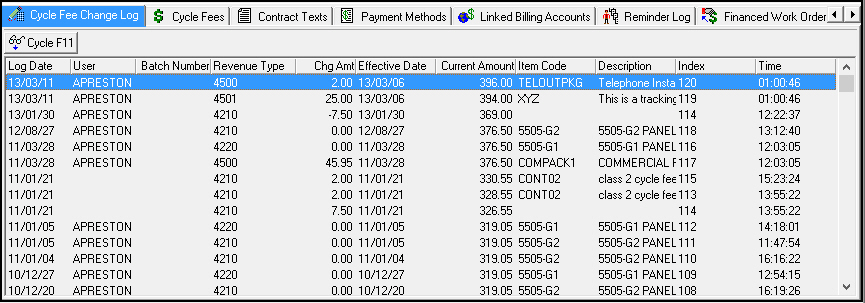
The following graphic shows the Cycle Fee Change Log as the program opens. The columns show changes that have been made to cycle fee amounts on this account.
Column Descriptions
The following table describes the columns used in this tab in Amount Change View.
Column |
Description |
Log Date |
Date this cycle fee action was taken. |
User |
User that entered the change. |
Batch Number |
Batch number this cycle fee was included in during the global rate increase process. |
Revenue Type |
Revenue type for the cycle fee defined in program #1512. |
Change Amount |
The amount that the cycle fee changed. |
Effective Date |
Date that the change in cycle fees becomes active. |
Current Amount |
Current changed amount of the cycle fee. |
Item Code |
Identifies the item that caused the change in cycle fees. |
Description |
Text description of the item. |
Index |
Field extension where the change was made. |
Time |
Time this cycle fee action was taken. |
Changing the View of the Cycle Fee Change Log
The Cycle Fee Change Log contains a toggle button to change the view of the tab.
Use Display Cycle Information to change the view between
Changes to cycle fee amounts
Changes to other cycle fee fields
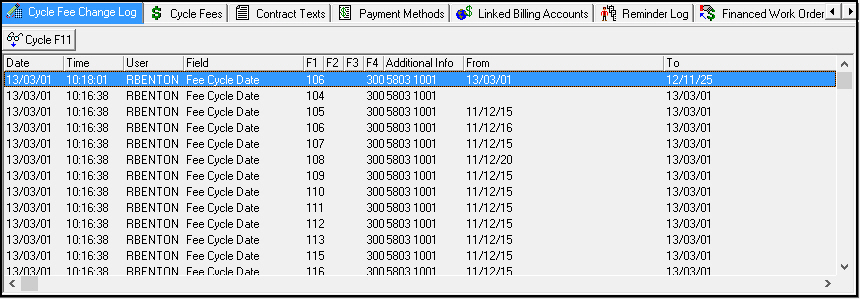
The following graphic shows the Cycle Fee Change Log with changes to fields besides cycle fee amounts.
Column Descriptions
The following table describes the columns used in this tab in General Change View.
Column |
Description |
Date |
Date this cycle fee action was taken. |
Time |
Time this cycle fee action was taken. |
User |
User that entered the change. |
Field |
Description of the field in which the change was made. |
Field Extension 1 |
Field extension where the change was made. |
Field Extension 2 |
Field extension where the change was made. |
Field Extension 3 |
Field extension where the change was made. |
Field Extension 4 |
Field extension where the change was made. |
Additional Info |
Additional information about the change. This may include the contract number and dealer ID associated with the cycle fee. |
From |
Data in the field before the change was made. |
To |
Data in the field after the change was made. |
Button Functions
The following table displays the buttons, describes the shortcut keys, actions, and functionality.
Button |
Name |
Shortcut Key |
Action |
Description |
|
Display Cycle Information |
f11 |
548/161 |
Toggle view back and forth between changes to fee amounts and changes to other fields in the Cycle Fees tab. |

Modifications and Updates to Cycle Fee Change Log
The following table lists modifications and updates to the Cycle Fee Change Log document.
Mod Number |
Date |
Description |
n/a |
8/1/14 |
Images updated. |